
Add an Export option to the Themes tab
Trying to use a custom theme without having to recreate it in new Blender versions is needlessly complicated.
Instead of clicking Export to export the file to your folder of choice for easy finding like with the keymap configuration, you instead have to manually locate the file by going to C:/users/USER/AppData/Roaming/Blender Foundation/Blender/Blender version/scripts/presets/interface-theme
And there's your XML file that you can THEN install, and manually move to a better location that you actually know how to find in the future if you forget the path to your theme.
Installing a theme that you created shouldn't be this complicated! I actually had no choice but to search on Youtube for how to do it, because this sure isn't something most people will find on their own.
It sure isn't complicated with importing and exporting keymaps, because the keymap tab actually has a proper export button.
The Themes tab needs an export button to make things easier for users.
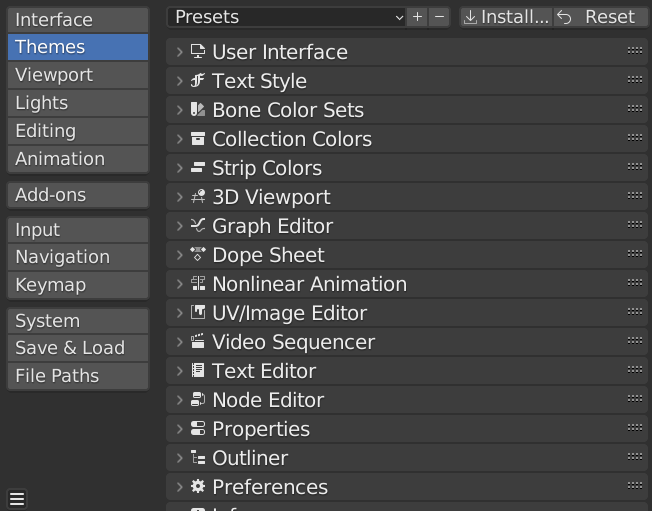
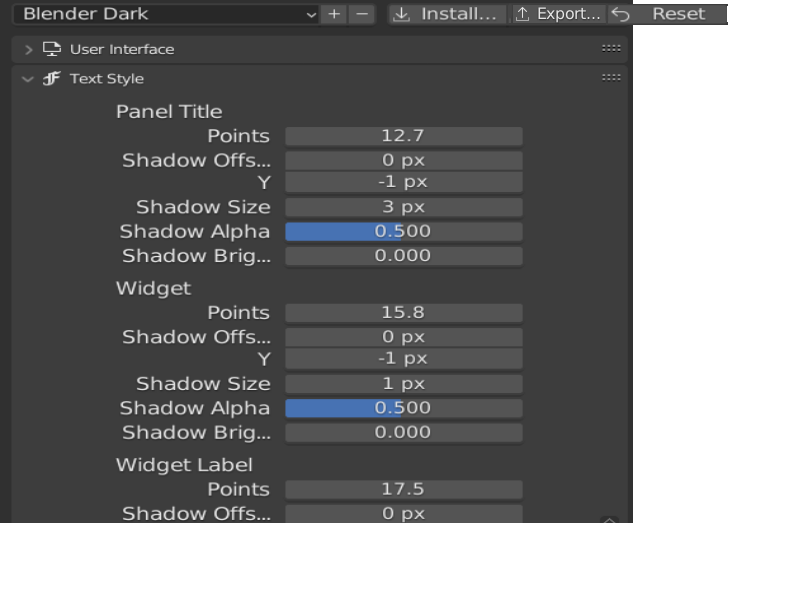
On the top is how the Themes tab is currently. No Export button, only Install and Reset. The second photo is a mockup of a new and improved Themes tab that has said export button.
0 Comments