
Proper "Alpha roll" for sculpting brushes
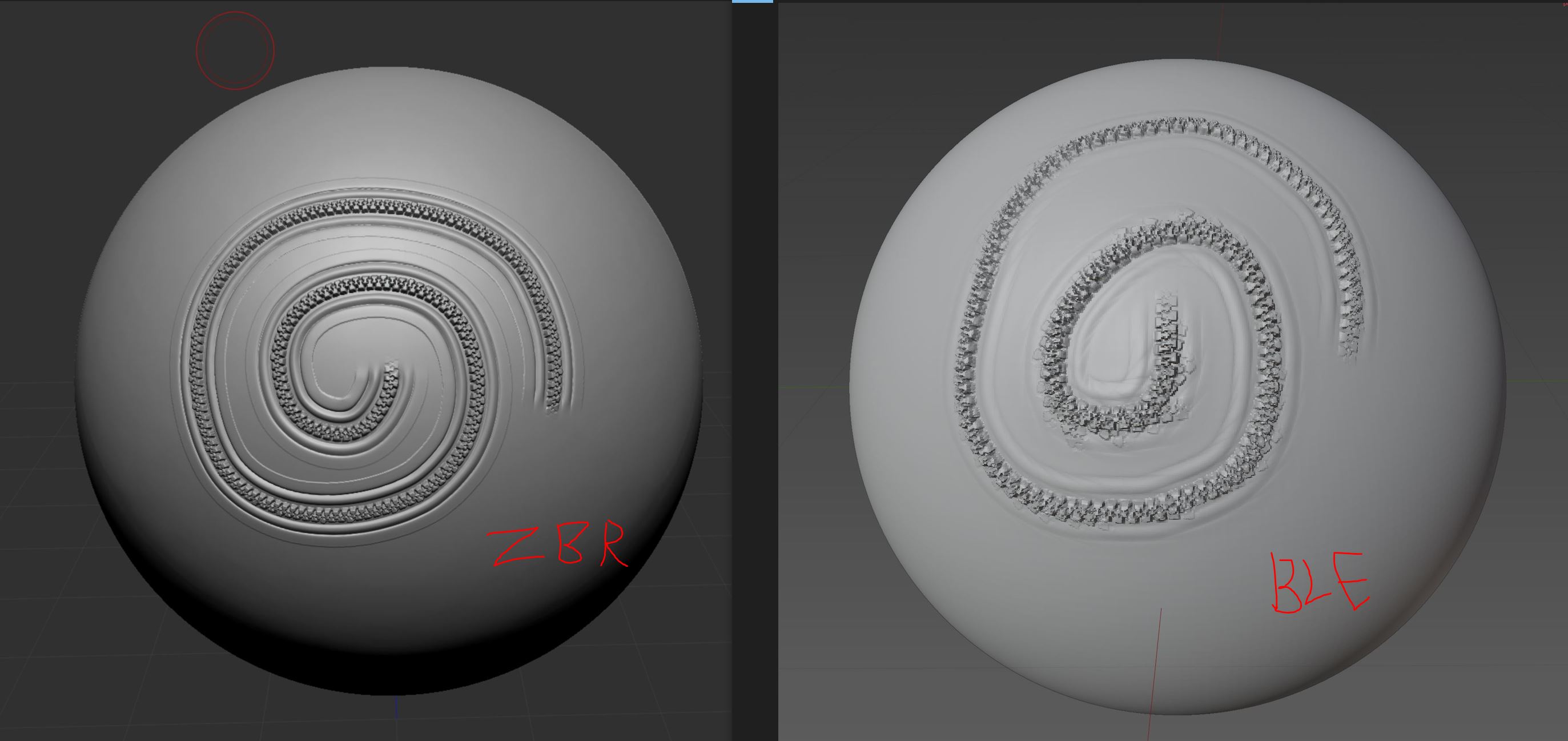
What is "alpha roll": Alpha roll is brush alpha ability to smoothly follow the stroke with progressively deforming while you move the mouse and change stroke direction. You can imagine this as a plane duplicated along the curve + deformation of each plane to better follow the direction of the curve.
Currently in Blender we only have "Rake" options which doesn work because rotating are happening for the whole alpha creating absolute useless results in most cases. You can imagine this as a several planes duplicated along curve, but not deforming at all, only simply rotate.
Proper alpha roll are solution for tons of cases like cloth sculpting: cloth seams, stitches, pockets, scars, sculpting nice looking welding seams, ornaments and so on.
This video explain "alpha roll": youtube.com/watch
Thats how the same alpha will look like in Zbrush (or 3d Coat) versus Blender.
4 Comments
This is already being prototyped and will be a target for the upcoming Paint Mode: T98070 Improved Rake functionality
Hello, are you still working on this? Is there any way to configure this functionality or download it as an add-on or something?
It's being worked on already. Only really 1 person coding sculpt area so no idea when it will be finished.
It's still in development, that's great, thanks to the developers !