
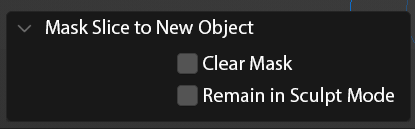
Sculpting: Mask slice to New Object dialog options
CURRENT WORKFLOW
Blender's sculpting hotkey Alt+Q switches your active sculpting object, creating an ideal workflow for multiple meshes that press up against each other, like muscles, or if you simply want separate meshes during a block-in stage. One of the best methods to block in this multi-mesh sculpting setup:
- Mask a section out with the mask brush (m) or lasso mask (Ctrl Shift Left Mouse), often followed by inverting the mask to work the desired section
- Use another brush like Layer or Snake hook to build up or pull out the mass, using Shift R and Ctrl R to retopologize to make an adequate starting amount of polygons
- Use Mask Slice to New Object so that the masked section is your new chunk of muscle of form
- Continue switching between objects with Alt Q.
THE PROBLEM This pipeline's workflow is great, but still has several tedious steps. First, the the new mesh always begins with the previous masked section, so you immediately have to follow Mask Slice to New Object with Alt M to clear the mask. Second, despite being in a sculpt workflow, the new object begins in Object mode, necessitating a switch back to Sculpt Mode.
THE SOLUTION
I propose that Mask Slice to New Object should include a dialog box with options to accommodate staying in Sculpt mode and diving right back into your workflow by clearing out the previous mask.
OTHER CONSIDERATIONS Mask Slice to New Object provides ideal functionality because of how it create a new mesh with a closed hole for both the new and previous objects. Extract Face Set creates a similar block to workflow, because it takes you to Object mode, requires you to manually adjust a solidify modifier, apply the modifier, and jump back into Sculpt mode. Many of these proposal ideas would work well with Extract Face Set as well. I think the philosophical goal is to do as much of this processing without ever having to leave Sculpt mode.
2 Comments
how about having new brush can draw a mesh . similar to draw curve in edit mode . but in sculpt mode . and this brush can have an option for snapping over the geometry . 🤔
Seems logical, the more you can stay in sculpt mode the better.