
Show Linked in Outliner
There is no quick way to show if an object is a LINKED duplicate or just a copy in the outliner.
Changing the icon or the color can help
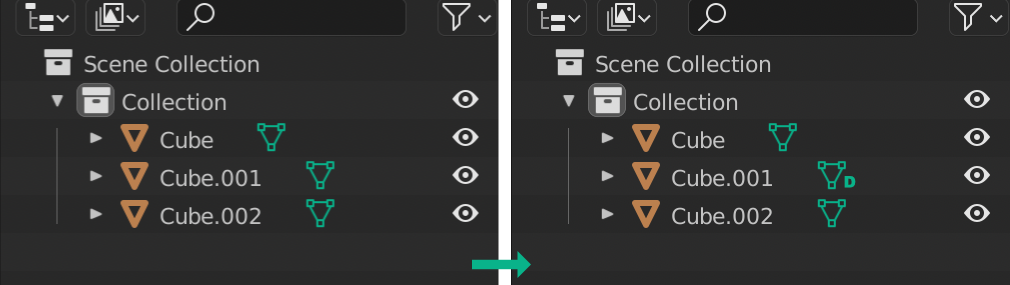
In the example photo Cube.001 is Linked. Adding L or D or another color is easy to show.
Also applicable to materials... As an extra feature, double click in the ico = select linked
10 Comments
A more precise term for this is multi-user data. Perhaps adding a user count instead of a letter would make more sense.
Data that is linked to an external file already receives a chain icon.
I think a slightly different icon and/or the number of co-users is probably the best solution then.
Why "D"? why not "LD" or "L" or like a chain icon?
Just an example, anything that helps. L or the chain icon better
Yes please... we are in dire need of an easier and more immediate way of visualizing which objects are linked duplicates or instances.
Yes, anything that shows it's not a single user would be wonderful.
Koko_ze, yes, Its better make a chain icon.
Such a solution fits only limited objects count.
It should maybe display a number of how many objects are using that mesh data block instead of a "D". More information.
This makes perfect sense! Seems so simple to implement, to begin it could just be a different color.