
bar to expand windows
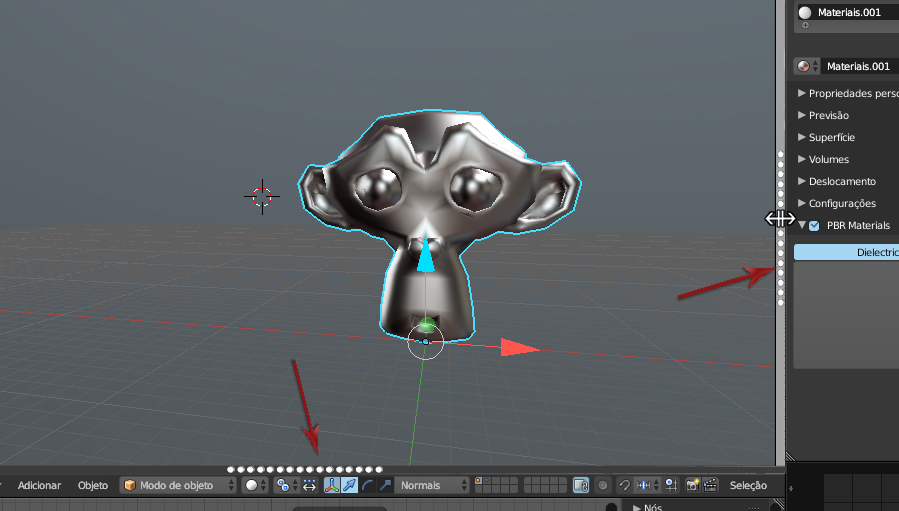
I had already talked about this before but now I have improved the idea - my intention was to inclement a bar to make it more comfortable to expand and minify the windows --- Currently you have to click between the division is a single line with the thickness of a Pixel for you to put the pointer of the mause to be able to expand - with a mini bar you when passing the mause the bar changes of color - to gray and appears the icon of arrows pointing right left as shown in the print - I had and I saw today that this feature is in MudBox and would be a very good resource - because expanding and minimizing windows is something that you are doing all the time.... thanks
5 Comments
Why not make the existing "Line Thickness" between the various UI elements just grow thicker when you put your mouse near or over it. And otherwise it recedes to what it looks like normally. When its thicker; you can drag the border of the window to the desired location.
@mcolinp: Agreed. I think that's a much cleaner solution.
yes increase the line would be an alternative plus the main issue is the detection distance if you increase the line and keep the contact distance the same thing does not work- the ideal would be to increase the contact distance to detect the command to expand window with the approach of the mause - the line is symbolic to have a greater detection distance could be up something invisible
I agree that the contact distance is too small. But I think increasing the contact distance only would be better without increasing the visual thickness of the line.
@contact5: We are not suggesting a thicker line at all times; only when the mouse moves close to it, with the purpose of resizing the window . . .
Some newer browsers and OS's display this behavior with scroll bars. When you start scrolling; they appear as thin; when you move you mouse towards them, they expand to allow you to grab the scroll bar and move/jump to the desired location on the page.