
Text Object - Content menu ...for easy animation
A simple addition to the Text Object attribute menu (see pic).
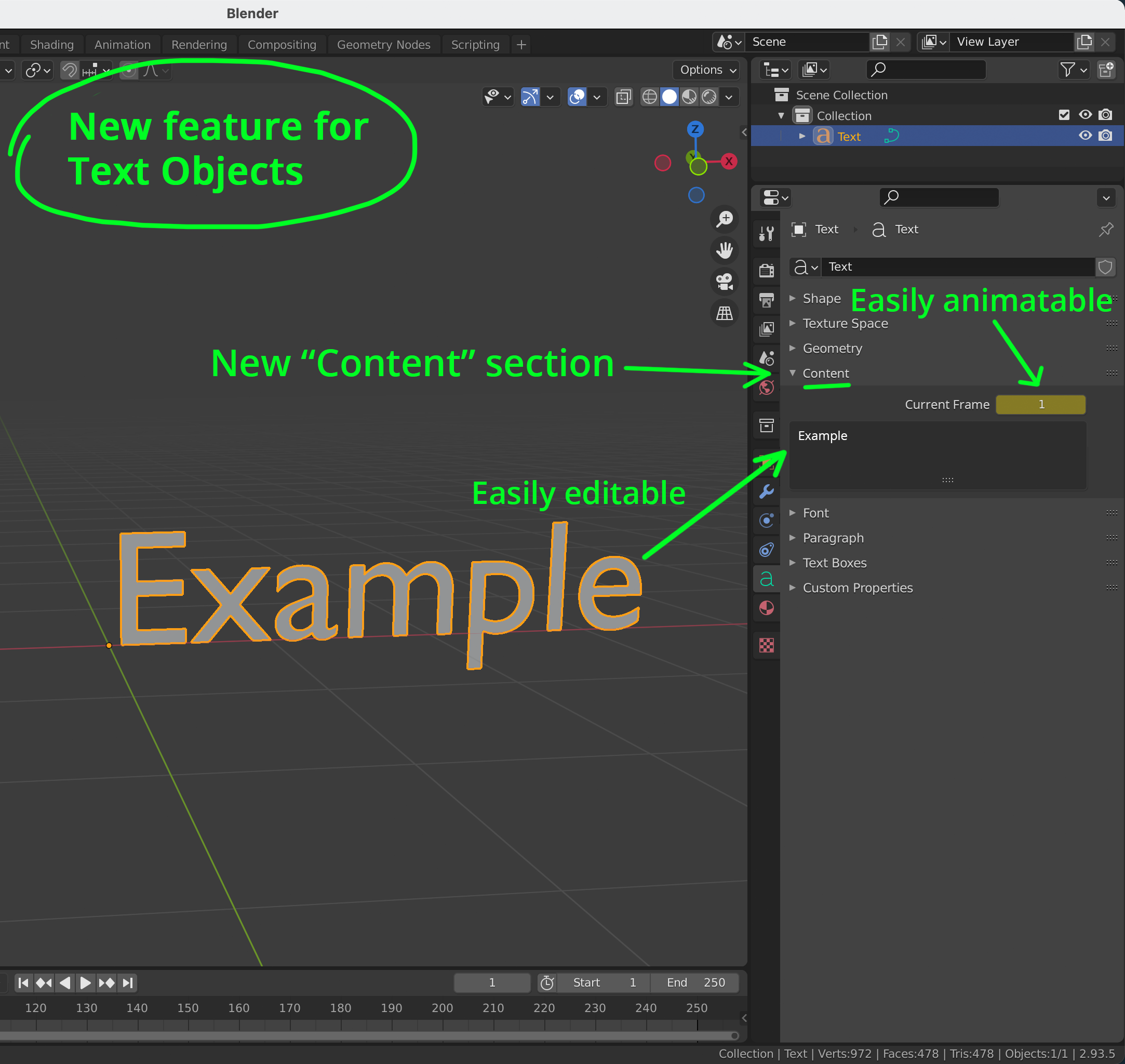
There's a field where you see (and edit) the content of your text.
And a frame number where you can apply a keyframe.
That's it.
This would allow the text itself to change on different frame numbers.
For example: at frame 1 = “001-002 default pose” at frame 2 = “003-050 walk cycle” at frame 51 = “turn 45 left” at frame 63 = “turn 45 right” , etc, etc…
I personally would use it as a clean way to apply visual frame counts and descriptions to game animations (above). I was actually surprised it wasn't here already. Yes, there are add-ons, but they're a bit clunky, or worse do way too much and clog up the screen space.
Other users could easily animate logos/titles/whatever.
Down the track though... the storyboarding features coming to Blender that (whether you know it or not) are going to revolutionise the storyboarding industry across the glove ...and the developers working on those changes would completely utilise this feature for things like frame numbers, descriptions, etc.
This little feature is something that keeps paying for itself down the road
(Storyboarding is coming to Blender: blender.community/c/rightclickselect/Cfcbbc/ )
2 Comments
Yeah, the glove could be a better place… upvoted lol.
Thank you. :)