
Asset Browser: New interactive moodboard clustering to "catalogs"
I was looking at the Playstation 4 game called Dreams recently, and I was interested in how they allowed the user to sort assets into separate cluster areas. Assets in the future of Blender can belong to many different catalogs at the same time and therefore they have to be manually sorted by the user through lists or less visual methods... which may not be ideal.
It would be helpful to be able to visually separate the space between certain assets in a catalog. For example a "doors" catalog would need to be further sorted into say wooden doors and painted doors. Sometimes you may have hundreds of assets that have been placed into your Blender project that need to be grouped visually in a catalog in order to navigate to them quickly.
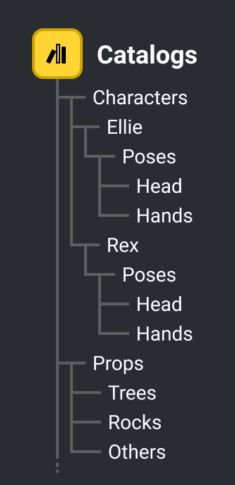
When you click the thumbnail inside a catalog it could bring up the virtual hierarchy or it alternatively could show with a keyboard hotkey. (This image is from the blender developers forum)
These next images are from the game Dreams. However, some other very different software such as PureRef are also good examples where Moodboards and clustering of images usually snapped together can aid creative work.
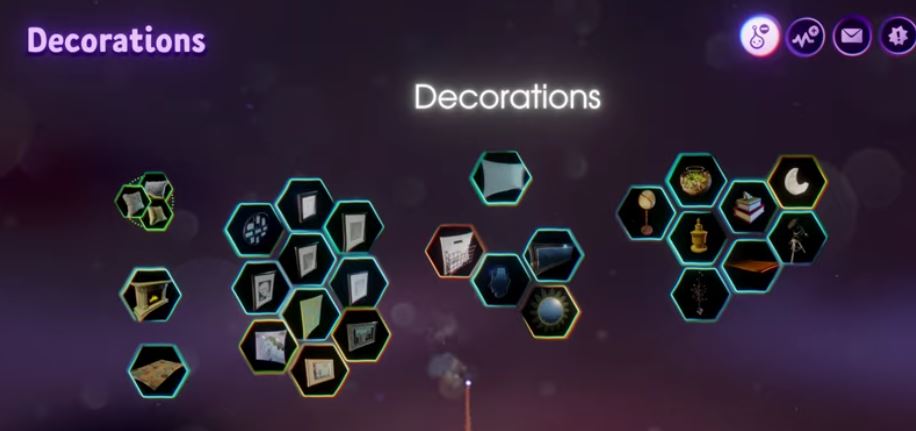
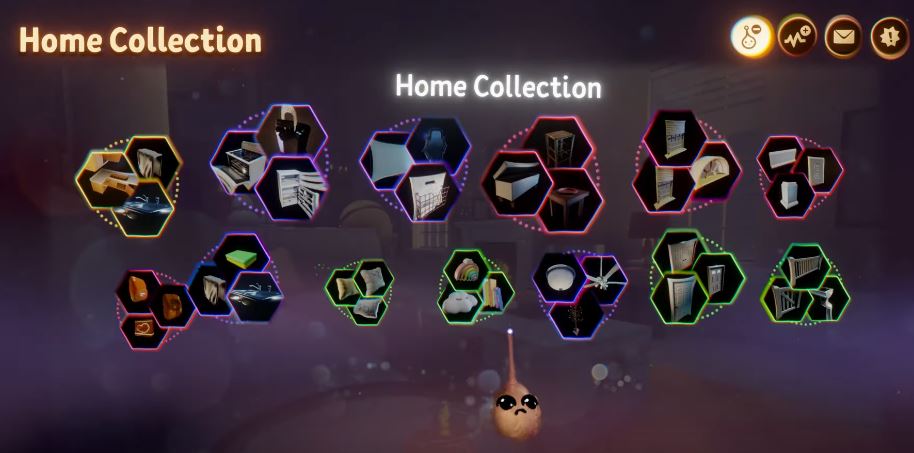
I would be happy with square or circular thumbnails instead of hexagons sorted into clusters, but the user should be able to drag and snap together the asset thumbnails interactively.
The interactive moodboard style clustering "catalogs" would most likely need be a toggle, as some people prefer lists or more standard thumbnail rows and columns as is the case currently in the asset browser.
Likely a long shot for the devs to attempt, but catalogs for the new asset browser need to be approachable and user friendly.
2 Comments
I sean patches for "catalogs" And they are comming but have no idea what the design will look lile
code.blender.org/2021/06/asset-browser-workshop-outcomes/ This was from June 28th, good also to click "Read More: Managing the Catalogs" part a bunch more info included there on that blog post. There are videos of the catalogs and the basics of it working on the blender chat on the 15th of September. So far they mostly got the hierarchy /lists working i think. blender.chat/channel/asset-project also I just had a look for any design... developer.blender.org/T90066 "The Catalog system (as described in Asset Browser Workshop Outcomes) needs to be designed, and concrete implementation tasks created" so no design as of yet