
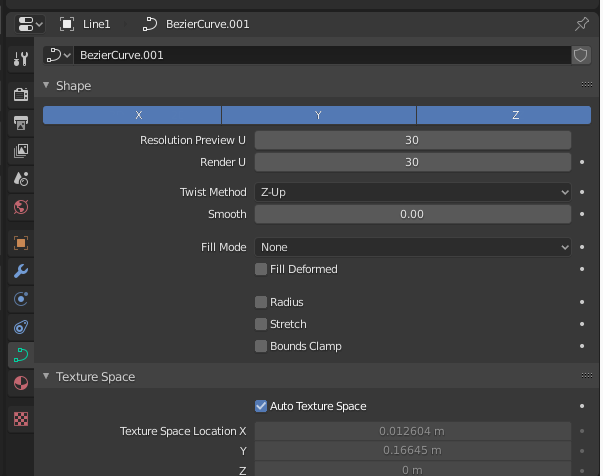
In Curve Shape Properties, Replace '2D' & '3D' with 'X','Y','Z'.
This one is like mac vs linux for how to structure control interfaces. Do you have more minimalist designs, or structured layouts with fine control. But in this case, It's ironically more confusing than most attempts to create a gentle experience to new comers and particularly those coming from Max and Modo.
If you ever use the curve tool to generate geometry, you'll find yourself thinking; How do I map to more than just one AXIS?
The odd truth is that it's not really '2D' and '3D', so much as 'Z axis' and 'All axis'. It's not really that much drama just to kill these two buttons and replace with with X, Y, Z. The behavior of 2 buttons could be replaced with 3 for much more control and ease of use. Each Axis is additive from one axis to all dimensions (3D).
Additionally, there is far more control in '3D' mode with how your curve appears, while 2D isn't even really that great for 2D work.. For instance, you may want to work in 2D creating walls AND roads because you only have to think about 2 dimensions, blueprint style. Well you can't lay down a fence and a road easily in 2D mode, but that could change if we go with XYZ. Then you simply have different settings per curve to get alternate geometry behavior more effectively.
To make this easier for newcomers to understand, we may for example use the following tool tips:
Over 'X' you'd see; (Latitude; Left and Right), over 'Y' you'd see; (Depth; Forward and backward), over 'Z' you'd see; (Altitude; Up and down).
In addition to this, there are subtle contextual functions that may serve to further enhance usability.
Perhaps in the context of 2D editor setups, the default could be 'Y' only for curves, and when created in 3D context, set to 'x,y,z'.
-S
0 Comments