
Toolbar: Inset Individual
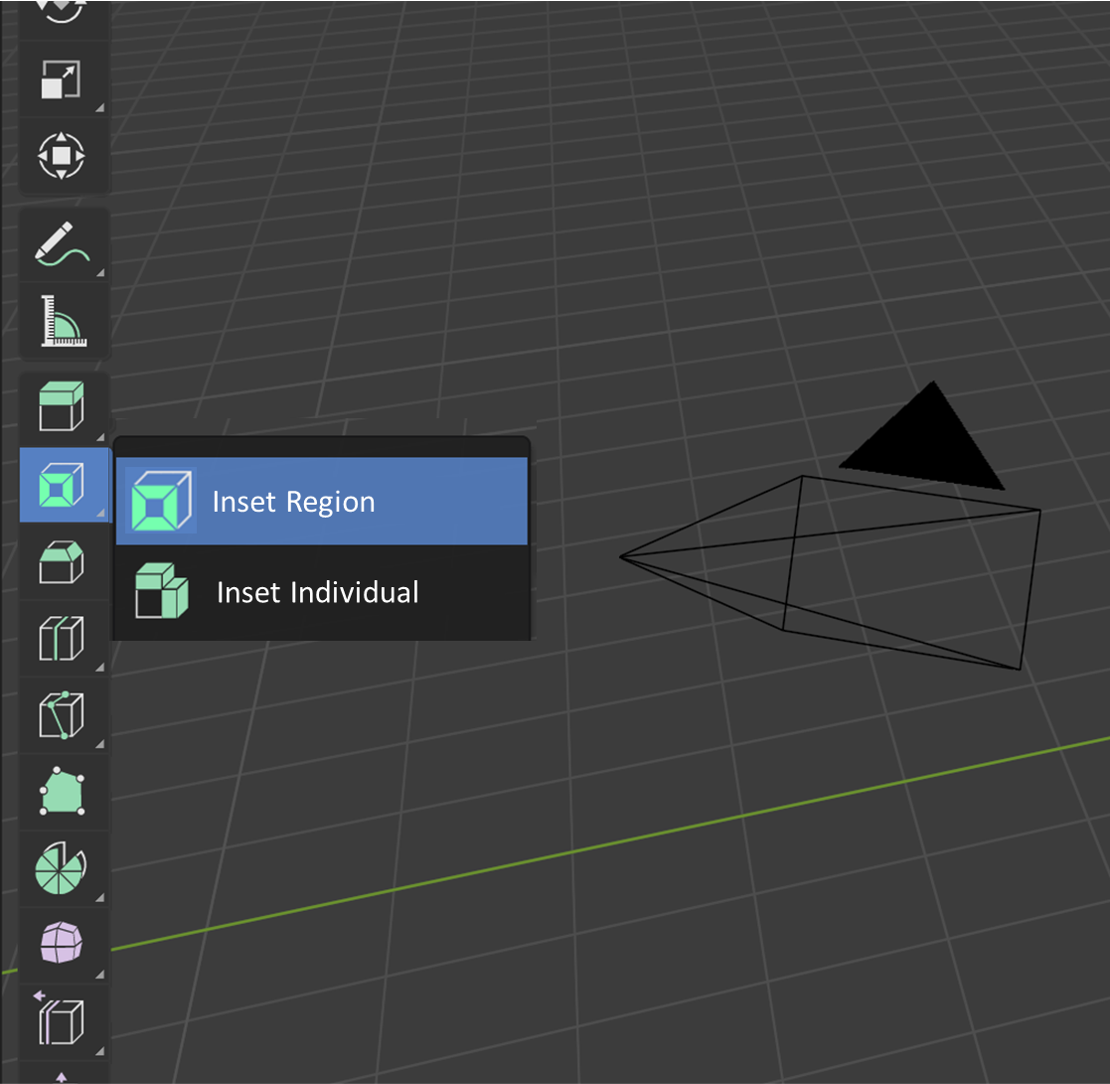
Inset individual is a commonly used tool but lacks a convenient way to be accessed without using the keyboard.
Similar to Extrude individual , the inset item in the toolbar could have a drop-out menu to select variations of the tool.
This would make this tool much more accessible to beginners and increase consistency with the extrude tool.
10 Comments
stuff like this is why blender is a mess. they should never do stuff like that. the extrude tools are the horrible example of a messy design
I teach Blender to beginners and this is a huge problem. The only way to inset individual without keyboard is to do the inset with thickness 0 and afterwards change the thickness in the operator settings.
* @philipp1 *
* @philipp1 * Extrude Individual and Extrude Region are actually different operators, so made into different tools. Individual is merely an option of the Inset operator. Which is exposed to the tool options as @TheRedWaxPolice shows.
* @philipp1 * while making inset press the I key again to make individual inset, it is that simple. this option will remain to individual until you make another inset and press I again. actually I is the toggle for individual
* @mrajendra2150 * The whole point of active tools is to reduce reliance on hotkeys where possible. If you're suggesting to "just use hotkeys", you're effectively suggesting to not use active tools. Which is not what this UI suggestion is about.
* @Stanislav Blinov * Blender workflow is mainly hotkey based therfore i dont think developers will look into that thing as there is currently major releases are going. also i will suggest to make your students mindset to use hotkeys as much as possible because this will help in a long run. Also, it would be good too to have this tool seperately.
* @mrajendra2150 * You do realize that what you're saying is, effectively, that active tools need not exist? Because if it's so "hotkey-based" there's literally no point in activating that tool at all. Whether, and what, (if any) hotkeys to use is, and must be, a preference. Sometimes out of habit, sometimes out of necessity (what if a person only has one hand? what if they want to use a tablet, which limits their off-hand reach to keyboard?). You'd do well to not shove any hotkeys down anyone's learning path unless it's absolutely necessary. Any sensible student should be able to figure out, access, and configure, which hotkeys they need, on their own. This is how you make good tools. Not by forcing the use of specific keys.
* @TheRedWaxPolice * Good point, that is probably manageable.
overkill...