
Modifiers UI further enhancements
The new
2.90 modifiers
features are awesome, and here are my ideas to take them a step further
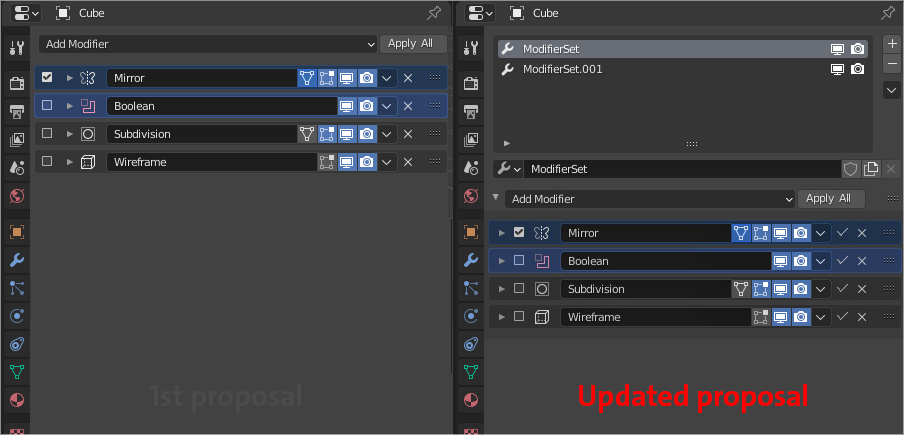
- a checkbox to the left of each modifier to enable/disable it altogether in one click.
- making modifiers selectable so you can select more than one and drag-drop them for even faster arrangement. same goes for duplicate, delete, etc.
- making them selectable is also useful with the new shortcuts recently introduced, for example, you can select them all with A key and then apply with Ctrl-A . or delete with X .
- " Apply all " button next to the modifiers drop-down menu.
Update
- Add an apply button with a
correct icon, for easy access.- Slot section like the one we see in
materialsandparticles, The idea behind it is to make it easy to create modifier setups and switch between them, or apply them across objects, (this can replace copy modifiers option)<P>Another benefit of this proposal is that you can edit the same modifier set for multi objects with differences, I expect this to be extremely helpful for
hard surface modelingand the addons related to it<P>
I don't know if this idea is worth it, please let me know what you guys think, there might be some aspects to it that I cant see that goes with or against it.
That's all, Thanks!
Ps: the post got 20 upvotes before adding the update
19 Comments
Maybe move the display and render toggle buttons on the left side instead of the checkbox.
* @XYZS * No, it should be consistent with the Particle Properties Tab and the Outliner. So on the right side.
* @gilbertorodrigues * the particle properties can be updated as well with this convention.
The idea of modifier sets is very good. Being able to select multiple modifiers to move would be awesome too. But by adding the apply button and a checkbox will increase clutter in the bar, making harder to read the modifier name, allowing to show up to 7 characters only. This would make impossible to read most modifier names, some of which are 3 words long. There's just not enough space there. This doesn't show in the images because you expanded that area considerably, which isn't a fair presentation of the idea. So I made a mockup of how it would really look in the default startup of your proposal(left image) and thought of a better solution (right image).
If they were to add the ability to select multiple modifiers to drag, why not also add the ability to apply and delete on selected. So there would be no need for the delete and apply on the side repeatedly. it could just be a button on the top of the modifier list (apply as shapekey, duplicate, apply, delete, etc.) that would only affect selected modifiers. {attachment proposalbetterpng}
My idea:
Response to update:
I actually really like this!
Agree, but not a checkbox to enable/disable each modifier. The right toggle buttons are good !
Thank youuu
The multiple selection is a wonderful idea.
However, i see no point in the checkbox since there is already the visibility toggle. What would "enable/disable" do more than "Show/Hide" ?
* @Peine_Perdue * I assume it would allow you to enable/disable it across ALL scopes simultaneously (in render, in viewport, etc)
* @Kai Christensen * You can do that fairly easily by just clicking and dragging across all icons, even across all icons across all modifiers in the stack.
* @thinsoldier * With a toggle up front, you'd be able to disable a modifier while retaining the 'display settings' you've used.
very good idea
I agree with dragging more than one at a time but I suspect there's some technical problem with applying more than one but not all modifier simultaneously.
* @thinsoldier * Isn't it the same as "convert Mesh from curve/meta/surf/text/" operator ?
* @arch.khader * That applies all , not some .
I think the node based modifier system would allow reuising modifiers on multiple objects. I'm not sure if it will also allow the multi-modifier-groups on a single object, which would be nice.
aaaaa
It would also be nice to add a marker in the middle of the stack and have a toggle to disable the part of the stack above the marker, like a show end result in 3ds Max.