
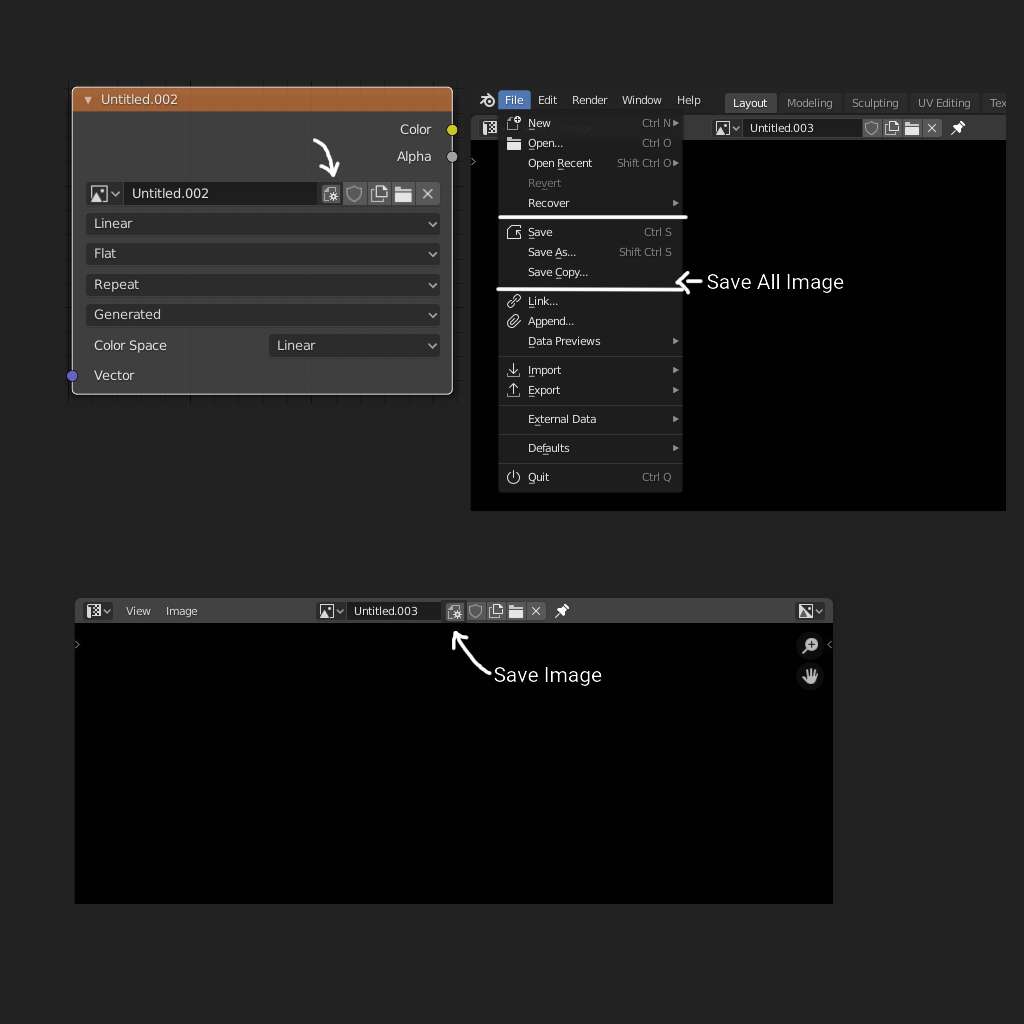
Giving a Save Image Button in Image Texture selection panel and save all image in file menu
Giving a Save Image Button in Image Texture selection panel (template_ID) and save all image in file menu
Reason:
- As we have an option to create new image from image node and image selection panel, it will be much more easy to save the image from that panel too after selecting the image. An icon after selecting the image will appear.
- Save all image in File menu is more easy to navigate
7 Comments
I recently lost a hand painted mask because I forget (and neither figured out) that I must force the saving of that image. I just take care of saving my proyect (Ctrl+S). But unfortunatelly the image was not saved at all. That is not good in any way.
It will be great if we have a menu called "Save all" in Main menu and if that menu is the default save behaviour (Ctrl+S). Saving everything, including images.
It is a common practice in most Developer IDEs. Where you have a lot of tabs and you don't need to save one by one separately.
Laking for that feature in Blender is counter productive. As in my case I lost work and I lost time taking care of saving explicitly if I work with an image.
Though it should be in the file menu of texture paint, i dont think it fits in the main file menu
* @romboutv * I don't think it's possible to separate menu template with layout template and if so then it will be again a cluttered setup just like right now. As Layout is upto users. Also, Texture paint layout already have this in Texture editor>image.
* @contact.cgvirus * Yes but why in the main menu, there are quite of other options to save items. Should they also than be added, i dont think so. But a more easier method would be nice
* @romboutv * Because when we have unsaved image, and try to close, warning appears. Now we have to go to texture editor. then save all image. File menu is intuitive for that.
Currently only the save image workflow is quite an embarrassing work around and image is most often used regularly. Let me know please which item needs this type of frequent savings. Will list them. I am already making a python for myself. Will add them. Thanks.
* @contact.cgvirus * They could also add that action in the warning. I think that would be better. Sorry but i dont think this makes sense to put that save option there because of this. Whats also perhaps weird is that actions which are not set to fake user will be deleted and no warning is given.
* @romboutv * Save all image creates packed image if not saved in location. So no question of loosing anything.