
Smarts Improvement in Blender's Outliner & 3d Viewport
A lot of improvements can be made to Blender's Outliner and 3d Viewport for great artists, animators & general users.
First of all, a lot of confusing points are currently available in Blender, related to the Outliner and 3d Viewport areas. I want to mention them here.
The
selection b/w 3d Viewport and Outliner should be completely sync
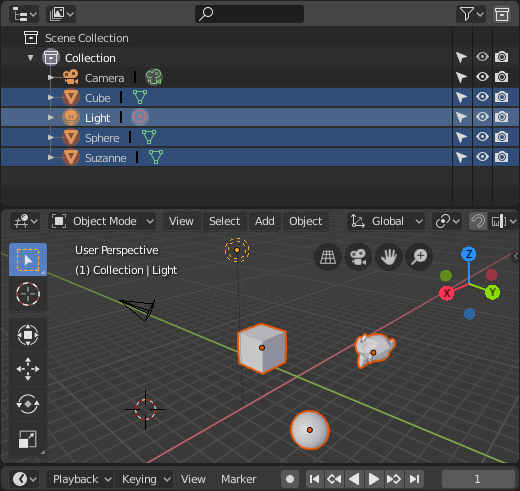
. It's mean that, if nothing is selected in Outliner then nothing is selected in 3d Viewport and vice versa. When items are selected in outliner (by clicking, box selects or any other means) then these item should be also be selected in 3d Viewport. In any way the the selection b/w Outliner and 3d Viewport is synchronize. As shown:

Their must be
active element
in the selection, like shown in the image below.

If all object in 3d Viewport are selected then it must be possible that some elements in Outliner are deselected. But if all elements in Outliner are selected then, all the objects in 3d Viewport must be selected.
All the elements in Outliner can be completely deselected. Even
active element can be deselected
.
Selected elements in Outliner must be easily shown. Currently
small circle around selected item's icon in Outliner is very confusing
. In some cases it's not shown due to environment lighting like sun.
The last selected element must becomes active. e.g when selection is executed using box selects then last item must becomes active.
Common Controls in Outliner
Shift + Click
-
If nothing is selected, then
Shift + Clickis used to simplyselect element -
If
only one item is selectedand action is executed to that's element, then theselected item becomes deselected -
If
one or more elements are selectedand action is executed to another element, thenall the elements b/w active selected element and last selected element becomes selectedincluding those two elements (active and last).
Ctrl + Click
-
Ctrl + Clickcan be used to add/remove items form selection
Ctrl + Shift + Click / Alt + Click
- These combinations can be used to change the active element from selection. (becomes newly selected item to active)
Note:
i will update my post later...
4 Comments
Thanks for your proposal! Like Jason said, this is a mix of both UI and UX improvements. Fortunately some of them are being addressed already:
I can't find the one regarding syncing the selection of viewport/outliner but it's been also talked about and pretty much everyone agrees it should be done, just so many things going on at the moment with 2.80.
Outliner related stuff now goes here devtalk.blender.org/t/gsoc-2019-outliner-improvements-ideas/7185
Thanks! for give me the information. I don't know about them before. Also thouse are on the other website which you mentioned. Actualy, i am currently implementing these. So here i give the idea to see what others peoples thinks about thease implementation (if necessory / nedd to changes something). But here i receive only the answer (hi your idea is already on the others posts......)
Variations of this idea have already been proposed on this site multiple times (both as individual ideas and, less pleasantly, bundled among a set of ideas in one post). Please search the site prior to posting your proposal. If there's one that matches your idea, contribute to refining that one.