
Improvements to navigation shortcuts
If you are following the development of 2.8 you may know that our awesome developers are working on a new keymap for the upcoming beast, one of which was double tap the [A] key to deselect.
This double tab thing got me thinking, where else can we apply this, what else can be intuitive to have this feature, and here is what I came up with:
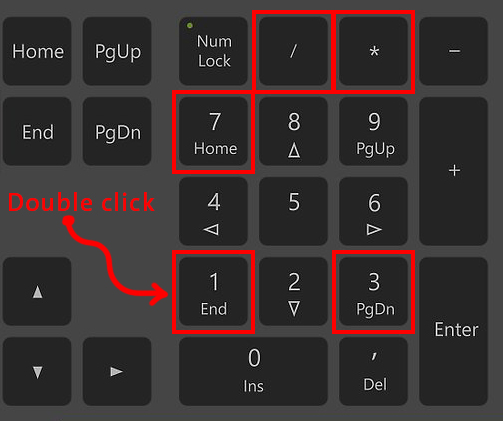
The navigation shortcuts ( the numbers on your keyboard calculator) :
-
Double tap the keys [1],[3],[7] to spin the view, for instance, when we hit [1] once it gives us front view, Now double tap [1] should give us back view, and so on and so forth. this is faster than ctrl+ the key.
-
tapping the [**] key to spin "user view" ( any view you are in), this can be very handy in so many situations, and since the [*] key isn't occupied, I believe it's the best operation for this key.
-
Tapping the [/] key to zoom every visible object to view, now this feature is in programs like autocad and its very handy, it lets you have a look at all of the objects in your scene, if you are zoomed in, it will zoom out until every thing fills the view port, and vice versa.
-
Double tap the [.] key to undo the zoom to selected operation, this can open new possibilities to this operation.
-
Double tap [0] key ti toggle between other cameras, tap [0] once still moves you to the active camera.
Pie menu
Last but not least, Why doesn't the pie menu have its own dedicated key, I find it difficult to press Ctrl+[↹] because they are above each other at the far left of the keyboard.
My suggestion for that is to use the [Q] key, one tap is for the quick menu (as is now), double tap/Ctrl+[Q] is for the pie menu.
5 Comments
Having an option to double click= hotkey is a good idea
@dodododorian: its already there (with deselect all) we want this concep to expand all over blender
You may want to separate your pie menu proposal to a new post because it appears to be largely unrelated to this one
Feature 3 is already in the Home key. "Pie Menu" is a misnomer here, because there are many pie menus, what you are refering to is just the Mode switching pie menus, but there are many others
You can do this now. -Goto Prefs/Input/3D View/3D View (Global) -Scroll down to find 'Ctrl Numpad 1' -Open -Click on 'Press' and select Double Click in the menu -Save User Setting -Goto 3d Viewport, tap Numpad 1 once, now tap 1 twice -Bam