
Keep selection when hiding/unhiding
Issue
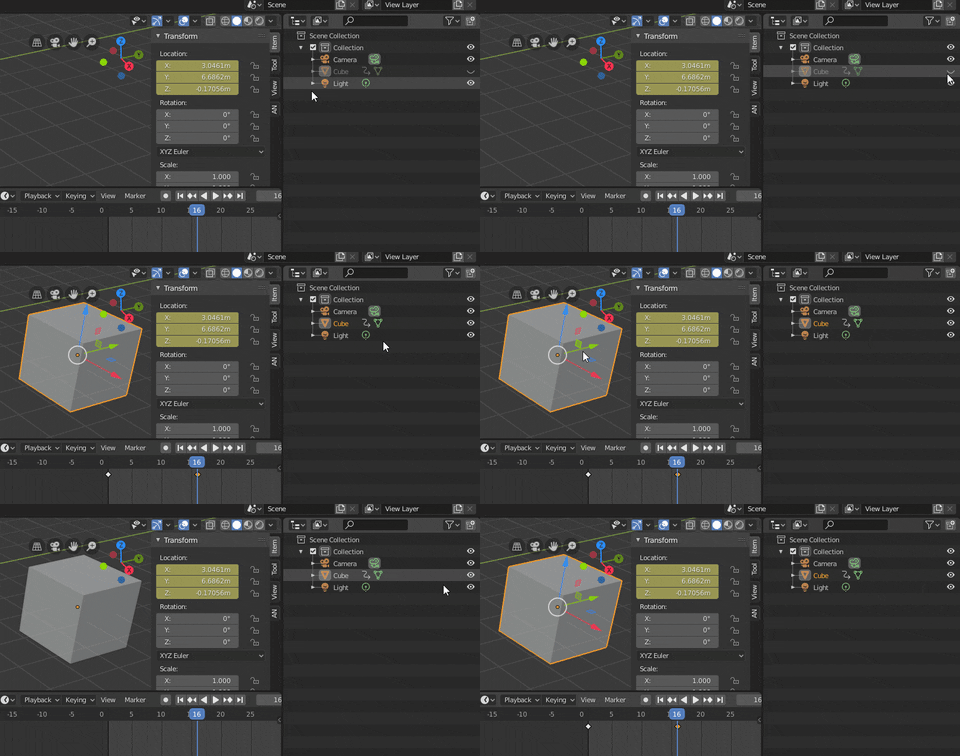
Right now, when you hide an object visibility in the Outliner, it also deselects it. This makes keyframes in animation editors dissappear unless you turn off "show selected" and turn on "show hidden".
Keyframes in the dopesheet disappear in a normal workflow, and you can no-longer animate visibility on selected items because it's hidden and the process deselected it - you cannot re-select hidden objects to get the keyframes again. When you unhide the object, it is now unselected making animation impossible without selecting it again, which is slow and very inefficient.
The process of animating visibility, hide, unhide, re-select, animate is.. long. Specially when you need to do motion graphics with switch outs.
You cannot select hidden items from the outliner to show the keyframes. You can only unhide them to get animation data. So to get your keyframes back for visibility, you need to first unhide in outliner, select in 3D viewport or outliner, THEN you have control... and if you are on autokey, you just made an unwanted unhide key just to get your keyframes to show on selected.
Task
- Make hiding/unhiding not change selection status to keep keyframes shown on selected and animation modes still active when unhiding.
Optional Task
- Be able to select hidden things in the outliner and show keyframes/animation data
TLDR:
Keep selection when hiding/unhiding.
Show animation data on currently selected hidden things.
13 Comments
Workaround - animate scale to 0
I know you wrote this a year ago but, thanks this is simple but I've been wrestling with this, and thanks, I was just about to do it via a shader but this is a way quicker workaround thanks!.
Yes I agree this is very annoying. The f-curves should still remain in the dope / graph editors even when object is invisible. I hate to say it... but take animation functionality from Maya as it works really well there. At least have a user preference to turn off current way it is working in Blender. Thanks
I'd consider this an anti-feature, personally. Blender disallows selection on hidden objects by design. It's a common assumption throughout the code (at least in the Python world).
* @Josephbburg * So, basically to do this, we would need to have an additional "hide" operation, where the object only is not visible. Then this new "hide" and old hide would work together. Somehow. Maybe. I literally didn't think this comment very much.
* @Josephbburg * This code paradigm is not a great user experience. Really, animating visibility (eg.) is a huge chore.
It makes sense for code manipulation, but this is a point and click type of workflow. You have to literally scroll the time line till it is visible to then select the object to see it's keyframes - then when you move the visibility keyframes and they gopast the timeline, it then hides the objects, and in conclusion, removes control and the selected keyframes.. then you can't do anything with those keyframes, and you loose control, and you then can't animate the visibility correctly and have to repeate process. I can see the hidden keyframes of the object on scene view with "Show Hidden", but what if I'm working with literally hundreds of objects? How much time do I have to spend to find those keyframes that got lost as soon as I dragged them past the timeline?
It's not a good UX.
* @Andres Stephens - Trinumedia * I agree, animating visibility in Blender is actually one of its biggest weaknesses. I use Python to set and manage keyframes for this when I have a lot of objects -- this shouldn't be necesary.
* @Artturi Mäntysaari * That is the the case with max where you have Visibility as a scalar property of the object and Hidden as boolean. They affect both viewport and render display (handy). And yes, the object remains transformable but you can only select it in the object list.
Recently I switched to Blender 3.3.1 from 2.79 (using the older version was a limitation of side software). So, I was very VERY surprised that the hide button no longer works like it used to. Now it disables things instead of just hiding them. This cause huge problems for me as for animator, I can't temporarily hide an armature for more comfortable process and animate selected bone, then unhide it and set a keyframe. This is realy REALY HUGE problem, I have no idea how to animate now as my rig is full of bone shapes and it's really har to understand the accuracy of a bone position I'm animating without hiding the rig. Imagine, even if I want to hide the lights from scene so that they do not interfere, the hide button disables them and they stop shining! And this is along with additional buttons added to disable in viewport. Just look how hide button works in 2.79, a bone can be selected in the action editor and transformed without auto inserting a keyframe, this is right what is needed and how this should work. Please, please, fix this!!! The hide buttom should not disable things, it should just hide!
What exactly is wrong with just toggling Show Selected and Show Hidden, as you've noted already?
* @Jason van Gumster * When you hide selection, it hides the keyframes on selected. I don't want to see the whole scene's keyframe sets - as I might be animating dozens or even hundreds of elements. I need a keyframe filter on hidden and still selected to be optimized. I don't want to have to activate a typed filter - I just need to hide, unhide, animate and not worry about configuring the dopesheet every time, and re-configuring my selection every time I set a keyframe.
The issue is that I'm adding hundreds of seconds (even minutes) to my day just in hiding, unhiding, reselecting, animating. It is.... reallly reallly slow.
How would you prevent users from accidentally moving or editing hidden objects?
* @Artturi Mäntysaari * Softimage allowed control even on hidden selections, and as the widget moves, you can see an indicator that the hidden is moved. Sometimes you want this functionality, as the idea of hiding is.. to exclusively not show in viewport, not eliminate all control, like the "select" toggle in the outliner that already exists.