
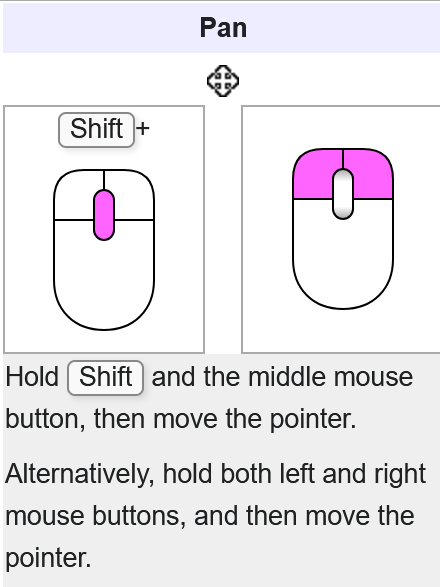
Add LMB+RMB to move the view.
Blender's navigation in Freecad allows you to rotate the camera by pressing both mouse buttons. I think it is a brilliant idea, as it allows you to do so with just one hand, and it's equivalent to a tablet gesture navigation. It even provides navigation accessibility for people with disabilities.
This way is impossible to configure in Blender itself, because it's not possible to do combos with mouse buttons.
The view is also centered at the cursor with clicking MMB, something that has been discarded in Blender because it can happen accidentally, which is why Alt+MMB is required.
Freecad allows multiple navigation configurations, and it's also very easy to change them, as the status bar has a button for it. If you want to test this functionality, it's very easy to test it from Freecad, as well as the rest of the configurations (CAD navigation, Gesture navigation...).
Link to the official documentation: wiki.freecad.org/Mouse_navigation
9 Comments
Why can't the mouse be used the way the mouse is meant to be used?
There are navigation buttons on the screen....
Thinking about it, how does being able to press two buttons instead of one is an accessibility feature for people with disabilities?
You may have joint problems, mutilated or immobilized limbs, paralysis, children with no keyboard skills... I can honestly think of a ton of situations.
Coming from Max and Maya, I remember when I started using Blender, I was amazed at the speed of working with keyboard shortcuts, but I'm also amazed that you could work with one hand in Max.
I would think a person with only 1 functional hand, would be better suited to have a mouse with more buttons. Or controller-mice/macro keyboards like hardcore gamers use.
Good point
On physical mouse that sounds nice, I reckon it could also be a nice way to handle third button events on mouses that don't have one (though that doesn't solve the rolling mouse wheel events).
But how would that work on laptops' touchpads? AFAIK more and more of them have no physical buttons alongside them nor "inside" the touchpad and instead rely on gestures which the manufacturer have to expose to the driver and then which the system has to pick up.
I was able to come up with bindings so that holding LMB rotates, holding RMB zooms and holding both pans the view! Note the careful use of Press and Release to achieve this:
Assign Left Mouse Press to Rotate View, and under View 3D Rotate Modal: Add Confirm, assigned to Mouse Left Release. Add Switch to Move, assigned to Mouse Right Press.
Assign Right Mouse Press to Zoom View, and under View 3D Zoom Modal: Add Confirm, assigned to Right Mouse Release. Add Switch to Move, assigned to Left Mouse Press.
Assign Shift Left Mouse Press to Pan View, and under View 3D Move Modal: Add Confirm, assigned to Shift Left Mouse Release. Add Switch to Zoom, assigned to Left Mouse Release. Add Switch to Rotate, assigned to Right Mouse Release.
You should also change all key-bindings that use LMB and RMB to something else.
This worked for me in Blender 2.83.
It's a shame the proposal wasn't well received, as improved navigation is constantly in use.
Although it may seem strange, two-finger navigation is very convenient, although it does cause a couple of minor issues: · The RMB context menu should be activated when release. · The RMB context menu is often inadvertently activated when you stop navigating.
Aside from this, I don't think I'll ever use my left hand to navigate in Freecad again. I recommend trying it out.
Personally, here's why - because my left hand is always on the keyboard. Pressing alt/MMB is no issue, as my hand is already to press G or E or 2 when needed.
For me, it's like all other software... that i also don't use one-handed.