
Materials Browser
The way blender handles shaders browsing is pretty tedious at the moment, if you wanna do a change to a specific shader, you have to:
- find an object that contains the shader in the viewport
- go to shader properties
- select the shader you wanna change
- go to the shader editor
Way too many steps, and if you wanna see all the shaders in your scene you need to:
- go in the outlier
- set it to blenderfile
- look for the materials and expand the list
But even then we can't preview or select them for editing from there.
So my request is to have a shaders/materials browser where I can preview and select for editing in the shader editor.
This could be expanded to allow us to drag them out into the viewport to assign it to an object's material slot or even select a whole lot of objects, right click on a material in the material browser -> assign material to selected
Seems like a lot of the asset browser work can be used for this, But this is about making a browser specifically for the scene's materials.
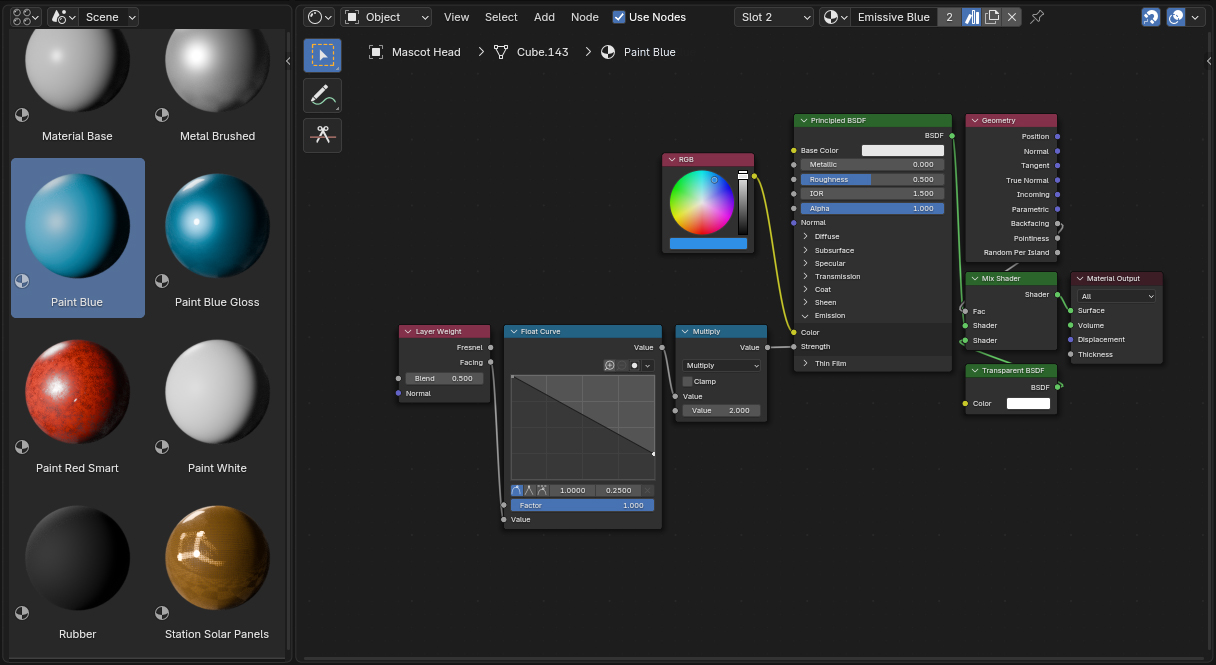
Thank you for your attention, looking forward to hear some feedback.
7 Comments
If you mark all your scene's materials as assets, you can use the asset browser as a material browser.
But with the caveat that you need to constantly mark any new material as asset.
I think it would be simpler if there was a filter option that, in the "Current File" view, shows all data-blocks regardless of them being marked as asset or not:
It would make the asset browser's usefulness go from just an asset sharing tool across files, to a global asset manager including in the current file. It would also make it easier to make new assets, since you could mark them as assets from the asset browser instead of first having to go in some other place in the GUI do to the same thing.
marking as assets is how I made the demonstation image and as you say its still a messy and tedious workaround. Completely agree the asset browser should work for your current file with a varety of filters as it would actually be super usefull for so many things, even things like like geometry nodes selections wich are still a pain to go and select for editing.
This is one of several often-requested features which seems like it should have been part of Blender 1.0. It's been absent for so long, nobody even thinks to finally implement it. (See also: grouping.)
Yeah grouping is actually my number 1 request too, there is a request that has been one of the top ones for almost a decade no and still is ignored.
blender.community/c/rightclickselect/Rcbbbc/
Yeah, duplicate of many requests:
blender.community/c/rightclickselect/Qk57/
blender.community/c/rightclickselect/Chhbbc/
blender.community/c/rightclickselect/Z6fbbc/
blender.community/c/rightclickselect/5gdbbc/
I agree, but I think the main point to me is managing a scene with hundreds of materials. We should have a material link menu, where we can see to which objects a material is assigned. There are materials that can be purged from the scene, not even with 0 linked objects.
That is something this system could fix by by having the usual small icon that shows how many objects use this material right next to the preview, and you could have the ability to add or delete any material right here too.