
Increment Number in Filename - Collection Exporter
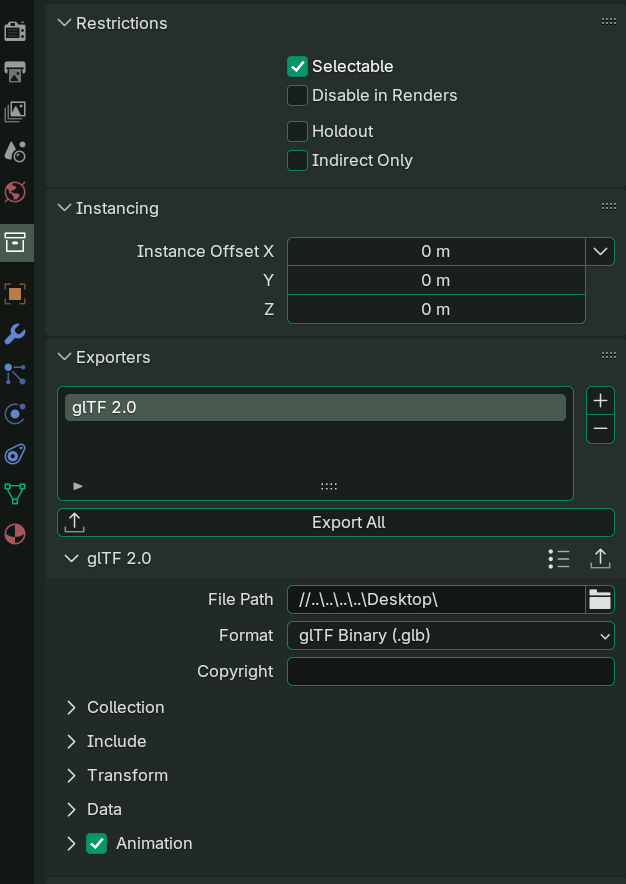
This is my first post, so hello! I had a simple idea that I think could improve consistency in Blender's export system. When exporting a .glb, .obj, etc., there's an option in the bottom-right corner to increment the version number using the - and + icons. I think it would be useful to have the same functionality in the Collection Exporter, which currently doesn’t include it when you hit export. That’s all—thanks a lot!
I'm using 4.4.3 right now btw.
4 Comments
I haven't heard of a "collection exporter", is it an addon? If so, you should post this request on the addon's official channels. RCS is meant for Blender.
No, it’s not an add-on. It’s a built-in feature in Blender. I’ve updated the post with a screenshot. Regards!
Collection exporter has been a thing since Version 4.2 LTS: developer.blender.org/docs/release_notes/4.2/pipeline_assets_io/
Oooh I forgot about that! I so rarely look in the collection properties x)
Since we don't open the file browser to save a file but instead just pick a path and then let the exporter make the files, I guess we would need a different solution where we tell Blender once for all that we want increment in file names, and let it do it automatically at each export?
That could be as simple as a checkbox, but considering we are already introducing the concept of variables in file paths for #133001 , maybe we could ask for a variable specifically designed for file increment?
E.g. in the FOSS screen capture software ShareX, we can chose between plenty of variables for increments but also randum numbers, date and time stamps:
Following Blender's variable structure of:
Imagine if we could write in the filepath
\\my_file_{i:###}to save your file asmy_file_001.glfand so on?Edit: I made a variables wishlist proposal: Wishlist of future variables and path templates — Right-Click Select