
Viewport current view plane lock (orbit/view rotation lock toggle)
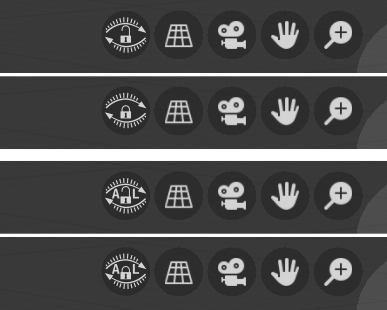
In case i’m doing 2D modeling/layout and i have to push some vertices on one (view) plane then shift (pan) the view, and then push some more vertices on the same (view) plane, i can accidentally tilt the view when i release shift key before stopping mouse move + mmb or when i place my finger on CapsLock and start mouse move + mmb (shift + mmb = pan and just mmb= view rotate by default, great for 3D, not always so great if i want to lock myself in 2D for certain work ), and if change in view is insignificant to notice at first i end up with half of vertices slightly misaligned, i realize that after extrusion and inspection in all dimensions, then i have to go tweek it and i get annoyed . My idea is to add one more icon to top right viewport corner or add keyboard shortcut to quickly toggle orbit/view rotation lock
BTW. I'm aware of axis lock, but if i know i'm gonna do a lot of 2D straight, extra dimension is annoying, and pressing g + shift + z is extra step, repeating that for every operation is time consuming, it is better to lock orbit/view rotation, press g move, apply, pan and so on....
Update:
Add option to enable/disable autolock for main views (left, right, front, back, top, bottom) - thanks Remake for this idea. Updated concept icons for visual feedback in case of autolock is on.
5 Comments
Although the GUI is different from the proposal, the upcoming 4.4 will have a viewport rotation lock:
#122185 - Expose lock_rotation in the view menu - blender - Blender Projects
Maybe the GUI could come later.
I would like to have an option to auto lock when i press 1, 7 ,3 on num pad.
@Remake: autolock for single (1, 3, 7) ortho (or not ortho depends what you need :P) view, that is good idea for settings option, so you can utilize quadview functionality in single view (it would save a lot of space), go go gadget (oh sorry widget) autolock !
There is already addon, which should be default in Blender.
"Lock View Rotation"
gist.github.com/Fweeb/bb61c15139bff338cb17
yes.!