
Projectable Decal
While camera projection is certainly very useful, something I like about game engines is how easy it is to add asymmetric details to environments using project-able decals.
I know that it's already somewhat possible to project textures using lamps, or by setting up a camera projection in the shader using texture coordinates, but it would be great if there was a way to actually project a material onto another object.
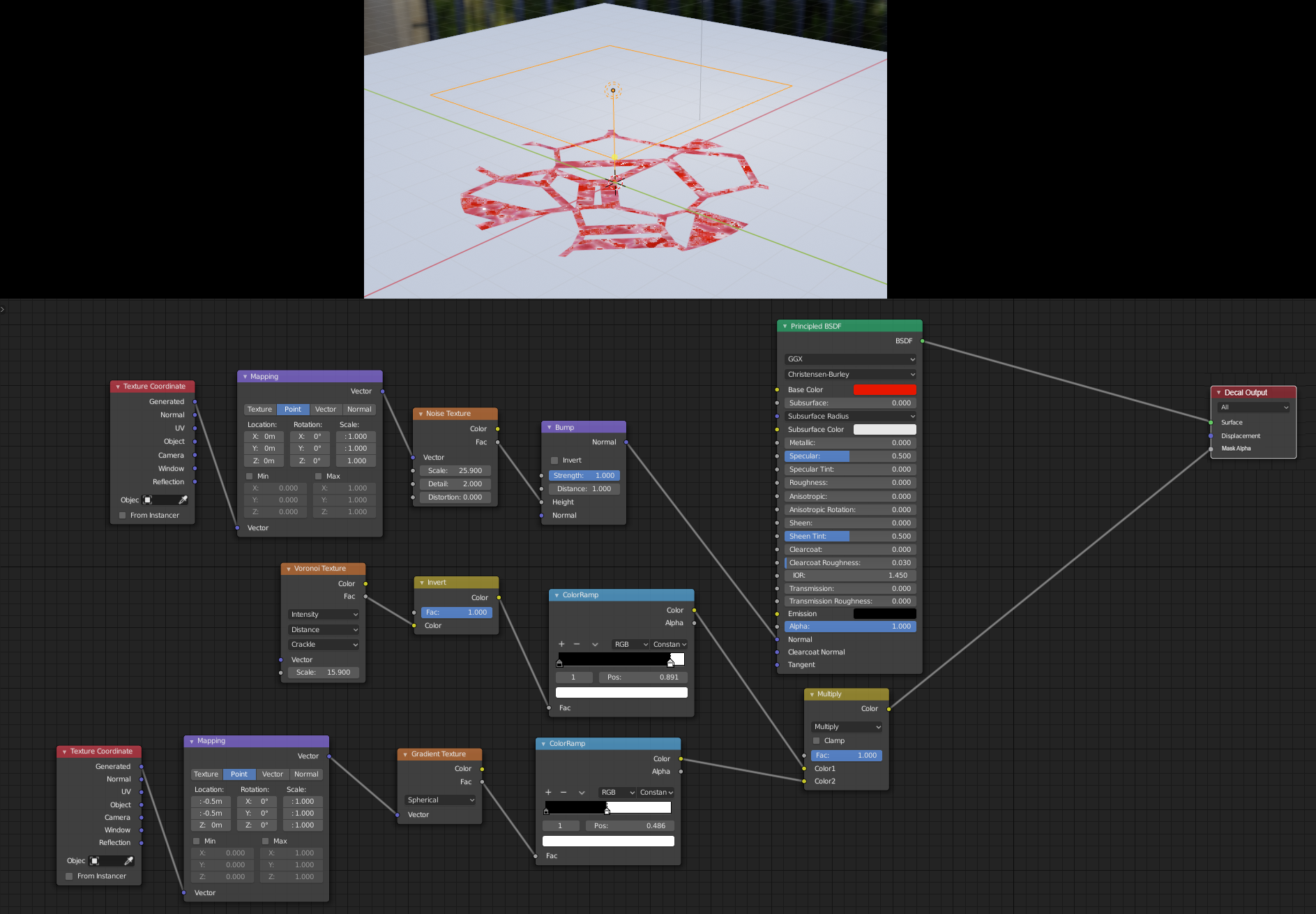
What I propose is a lamp type object called "Projector," that has it's own special material output called "Decal Output." It would be able to project orthographically or using perspective using the same UV coordinates that a plane would normally have.
The main difference from camera projection as it is now, would be that decals could be easily duplicated and moved to other objects using a generic shader for the decal, instead of having to manually go into each separate material and add in the decal.
EDIT: In the example, this would be what my imagined "Decal Shader," setup would look like. Imagine just being able to hit "Shift + D," and duplicate this 20x all over.
20 Comments
I dream of the day when I can simply bring up the add menu and choose 'Add > Decal', go to the Decal's properties, choose a material, and a shape for the decal (Omni / Spot / Ortho / etc), optionally limited it's influence to a collection, then just position the decal anywhere I want, scale it, rotate it, maybe even parent it to an object so it moves with the object, etc, and whatever material I assigned to it will be projected onto the surface of any mesh objects in the scene, blending all material properties in the process.
It would be so insanely useful. It would speed up workflows tremendously and make several addons that attempt (and fail imo because Blender needs this functionality 'out of the box') to provide this same workflow redundant in the process.
Any updates on this?
I've figured out how to do this with modifiers! Any number of decals, any object in a scene, no fussing around for every decal you add. Anyone interested in a tutorial?
* @ Grady * If there is a flexible way to do this with modifiers I'd definitely be interested, as I certainly couldn't figure out an efficient workflow
* @Zach Hixson * I just put it up as a reddit post with a tutorial today. I still want to see Blender's devs add a proper decal type object with a better workflow than this but it works pretty decently: reddit.com/r/blender/comments/k7d857/i_figured_out_how_to_create_fully_dynamic_mesh/
* @ Grady * Awesome, this is a perfect visual example of what I was proposing!
Decals are definitely in my top 10 wishlist for Blender. The ability to go "Add -> Decal" and just pick any material for it, then move it into place, adjust it's size and depth, tweak blend settings, limit to collection, etc, would be just incredible. It would speed up workflow so much.
Ended up here looking for exact this solution. I also knew about UE solution with decals and current thing I was working on would benefit from something like that immensely.
Here is what I'm trying to do:
Let's say I have a piece of rock/stone, single uv unwrapped and textured mesh asset. Now I'm scattering this asset with duplicate linked across my scene in small stream, half-submerged in water. They are scaled, rotated, etc.
Here I would like to be able to make their texture wet on the bottom half up to few centimetres above water level.
Next I would use multiple instances of this stone asset (placed next to each other with some overlapping margin) to "build" slightly bigger rocks and place them on the ground in my scene.
Then I would like to be able to place moss texture on some of them.
I think the type of decals that UE provides are great for such scenario. I'd say I'm only intermediate in Blender and for now I can't figure out good way to easily do this kind of stuff with existing tools I know.
Here is a video that show how it is done "manually" in Blender. If this could be somewhat automated into a new modifier that would do:
a checkbox: "project as decal"
numeric input: projection angle x,y,z (could use the decal object origin angle) object selection (droplet picker): object to project
This is a standard feature in game engines, as is allow designer to break texture patterns with other textures.
I see also an usage to project "toons" animated faces (like decals) on a 3D Character:

Example:
* @Christian Clavet * The issue with this technique, is that as you said it's not automated, and secondly, but most important, it doesn't take the material beneath into consideration unfortunatly. Deffered decals like in game engines are i think what we are all looking for, so we wont need those endless mixing of shaders just for a simple leak or sewer plate
I agree that it would be great to have something like this in order to project images/decals onto geometry. Preferably so that they can be adjusted afterwards and with the possibility of projecting with a shadow, similar to what one would get with a real projector.
When we lost square spotlights in 2.8 we also lost the capability to do this.
You might be interested in a script I wrote to speed up the process of projecting images/decals on geometry: Camera Image Project
How does this differ from simple Object coordinates? For reference: docs.blender.org/manual/en/latest/render/cycles/nodes/types/input/texture_coordinate.html
* @Jason van Gumster * How achieve decal projection with that?
* @Pawel Piotrowski * Like this:
{attachment object_coordspng}
And an example file for you to play with. Transform the Empty and the texture moves, rotates, and scales over the surface of the object.
* @Jason van Gumster * No, this is not projection decal. Nothing is projected on anything, that just shader. Different method with different results.
Projection Decal act as light that is projecting material instead of light or shadow. Main advantage is that they are easy to set up . In shader You would have to implement in every shader every decal that you want to be visible.
I guess that i would be eevee only feature cause Dbuffer and deferred shading sorcery that allow easy implementation in game engines.
Example: l
l
* @Pawel Piotrowski * OK. So you're just talking about lamp textures. Technically this is doable in Cycles, but not currently possible in Eevee.
In any case, the original proposal was specifically asking for a feature of the shader and that's already possible with Object coordinates.
* @Jason van Gumster * Like I mentioned in my original post, this is the closest current way to do it, but it's still slow and not as convenient as decals in something like UE4 or Unity. While it's certainly possible to get the projection effect doing it this way, it's extremely messy for more than 1 decal, and it's also slow a lot slower.
* @Jason van Gumster * I experimented a bit with this technique and it seems to be quite useful. Thanks for this tutorial.
I have one question though. This texture projection is happening indefinitely. In your example arrows are visible also at the back of monkey's head. Is there an easy way to have it ignoring backface projection.
* @Tomek * Technically speaking, that wouldn't be backfacing geometry as the normals on those faces are correctly pointing outward. What you're seeing is kind of a natural side-effect of Flat projection. There are some ways to get around that... each with their trade-offs. I've had the most luck using the dot product of a normal (like the Normal socket on the Geometry node... or the Object coordinates themselves).
I'll see if I can put together an example file.
* @Jason van Gumster * Cool that you're helping teach people that method, and go ahead with the example file, but we are getting a little off topic. To clarify my original proposal: In a similar way to a lamp texture, projectable decals would be able to project a shader onto another object, independent of that object's shader. This would allow for easier details throughout a scene as the decals shader would not have to be built into each individual object they were projecting on