
For retopology - Option to hide vertices of the back faces
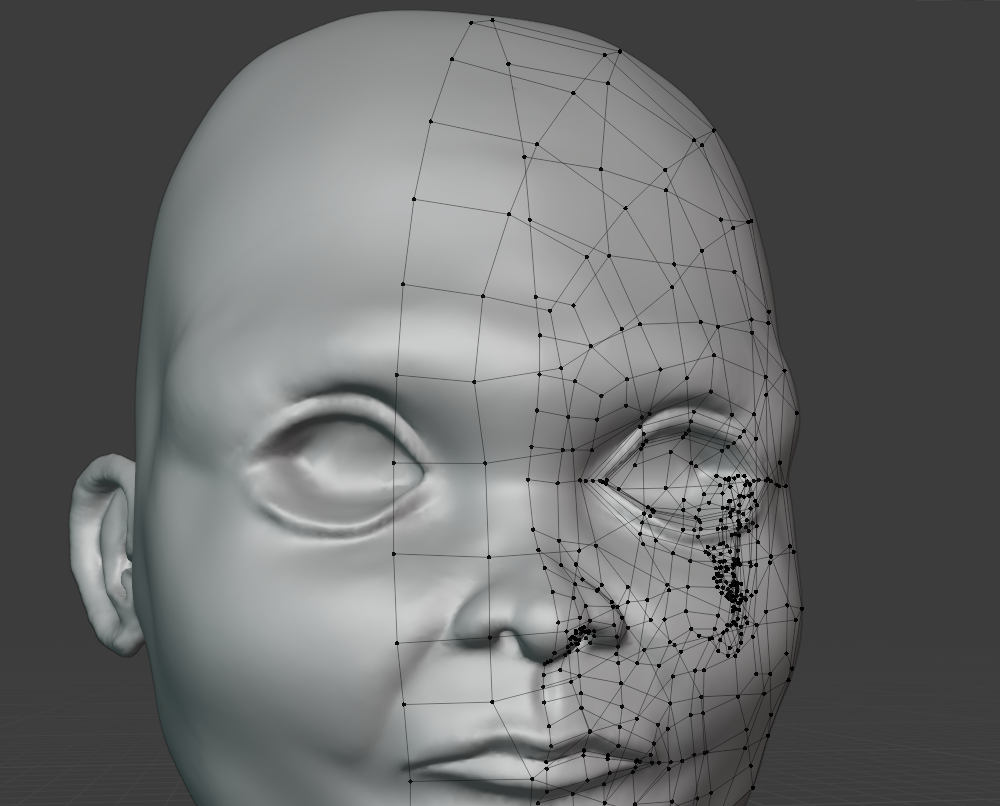
When retopologizing, in order to be able to see both the repologized mesh and the high res mesh (the sculpted one) you sometimes switch to Wire display on the retopo mesh, or maybe X-Ray on the viewport, and turn on "In Front" on that mesh. You also have the posibility to turn on Backface culling to not see the faces from behind, and have a more clear front view, but the problem is that, in edit mode, you still can see (and select) the vertices of those hidden faces, and is a mess, you are seeing the mix of front and back vertices.
So my proposal is about making an option to hide those vertices of back faces, so you can just focus on the front ones.
This idea was marked as a duplicate of A True Retopology Shader for the Modeling Viewport.
12 Comments
Not just for retopo. Backface culling should hide EVERYTHING that's back-faced, that's mandatory for performances.
This could be useful!
I 'd like to see this added in the future it would help a lot, and I wonder why back face culling works on faces, but the same effect hasn't been applied to edges and vertices? Would it be possible to say if a face is culled, then don't show it's connected vertices or edges either, or set draw opacity based on normal direction from camera? The selection options don't change, but only what angle you can see geometry from on a per object basis. I'm using the Draw Xray addon in the mean time.
For retopology, the topo mesh should have a combination of draw on top + back vertex, edge and face culling. The current show back facing vertex and wire during back face culling could be optional.
as I mentioned in another post similar to this. The only current workaround is a plugin I have found long time ago at Gumroad: gumroad.com/l/draw_xray It is free and it gets the job done. I use it every time I need to do retopology since I have found it and it works great. Use this as an alternative until the devs implement something like this in Blender. Cheers!
Bump. Any update on this? Is there a way to do this? I keep accidentally selecting backface vertices and pulling them to the wrong side of the mesh.
Hi :) Fixing this issue
blenderartists.org/t/edit-mode-retopology-hide-backface/1382294/13
To do retopo you need the tarjet solid and the new mesh semitransparent or transparent on top, this can be archived with eevee, you need to enable in the object that you are creating in viewport display in front, and make a new material and enable in the settings backface culling and alpha blend, and the alpha is controlled with the alpha of the material.
you can toggle xray on or off (small icons left from shader modes)
* @peter.boos * but you often need Xray or "in front" display because the front retopo/lowpoly mesh often gets behind the highpoly mesh. But that's xhat makes the view unusable because it also draws backface mesh. And you don't want to spend hours toggling that on and off all the time, especially when the issue leading to this is a design issue & technology breakage.
* @-L0Lock- * ok i see your point, upvoted
So really we need a way to show the wireframe of a specific mesh and have that render over the top of anything.
* @Joseph Burgan * we already have that, op means we need a way to HIDE the back facing topology of that object so that it does not interfere with the retopo process. This is currently impossible and retopo besomes stressful with plenty of mistakes that sometimes you notice a bit too late ( you basically realise that you have connected the wrong vertices and you need to go back and fix it)