
Transport bar in all animation windows
I mean, come on! Why? Why only the in time line window? I don't get it!
I'm joking of course. It would be great to have access to the transport bar in all animation windows :)
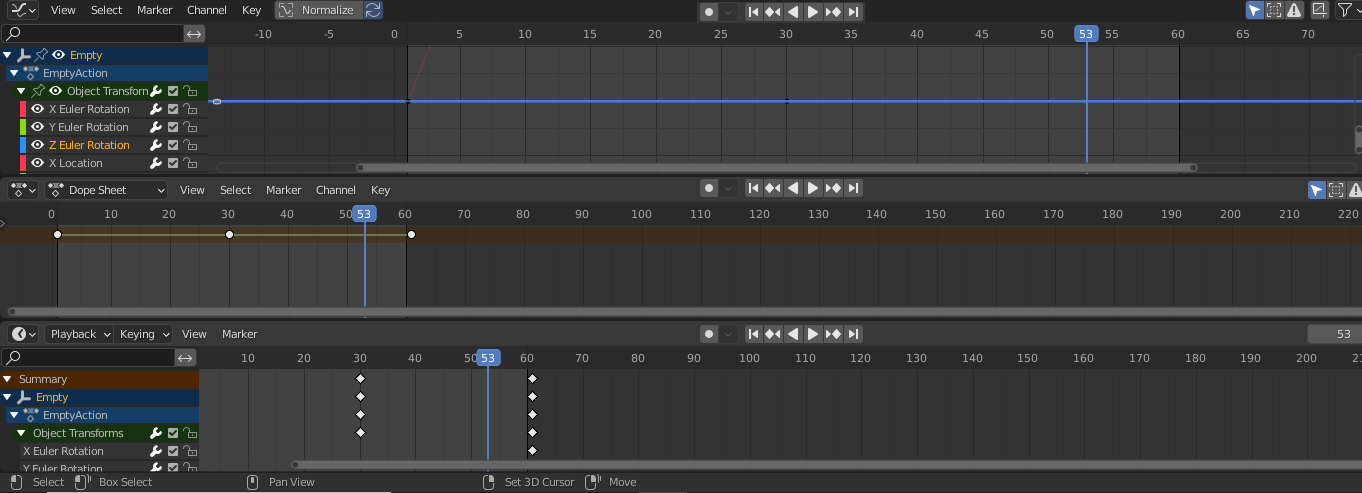
I mean, come on! Why? Why only the in time line window? I don't get it!
I'm joking of course. It would be great to have access to the transport bar in all animation windows :)
14 Comments
Check out Frame Ranger by BlenderBoi (on this page the 'Transport Bar' is called the Animation Player): blenderboi.com/frameranger/
What are you talking about ?
* @-L0Lock- * I call it transport bar, maybe its the wrong term. I talk about the bar with play/forward etc It's only show in time line currently (I may be wrong, is there an option to display it in dopesheet and graph editor?)
* @artnorab * oh right...
To be honest I prefer it this way. I have no need to have these on every possible animation-related editor, I usually have the timeline shrunk down to the top-level keyframes height to mimic my workflow with Maya, or completely down to just its header.
* @-L0Lock- * I understand. You have some habits. I guess it is a good reason to not make Blender more ergonomical.
* @artnorab * Duplicating UI is not more ergonomic, it's cluttering and messy. You already have your transport buttons in one place, you need the timeline and its header content pretty much all the time. So how having these buttons on every animation editor is more ergonomic? What does it achieve better ?
* @-L0Lock- * You should not confuse your usage habits with ergonomics. The ergonomics of the user interface implies management of accessibility and space, roughly speaking. Keeping timeline window unnecessarily open if you want to work in other animation-related window is a waste of space. If you don't understand this simple fact, unfortunately, I don't have time to teach you a course on UI ergonomics.
Moreover, it could be an option. This way users who want "Blender like Maya" would stay happy.
* @Nurb2Kea * Oh... OK, thank you for the information :)
Sure, as my comments' history proves it. Feel free to check every post I ever made on this website and see for yourself if it's mostly bullying.
Jokes aside, may I quote to the both of you what's written on the RCS homepage ?
We are all here to push Blender forward. If you also want to be part of that, then please cut off the accusations, pedantic remarks and overall hostility?
I only mentioned one of my experience as an example, because - somehow - things that goes a different way elsewhere might have a reason to be, and I think it's interesting and also unhealthy to ignore the outside world for the sake of being different. Maybe I should have not mentioned it, so let's pretend it didn't happen and let's go to the basics:
Whenever you animate, you most of the time deal with frames and keyframes right? So that means - most of the time - you need playback controls, frames controls and keyframes controls. It so happens that Blender has most of that in its Timeline editor's header; the most likely to be used all the time being the Frame Controls and Transport Controls who can be used up to several times per seconds on normal usage. Followed by the Playback and Keying popovers and the menus who are used more like a few times a day or once for every project. Other useful tool are accessible in other animation editors that have an exclusive usage for it and are hence more situational.
In Blender, this takes only a bar of 25 px height, can be vertically compressed down to 1583 px before losing stuff. And thank's to Blender's space system, you can have this editor at various sizes, pretty much anywhere and as many of it as you want.
So, we have literally the "animation essentials tool belt" with the main animation tools at one place and that can be easily pushed whenever it suits you for a cheap space usage.
So, then:
If you duplicate a bunch of buttons on every animation editor for the sake of accessibility, isn't it at the cost of space and readability?
A few things I don't get here:
How is it "unnecessarily" open? If most of the time you need almost all the timeline's header content, then it's not unnecessary by essence, right?
Isn't duplicated UI also a waste of space? If so, what's the best waste between duplicating stuff around and having it in one place that takes just a tiny amount of space?
If we apply this logic of duplicating UI whenever it is needed, then how about the playback and keying drop down menus? And the frame controls?
And how about others editors who are not animation-oriented but still affected by it like the viewport and compositor? After all, when you animate you might need only the viewport and the transport buttons, so why not have just that?
Sure, you can say that for almost every proposal ever made, just make it optional. But your proposal is competing with every other one and you also need to convince Blender's developers or addons developers, right?
And, how this option would translate into Blender's UI? Would you have the option to enable this for each editor separately or you have one option somewhere that propagates the transport controls everywhere at once? Would this be in the user preferences or in the concerned editors themselves?
* @-L0Lock- * You seem to forget something important : not everyone needs to have all animation-related windows open at once. A lot of users do little animations that just require a few keyframe. But when they want to tweak this kind of animation in dopesheet or graph editor for instance, they have to split the windows and keep timeline open, and yes it's a waste of space and time.
Speaking of the timeline, it's not much use without its header content. So if that's too many windows for you, we can be happy with just the dopesheet, get rid of the timeline and place the timeline header content in the dopesheet header. Then this is one less transport bar to display. Nice, isn't it?
About the question of space, I have already answered to it and again, the screen shows there is plenty of it.
In terms of readability, we lose a little, but not that much, and we save time and space. Is it worth it? The math is quick to do.
"how this option would translate into Blender's UI?" Really? no comment.
Again, all of your arguments here are based on one way to use Blender. Yours. You have no idea what ergonomic is.
I wonder what is your goal in writing this kind of commentary? Do you feel committed to a mission? Do you want be the divine filter between users and developers? Votes are more than enough to show developers what suggestions are popular. There is no need to come and contradict proposals just because you are not interested in them.
If you say so
Hi, sorry to bump this old topic, I just want to say that you are not alone to feel this need of "Transport bar" (and it took me a bit to see what you was referring to)
I use a lot the shortcuts keyboard but sometimes, going back to specific frame, or just a click of mouse to go back to start is faster. I often need when I'm in the graph editor to either:
-Do ctrl+tab, use the transport bar and do ctrl+tab again to go back to graph editor (but doesn't work with dope sheet (ctrl+tab switch from dope sheet to graph editor but the transport bar is only in timeline, also i never use CTRL+F10 12 etc... keys) -Or either split the screen just to add a really thin timeline just to see the transport bar.
@Lauloque It’s pretty petty to dig this up after four years, but damn, it’s so satisfying to see I was right years ahead of time. Playback controls are now available from most animation windows, and it’s incredibly handy. Think of me next time you use them. You’re welcome ;)
Nothing wrong with coming back to tell when a proposal got implemented. Plus: you forgot to set the status as done ;)