
Visually Highlight Modified Parameters
Hello everyone,
I want to share an idea that I believe could significantly enhance the user experience in Blender. This idea is inspired by how Houdini visually highlights modified parameters, making it much easier to track changes during editing.
Functionality Description:
Visual Indicator: Each time a parameter is changed, it should be highlighted with a distinctive color or style (for example, bold).
Category Highlighting: Besides highlighting the specific value, the category to which the parameter belongs could also be highlighted. This could be through an underline, colored border, or a slightly different background.
Persistence of Changes: The highlighted changes should remain visible until the project is saved or a "reset to default values" action is performed.
Benefits:
Improved Visibility: Facilitates quick identification of modified parameters, saving time and reducing confusion. Better Edit Tracking: Helps users keep better track of modifications made, especially in complex projects.
Easier Debugging: Allows for easier detection of any changes that may be causing issues, simplifying debugging and parameter adjustment.
Visual Example:
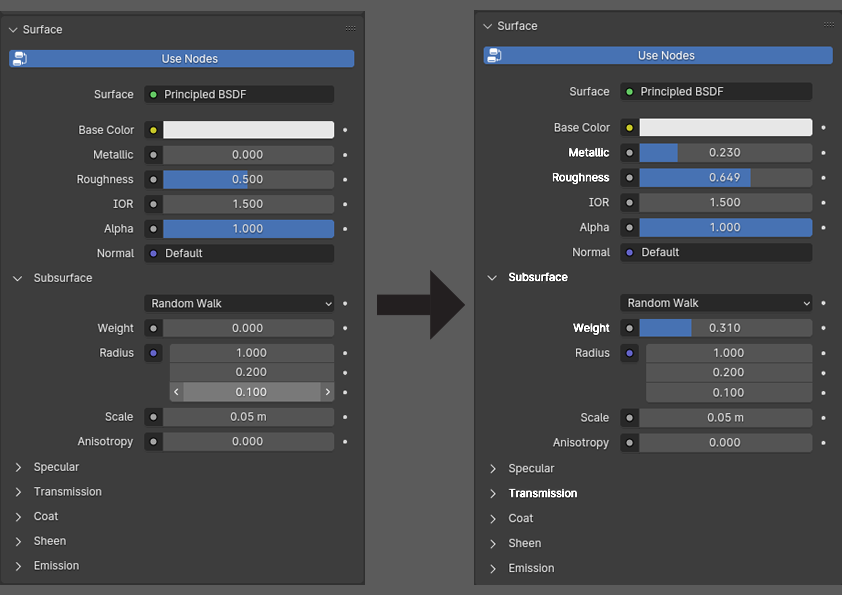
I believe this enhancement would be a great addition for all Blender users, from beginners to advanced, and could be integrated into future software versions. I’d love to hear your thoughts and if you have any additional suggestions to improve this idea.
2 Comments
Touch Designer has a button "Non default parameters only". Which hides everything that wasn't changed. I think it's really great.
Given that we don't have the option of setting default values for so many things, I'm going to disagree with this suggestion. I would be seeing random bold type all over the interface, in places that for my own personal needs are actually the default.