
Project fluid onto collision boundry (Fix for blocky fluid collisions)
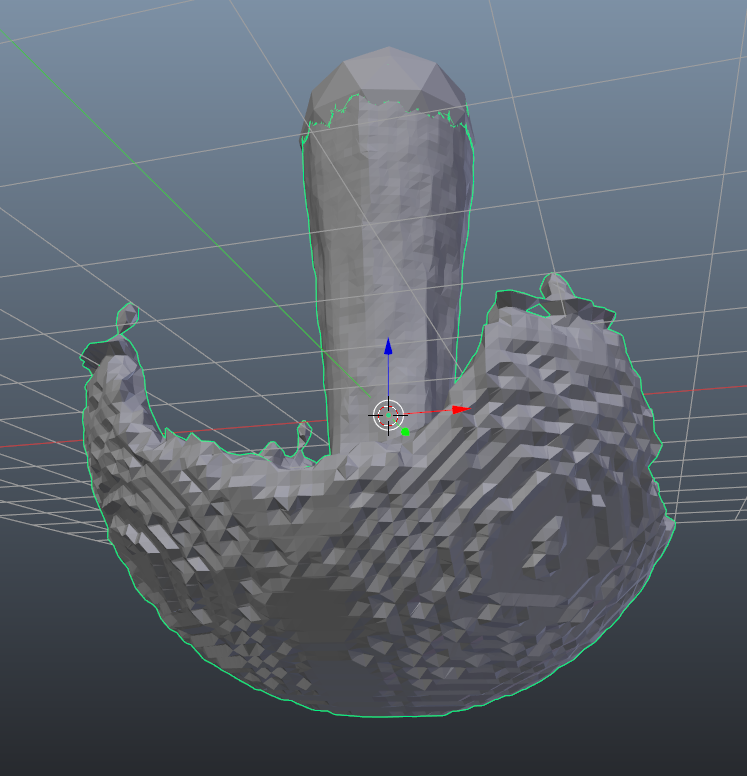
I've been doing a lot of fluid sims recently and noticed that when fluid collides with a curved surface it creates a blocky effect that is extremely ugly. I haven't messed with the Blender code myself, but I assume it's due to Blender using a Voxel / Grid based calculation in order to generate the mesh.
What I'm wondering is why we don't just project all the colliding points directly onto the mesh it's colliding with? When fluid collides with a surface it tends to align itself perfectly to that surface, so by projecting the points we would (in theory) get a perfectly smooth boundary that is also physically accurate.
8 Comments
There wont be any improvements to currend fluid simulation system. New system Mantaflow will propably will be in next version 2.81.
You can test builds with it out on graphicAll.
* @Pawel Piotrowski * I will try mantaflow and see if that works. It seemed like one of those things that's been talked about for years but never released. As someone else said I didn't know it was that close to master.
fluid-particles are bubles/voxels. That gives such grainy result. But there can be post-processing like shrinkwrap. Did you tried mantaflow builds? Is result the same?
* @ Vyacheslav * mantaflow has the same issues. Along with pretty much every fluid sim solution I've used. Even if the particles collided with the underlying geo the mesh voxelizer would most likely create the same issues.
* @Alex * That's what I mean. I messed with Mantaflow a little earlier, and while it's good, it still has a small trace of those rings. My Idea still seems like a good solution to this: During the meshing step, if the particle is in collision with geometry, project that point onto the geometry's surface.
* @Zach Hixson * It's worth considering that if you're seeing the same issue in different fluid simulators, then chances are good that the solution is not as simple as you're imagining it to be.
* @Jason van Gumster * It can work as postprocessing: shrinkwrap with limited distance, by authomaticaly created group-weights. Then relax wireframe. The result will be smoother at least. Now shrinkwrap do not have radius of search at all.
May be the problem is simulation systems just don`t make such biased things and they try to keep raw result
* @Zach Hixson * it's nice to brainstorm but I think there is a slight misunderstanding: when the data is sent into voxelizer it doesn't matter if the particles are partially inside or outside the surface. Either a point occupies that cell or it doesn't, I think there's some anti aliasing that can happen but it still doesn't solve the artifacts completely. To my knowledge even VDB doesn't offer a solution to that, it's completely unaware of the scenes geo outside of the injected voxels, and introducing blender's collision handling code back into the fluid simulation system would just be a mess (without breaking it up into nodes). The best one I can come up with to solve this issue entirely is to make it slightly outside the domain and use a boolean with the original container or do something with the compositor to fix it in post.