
PROPOSED - New subdivision techniques
Helo all.
My idea is a redesign of the current sub div and multi resolution modifiers, also delete both from blender and create a editor type with it.
Now, modifiers are based on the amount of data provided manually by user, so, between point 1 and 2 and 3, will always be a fixed amount of subdivisions defined in the modifiers, even if the distance of the point 1 to 2 is 30 times the distance between of 2 and 3, the majors problems of this method is the bad distribution of the poly count in complexes meshes, too much data in small places and to little in higher ones, and we also have the problem with the intersection loops.
So, instead of use the regular method, my propose is "get rid" of the actual and usual math method and develop a new analysis of data, new math that analyses the distance between vertices and face sizes and them decides based in the minor-to-big faces where to distribute the edge loops, a more even subdivision, them, after the new analysis, give the user the option to add a regular sub division.
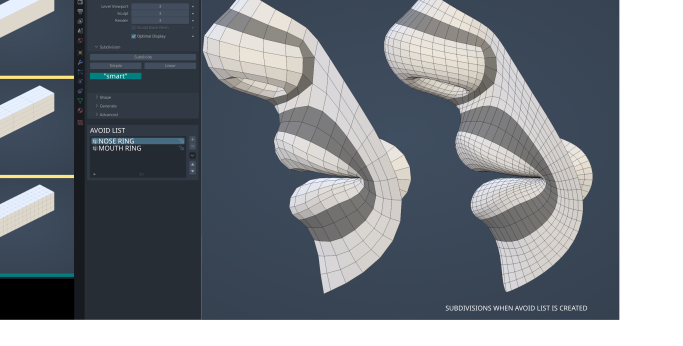
In the image bellow, it's visually more clear. On the left side, we have on 1 and 2, the regular way subdivision works, just adding division loops.
On 3, it's a better view of how the "new math" works, analyzing the size of the smaller faces and then distributing more loops on long edges.
Adding the new sub div to a "core level" like a editor type, will also make things more clear and less weird than add / remove modifiers on a list, it also prevents the problem that we have with multi res and mirror modifiers in the sculpt work space.
Creating a user manual addition of places to avoid and ignore, will give the user a more automated loop control, instead of CTRL+R in some specific places.
Two things I've forgot to add is the mirror option, for mesh and brushes, with clipping option and axis selection and another list called ignore list.
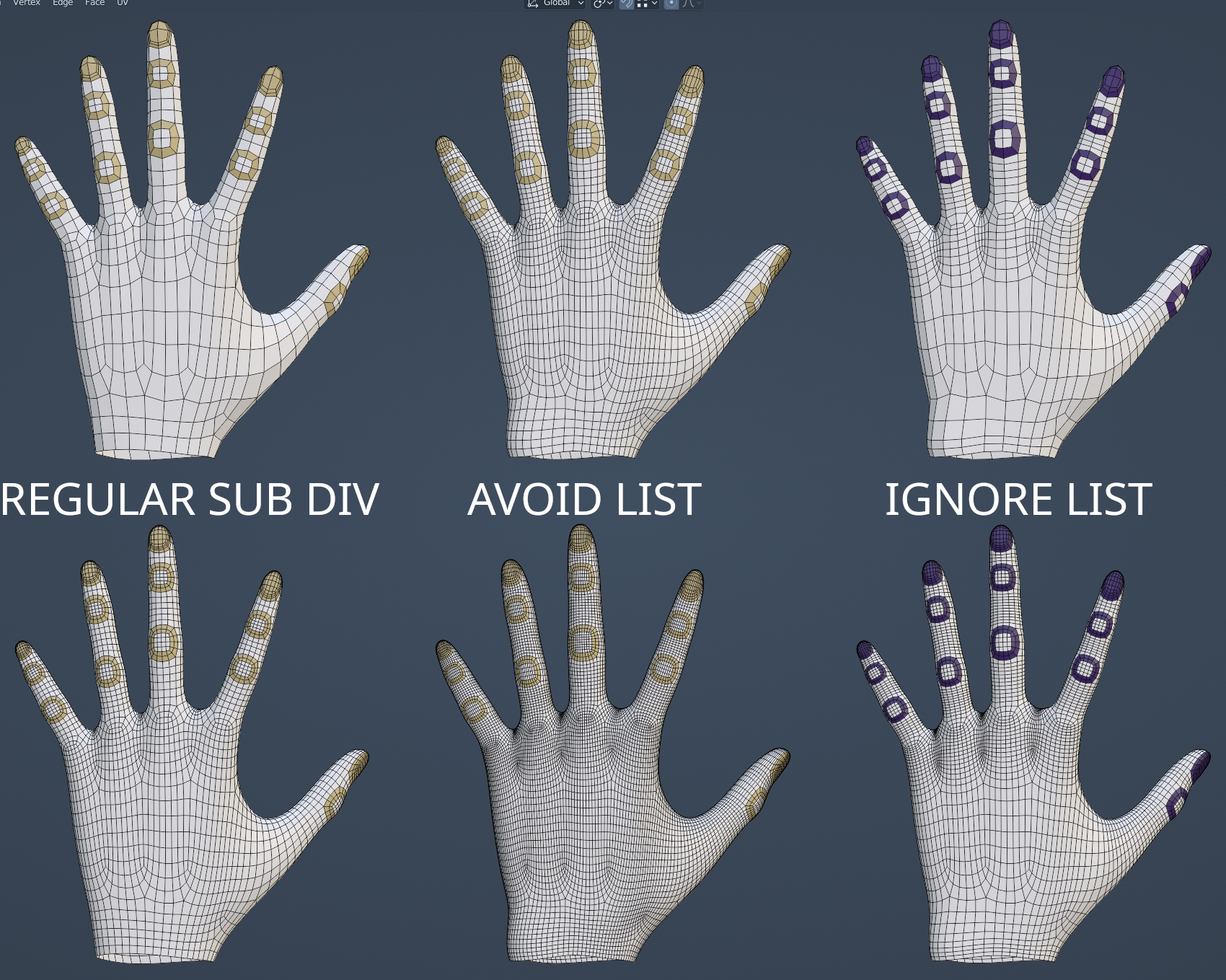
The lists are just poly groups that the math will try to avoid or completely ignore.
In the image bellow, on top left side, we have the regular mesh, in the middle where the finger joints area are marked, it will reduce the number of some rings, this will make things a little more easier to sculpt, and in the top right, we have the ignore list, where even the overlapping edge flow is ignored.
With the avoid or ignore list, a bigger number of details has been added to the flexible skin between the fingers, that can be sculpt in details.
An in the bottom of the image, we have a single sub div added to new mesh.
In the bottom mid hand we can see how much control we can have over the final poly count with more evenly spaced geometry, what can help to reduce even the rendering time in some extreme situations, considering it can "downgrade" some levels of the regular multi res and sub div, like use 3~4 instead of 6.
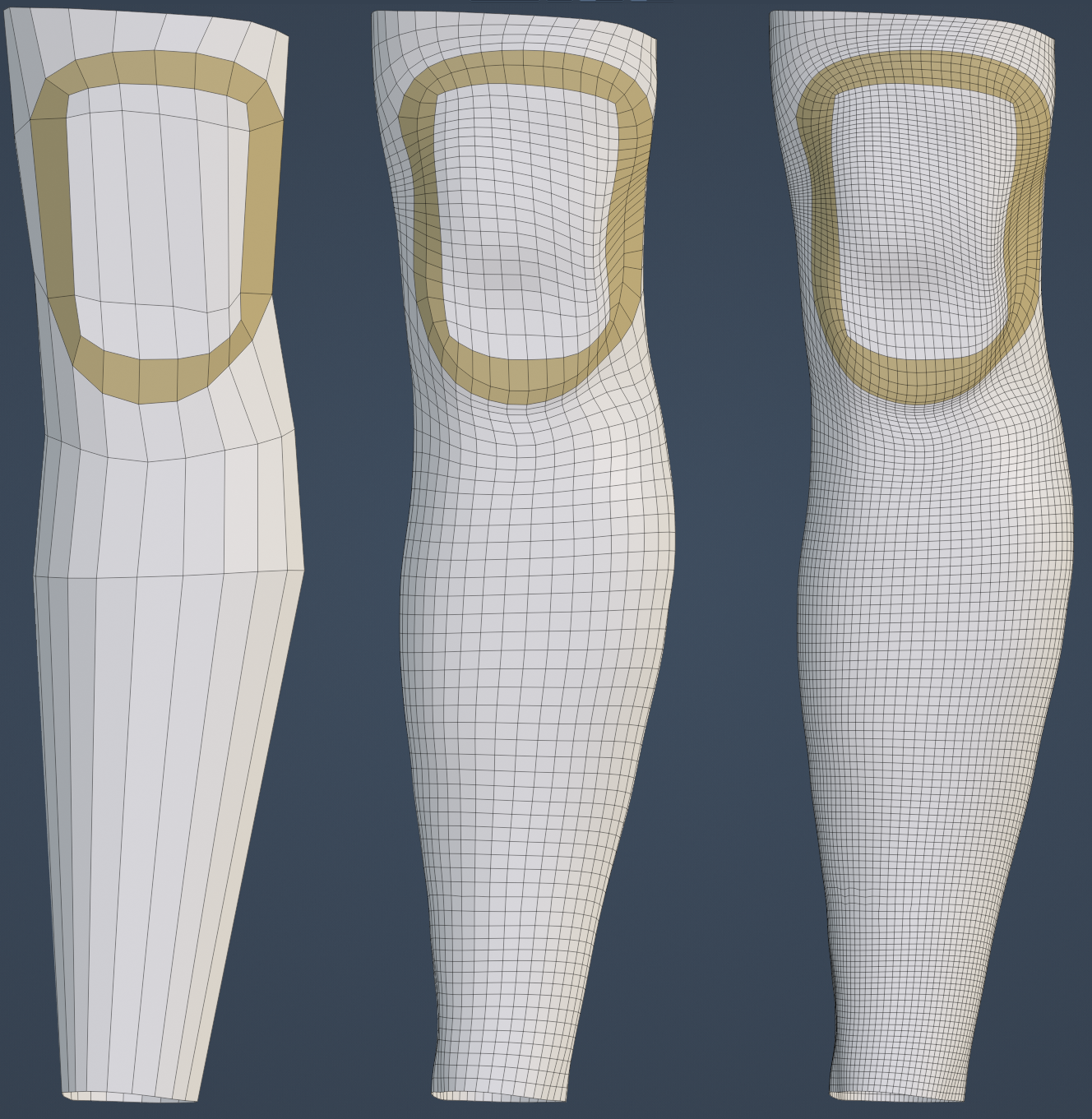
And in the final result, we have the most "notorious" usage of the the new good math, less working and worrying in the original low poly base mesh, and more easy access to high poly count for sculpting.
Backing to image one, there is some things we'll talk about it now, but have in mind that this is a rude idea, and need improving.
First need in my opinion, is set a new "editing level" with Level Viewport, Sculpt and Render, so it's will be easier to adjust, add and remove poly groups.
Mirror options for mesh and brush with check boxes for each axis, for sculpting and editing.
So, after the regular information, more precisely after the "smart" button, some options and rules need to be added.
Smart , simple, and linear, will create "layers" that describe the order of everything.
By layer, I suggest something like the "avoid list panel", like the ones created with regular modifiers with a X to close it, and to it store it's own poly group of avoid and ignore data.
I also doesn't see to many sense in enable the smart div after a regular div, so in my opinion this should be only once at the top and after some tests, maybe more times, I'm not really sure about it.
A new re projection from base to higher poly when the lower level is edited.
For now, we have some weird problems, specially with the multi res, like twisted polys, vertices in wrong x, y, z position and some weird problems with scale tools in editing mode.
So the the math needs to be ignore after some editing and them re projected to the higher level when the user leaves the editing mode. What takes one of the most incredible usages of blender, that is sculpt and edit at same time.
And for last, at this moment, a "write to disk" check box option for each level of subdivision added, it's just a backup option in case of any error. This option should just add a "mesh" object in the outline, that we can move outside for any other use.
Option in the export window to apply subdivision
Sorry for my bad English, and please be free to suggest and ask for something.
5 Comments
A little comment after some comments:
When I used the expression "get rid of", I didn't mean "delete the modifier from blender code and never use this anymore", but "get rid off the usual regular thinking / interface / math" of just subdivide 1 or 2 times like the today's modifier. That's why I've used "get rid" with quotation marks and talked about a mathematical formula in sequence.
I also talked about this feature be a first step, to equalize everything and them add the regular subdivisions.
If somehaw I've writte something suggestint it like a "radical must have change", I'm sorry. This post should sounds more like a "evolution".
People who propose a radical new method of mesh analysis usually have links to an open research paper with code examples to back it up, or their proposal is based on a technology that already exists. This proposal is pointing at a few images and saying "make math do this".
Also, this is a lot of "math" to avoid adding or deleting a few edge loops manually. If this is even possible, I'm not convinced anyone actually needs it.
This. And in any case: it does not justify getting rid of any current solution.
The idea behind this new suggestion is good. I wouldn't get rid of the current Subdivision modifier, but if the math is complicated maybe we could try a simpler solution. In the Subdivision menu, add a vertex group option where you previously select and save, and that vertex group would be ignore by the subd mod, or maybe instead of subdividing X times, it subdivides X/2 times.
"Radical" is a strong word, maybe my problems with English transcriptions suggest it somehow, but it wasn't the intention anyway. It should suggest a "evolution" of the usual method.
The only drastic change is swtich from a modifier from a new tab on the panel, considering the math of the modifier will be the same on both places, it's not "radical" in my opinition.
"Need" it's a not a word that I would use, but a lot of people can get benefited from this, specially sculptors. For those who use ZBrush for sculpting doesn't make any difference, but for those who use Blender, maybe does.
And about a "lot of math", we have a lot of math on voxel remesh and it works.
Even if this "new mathematical loop" takes about 30-90-120 seconds to be done, like I suggest, users / dev team can write the new suvdiv to the file and work directly in the subdvision level instead of use the math of the sculpting over the math of the subdivision.
So basicly, the modifier will create a higher poly mesh, but in a automated process, keeping the low poly. Mid-high res will receive data directly on it. So, I'm sorry, but I don't understand the relationship of math and difficulty in this particular case.
I understand your points about "technology that already exists" and "paper with code examples", but I'm just a regular user without knowledge or talent with programing, so I came here.