
Minor Quality of Life Improvements - New Image Presets
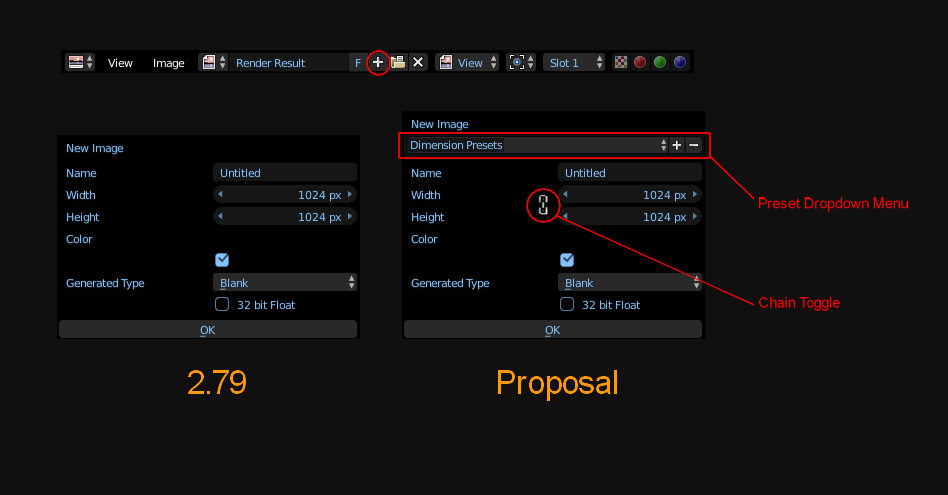
The ability to save image dimensions (E.g. 2048 x 2048) would cut down on repetitive actions & save time on not recreating the same output in future projects. Additionally a chain toggle between the width & height can also help reduce tedious user interaction inputting the same value.
5 Comments
Just as a note so folks remember this feature exists: if you want the values in stacked values (width/height, x/y/z location, etc.) to be all the same, you can <kbd>Alt</kbd>+LMB drag across the values to highlight them all. Then when you change one, all of them get the same value. This works great in a lot of cases, but it might be nice to extend that so there's an option to maintain aspect ratio rather than lock the values together.
Exactly. This works really well when you need the same values.
But that function is kind of hidden: nothing indicates it clearly in Blender, nothing to learn about it except reading somewhere in the doc or seeing someone doing it.
And when you only want the same ratio with different values, there's nothing nowadays. A simple "link values", eventually with a link icon like we see in a lot of image/video editing & 3D software. That would be nice and intuitive.
hmmmm
I will add one more to wish list: do not replace selection, when you type operators like / -+, so that you can click value and immediately / -+ to modify value
Totally agree. This would also be a welcome addition to the render output resolution controls.
For the width/height linking feature, what if there were an aspect ratio field that appeared below the width and height when the chain was turned on? That way, you could easily choose any (for example) 16:9, 2.40, 4:3, etc. resolution by entering only the width.
Of course, it still retains the behavior you want (same width and height); you could just enter 1.0 for the aspect. The aspect ratio could also benefit from the dropdown idea, as it could have several common ratios in the list, including 1:1, and a "custom" option to input your own, just like the frame rate dropdown.