
Left handed keymap setting
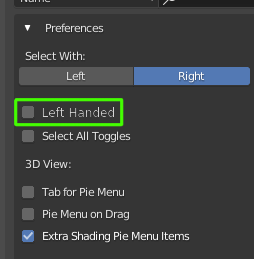
I love the right click on Blender and I've used it ever since but recently I started using my mouse as left handed (right click OS wide) so left and right are inverted but.... then Blender occurred! and I thought : "no problem, I'll just switch to left select!" just one problem... The behavior was different! So I'm proposing a an option like: "left handed" on the keymap preferences settings!
Not just for me but for all those people we never thought be left handed but using right click or the opposite!
5 Comments
I am slightly confused with the left handed situation. I am left handed but what keymap makes it difficult for you?
* @johnpdelacruz26 * , okay, maybe it's because I have a right handed mouse... I can actually swap the right and left buttons and use it with my left hand as if I am with the right one.. Does maybe a left handed mouse behaves differently? The problematic part for me is using the right handed mouse swapped on Blender because well, the right click becomes left and if I select the left on the settings to solve the problem, I get the different behavior of driven by this change..
So my request would maybe be more like: an option to make the left click to behave like the right one. i.e. left click select like the right click select instead of the menù. Hope I expressed myself better :)
* @Francesco Gobbo * So you mean you are currebtly using a mouse with your left hand?
I am left handed but I use the mouse with my right hand. Your situatiin might be unique. Although this situation is slightly isolated, it would be nice if blender or a developer would consider this and at least give you a script for this.
There are a lot of papercuts that are unique for everyone it would be nice atleast once a month if blender would offer an optional script/addon/patch that any user can just download if they have issues using blender.
* @johnpdelacruz28 * I use both depending on the situation.. but mainly right handed mouse with right hand but with left and right swapped : )
and yeah, that thing would be cool.. It would add specific but interesting stuff to the program ^^
or maybe the "select with" could be replaced by "mouse keymap" with options:
and when selected blender: