
Have Denoiser (Open Image & OptiX) NOT denoising transparent background
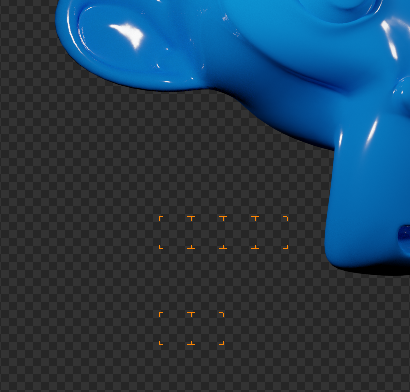
When Film with Transparent is enabled, it would be amazing for shortening render times if the denoiser could skip render parts that are fully transparent, and just denoise where there are objects, taking into account also objects with alpha and/or shadow catcher.

10 Comments
BTW, It should denoise shadow on a shadow catcher.
* @yasharjk * i was thinking same, any transparent object in scene need denoiser too.
This is done in Cycles X, I think.. Download blender 3.0 alpha + Cycles X and check it.
Use the denoise node in the compositor instead. It is much faster because it denoises the final image and not each tile.
If Monkey have alpha set smaller than 1.0 in his material, should be denoiser work on it? This request not make too sense to me p.s. your image show render tile not denoiser tile pass
* @NiCapp * It's not a material with alpha, it's a scene with Film set to transparent, and yes those tiles are precisely from the denoising, didn't know a better way too show it but trust me it is.
* @slowk1d * ok, add alpha to your monkey, with your proposal denoiser will be disabled? Blender 2.90 already have
Adaptive Samplingto fast render solid background, alpha background is irrelevant.{attachment Screenshot_20201118_151912png} Upper part of image is same as yours with shadow visible, as you can see shadow is transparent, this should benotdenoised? Why?p.s. image is composed in bottom part of image to show transparent shadow
* @NiCapp * Sorry if I sounded harsh, not my intention, and I get what you mean. My request is specifically meant for film set to transparent: I absolutely don't want objects with alpha not getting denoised, what I'd like is that parts with just the FULLY transparent background are not denoised. In your example, a tile that has even partially the shadow inside would be denoised, but every other part of the background that hasn't an object, with alpha or not, and it's transparent, would just skip the denoise. Adaptive sampling is indeed great, but denoiser just denoises everything with the same amount of time. Hope it makes sense :).
* @slowk1d * how Blender can know what part of image is background before render it? denoise over flat color is skipped and virtually is instantaneous
* @NiCapp * I recently rendered a car model that was used as an overlay (in compositor) on a video. The video was 4k. This means I rendered the car in 4k also, but the car, being small, only took about 2% of the frames space, the rest was covered by transparent alpha. Having it rendered without denoising took 20 seconds, while having it rendered + Optix denoising took about 3 minutes, most time taken by denoising "empty" transparent tiles. So, denoising for tranparent tiles is far from instantaneous, its slooow. Of course, there is first a render step and then a denoising step. If Blender keeps track in the rendering step if all pixels are fully transparent, there is really no need to progress to the denoising of this data? It could just skip the denoising step for these tiles all together. It really seems to be a serious oversight the way things work now, especially as scene compositing is done so often that frames with big alpha areas pop up all over the place.