
macOS Title bar proposal


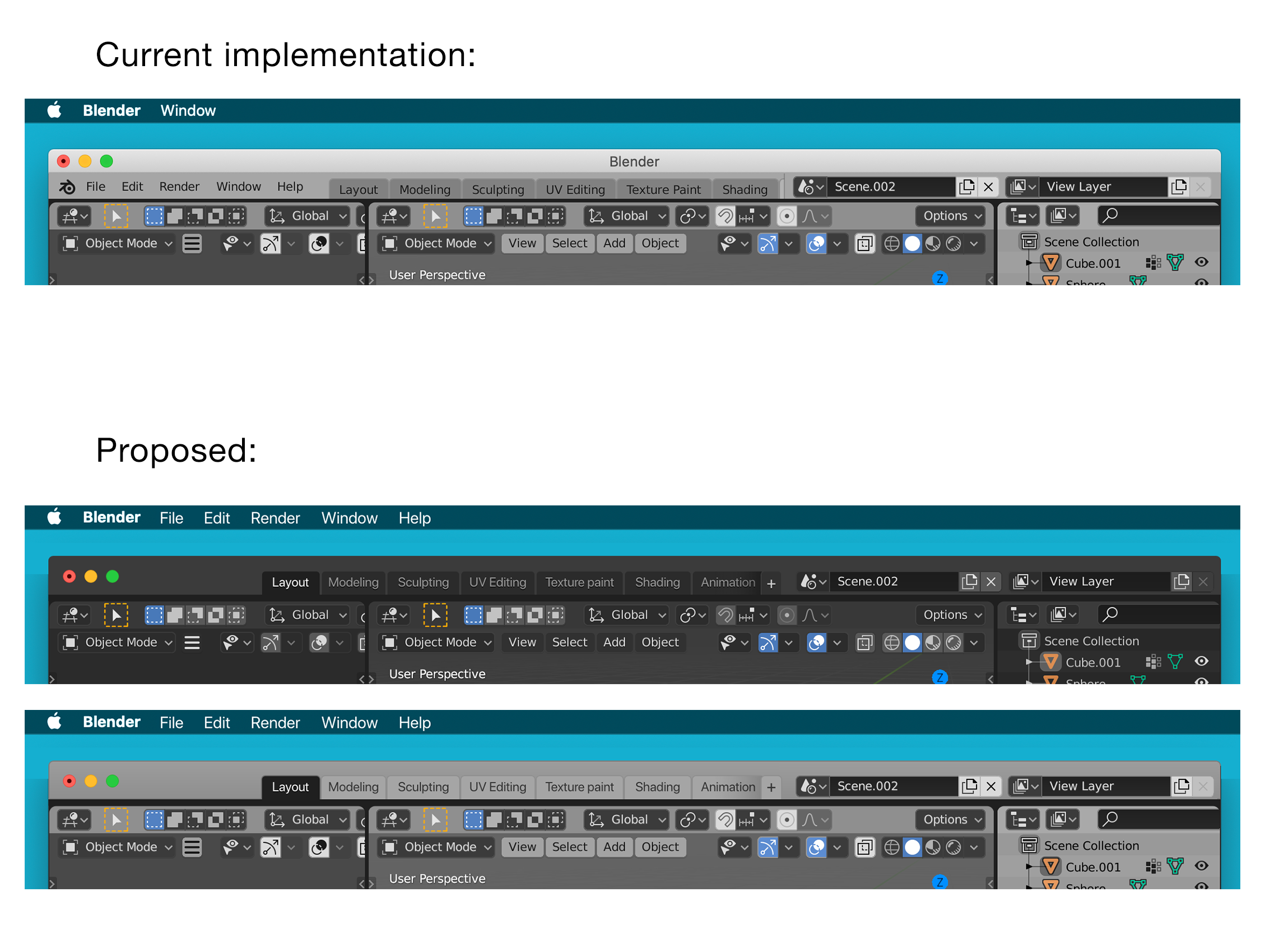
Proposal
- Implement the menu items (File, Edit, Render, Window and Help) in the macOS menu bar to free up space
- Integrate the workspace tabs, scene selector and view layer selector into the title bar.
- Keep enough draggable space (on the left of the workspace tabs and above the workspace tabs, scene selector and view layer selector)
- Have the add workspace button always visible, with a gradient to communicate scrollability
- Make the active workspace tab the colour of the space in between windows to communicate hierarchy.
Why?
- Menus in the menu bar instead of the title bar in macOS are used by every macOS program such as Photoshop and are expected from macOS users.
- Reduction in vertical height
- More workspace tabs on smaller screens
Considerations
- The scene selector and view layer selector could be redesigned to take up less space or adaptively resize when the window becomes smaller. That way the workspace tabs get priority and draggable space could be increased. (This would have implications for other “asset link browsers” however)
- Contrast between the main interface and the title bar
- Feasibility. How much effort does platform specific integration of the title bar take?
- When the window is out of focus, the title bar should reflect this (e.g. become lighter and greyed out) How can this be implemented with taking themes into account?
- Windows and Linux implementation.
8 Comments
Yes yes yes!! Great idea. Also mentionned here: devtalk.blender.org/t/merging-window-title-bar-with-top-bar/7162/28
Btw, what is the dark theme you're using in the first "Proposed" screenshot?
I thoroughly enjoy how adobe apps are the same no matter what OS I'm in. I constantly bounce back and forth between windows and osx and I enjoy Blender being identical in both. I don't care if they add this proposal but it needs to be an option I can turn off.
* @thinsoldier * What do you mean exactly with your comment about adobe software? They do implement the macOS menu bar
* @arjo.nagelhout * There are other things besides that. For instance all old-school mac users turn off the "app background" window in photoshop but I have the option to turn it on in osx to make it the same as in windows. I don't disagree with your proposal, I just want it to be an option and not a new default.
* @thinsoldier * I added an objection / counter argument to my own proposal as well: devtalk.blender.org/t/ui-proposal-discussion-macos-specific-title-bar/
Adding the option would be an option indeed :) Do you maybe know earlier discussions in this area of the Blender UI? Making it platform independent or fit certain design standards?
However, when full-screen the title bar is hidden. Making Blender a fullscreen, compared to illustrator which still shows the top Mac bar even when full-screen.
Personally prefere being free of the grey top bar.
{attachment Screen_Shot_2020-06-15_at_111253_PMpng}{attachment Screen_Shot_2020-06-15_at_111109_PMpng}
* @hemdrup * One gripe with many Adobe programs on macOS is that they actually can't become fullscreen. The green circle shows a plus instead of the fullscreen icon - it just expands the window to the entire desktop area.
The menu bar isn't shown indeed if proper fullscreen is implemented, which is the case with Blender. Because the menu items (File, Edit etc) aren't used commonly it is perfectly fine to have it auto hide in full screen.
This is the common behaviour of the menu bar auto hiding in fullscreen in macOS.
* @arjo.nagelhout *
You speak the truth :D Ah. yes, It's hidden until you hover all the way to the top in Safari.
Safari {attachment Screen_Shot_2020-06-16_at_83716_AMpng}{attachment Screen_Shot_2020-06-16_at_83710_AMpng}