
Open Menu & Search Function After Dragging a Noodle and Releasing
This is pretty self-explanatory with the image provided and it can speed things up a lot. If you just drag, release and type what you want then enter. If you have used Unreal you know what it is.
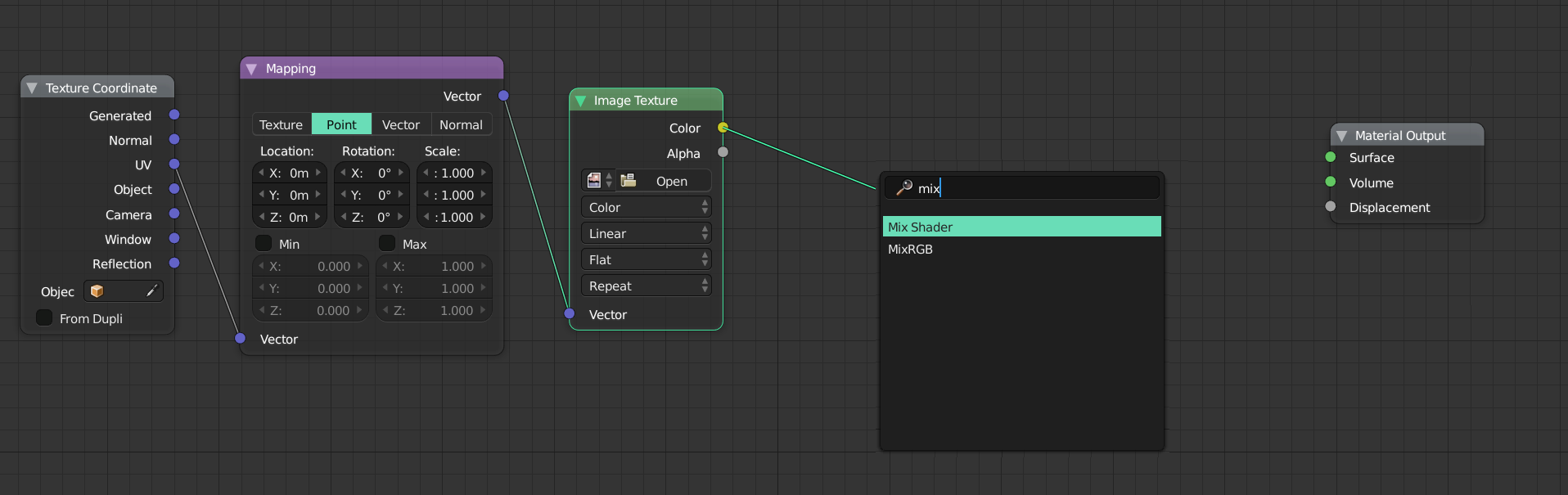
49 Comments
I think we need combine Search with Add Menu. It more advanced. Maybe something like this?
<img src=' s33.postimg.cc/i3z8i6ulb/nodesadd.jpg' border='0' alt='nodesadd'/></a>
<img src=' s33.postimg.cc/uvdeogjq7/Nodes.gif' border='0' alt='Nodes'/></a>
@Axel Mening: That is exactly the proposed idea. My pictures just show when typing as it filters by name. I never meant to say not to have the original menu. It just goes straight to the search function so you can immediately type. So yeah we agree on this.
* @Axel Mening * no you because you lost the "shift a + h + p" for a principled shader this way, for example
Love it in UE 4 :) Vote up !!!
@forestgumpovu4: That's it. ;)
I'm working into this. It's almost done.
* @J. Fran Matheu * Can't wait.
This was also mentioned earlier in these areas to add "on search" similar to Unreal Engine 4's nodal workflow.
@ondraise15: Not entirely sure someone else suggested something similar 2 years ago, I think it was different. Are you sure someone mentioned this exact idea?
@luisburdallo: Yes, in these suggestions forums not a few weeks ago.
yes, and also backwards, eg. when dragging inputs (left-side of nodes). Another thing: instead of an empty list and search, i think it would be better to have a list of all nodes that accept the connection, and we can narrow it down typing the letters, as we do for material list for example
@: That's a good point tho. That would also kill two birds with one stone and teach people how things compute internally.
***@
Exactly my ideaq. it's specially more useful in big noeded areas like animation nodes
For this to work it would also be necessary to implement that: when alt + click or ctrl + click on the inputs/outputs of a node these are disconnected.
@zebus3d: Yes that would be wise indeed.
JF Matheu has started working on this suggestion. twitter.com/jfranmatheu/status/1282256728550236160
Marking this as finally done ! 🎉
Already in master 3.1 Alpha.
As an option yes. I always hated it in Unreal
Is it realy in development ?? never seen it mentioned
I can't wait for this function.
People refer me to this post, so I am referring back to my proposal :
please let us choose between search or the classic shift a menu
@dodododorian: We already talked about that. It should bring up the menu with a search box so if you immediately type it will filter your menu options if not you can simply use the menu as you would normally do with Shift-A.
@luisburdallo: no because you can search inside the shift a menu the "smart way" , for example "shift A NC" = colorramp "Shift A HP" is the principled shader "Shift A CI is invert node" ""Shift A HD" is the diffuse shader "Shift A VB" is the bump map shader "Shift A HE" is the emission shader
if you want to search just hit space, or click ? and then write what you want , otherwise all the people doing the "shift A +two letters" workflow will not work anymore
@dodododorian: We are trying to make it simple for new users and more intuitive. For that, you have to memorize all initials and node letters. We have enough shortcuts already and going in that direction is not going to help bringing more users to Blender. Nobody says to remove that option because for some people it would be a must-have. It's about flexibility and simplicity. I would be happy by simply being able to type a name without having to click on search first but I think this method that Unreal uses make it very intuitive. Another good point would be for instance if you drag a noodle out of an actual connection and hovering over a noodle it could place the new node in between both connected nodes. I could think of another option by holding shift and connecting two nodes will bring the menu up and once you choose it will place that selected node in between.
@luisburdallo: How about menu pops up when you drop the node, and search opens on any key-press that follows (Except [ESC])
So you can drag-drop and select or drag-drop-type just as fast as you need.
(Edit: Or in other words - Exactly what you said above.. D'Oh!)
@luisburdallo: im not against it i just say that before hitting the search , baybe a clicl or a spacebar is needed , otherwise it break the workflow of a lot of people .
@dodododorian: I don't know if I have changed my shortcuts but space for me doesn't open the node's menu. Does it for you? I am also against breaking any current workflow for now. I think we should always add a better more intuitive solution if we can and let users adapt and decide how they want to work. We are always gonna have to adapt in the future to something we cannot just maintain our current workflow 100% forever.
@ammusionist: :D At least we agree.
Pretty cool ideal, upvote.
Dropping the node where ever you had the mouse before opening the search menu would make the most sense as you drag the noodle up to where you want the node to be dropped, basically. If that could be problematic then making use of the enter key twice, would just drop it where the noodle was at while not interfering with the current system.
Oh yes, something I wanted for a very long time now!!
can we have the normal add shader instead of the searching menu ?
@a5435324: You would just need to type "add". It needs to allow you to search for any node.
Hope it gets the attention from the devs ;).
I already made this suggestion : blender.community/c/rightclickselect/GFbbbc/
@sidartalei: You forgot to add the proper category and that is probably the reason I couldn't find it. Anyway, the important point is to get this done if possible.
Yes, wasn't trying to downplay your post. But I'm not too familiar with what goes where.
@sidartalei: I understand. Having the general category active for every single post seems confusing to me. I think someone even posted a proposal to turn that General category off so things get more organized.
Perhaps not by default, but with Shift-Drag noodle? Also - Love the idea of a menu with nodes that take the noodle type as input!
@ammusionist: Why would you want to be able to drag a noodle out of an input and do nothing when releasing the mouse button on an empty space?
@luisburdallo: Good question.
I was thinking about additional confusion for beginner users. Accidentally dragging out a connection, then being faced with a menu when they didn't connect it to anything.
@ammusionist: I guess that is something they will have to learn. New users just need to learn that if a menu appears is because you released the mouse without connecting it onto another node. Not much room for confusion there. Is just black or white. Menu popup or Connection.
@luisburdallo: Yeah - This idea is growing on me. I'd still like to see the option to turn it off in User Prefs though.. But on by default!
This would be great to have in Blender!
Great!
Brilliant