
Missing Modelling Tools
Hi, Coming from LightWave, three tools I really miss are Bend, Twist and Taper. You can use modifiers but this is an accurate however slow and cumbersome way to work, especially ifyou want to model characters and organic stuff where its way more about feel.
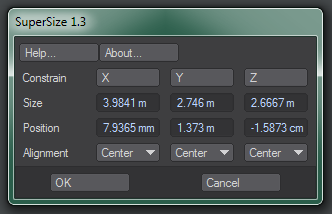
Secondly, Numeric Input is a feature all packages (except LightWave!) have but I had a plugin for LW that was from the 90s and defunkt but super useful. It had numeric input for position and scale and worked on all data types. It made accurate modelling of real world objects a breeze and if you imported a character and it was 15m high and you needed it 1.77m, just type that into the Y scale (Z in Blender), press the Y button and all other axes scaled to match.
As a former programmer, copying this functionality would be 10mins work! The plugin was Japanese, no longer supported and even the website was derelict 15 years ago, now gone. But I still use LW for accurate modelling with this 32bit plugin as Blender has no way of accurate modelling hard bodies. So many things from cars to guitars just don't look right unless they are accurate.
Thanks for some help!
3 Comments
In object mode if you open the N side panel you can see size/dimension info where you can enter a specific height and it adjusts the scale.
Can you cite some specific models or forms you want to achieve?
15/1.77 = 8.475
if original scale is 1: 1/8.457 = 0.118
Why adding a tool for such basic maths ?