
Global gravity
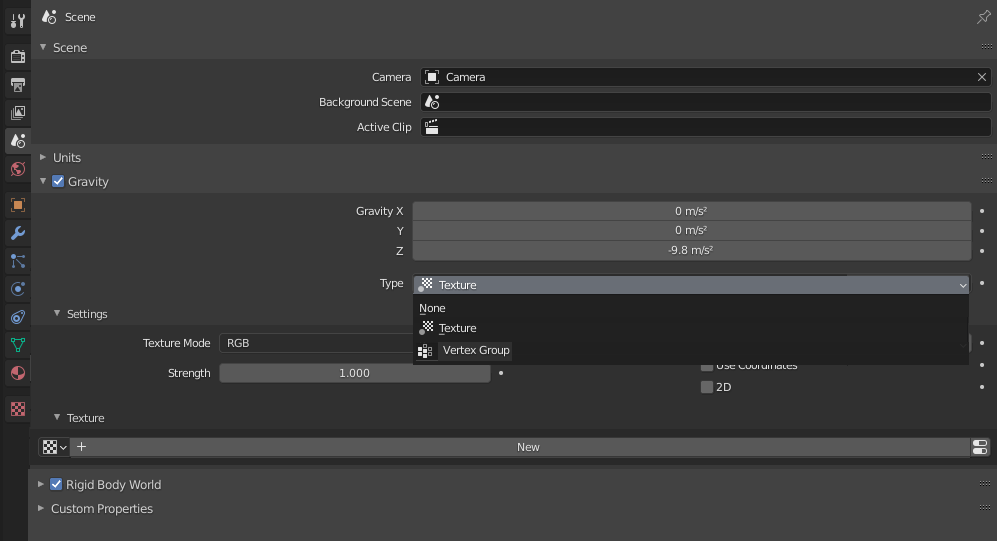
Global gravity controling by plane with texture(Black-White RGB), plane painting with weight Paint(vertex Paint) or voxel texture. Maybe another way also.
For example,we can simulate various gravitational anomalies like TYTAN Thanos home planet(Avengers) in game engine or Blender inself.
See: blenderartists.org/t/physics-simulation-with-variable-gravity-field/1277061 See: physics.stackexchange.com/questions/606178/equations-of-motion-for-a-uniform-disc-in-variable-gravity-field
3 Comments
Physics textures would be very cool. There are so many different physics settings where textures would be useful.
Good Idea - probably this will be possible to do with Everything Nodes in the future anyway. But please. Explain it a bit better and more detailed.
Now in Blender there is no way to control Global Gravity with texture, vertex,or another way. Maybe there is some other way to control global gravity, I don't have a better idea.
We can use a Texture force field to create an arbitrarily complicated force field, which force in the three directions is color coded. Red is coding for the X axis, green for the Y axis and blue for the Z axis (like the color of the coordinate axes in the 3D View). A value of 0.0 means no force, a value 1.0 means max force. We don't need falloff option,because at an altitude of 0 meters or a few kilometers, the difference is minimal and then it can be assumed to be 9.8m / s ^ 2.This texture causes of effect on Global Gravity.
Or:
Vertex groups you can assign different weight values (in the range 0 to 1) to the vertices within a vertex group. We don't need falloff option.This vertex causes of effect on Global Gravity.