
Auto-framing channels in the Graph editor.
An option to autoframe whenever a channel is selected, it's so tedious to keep hitting the home button to frame on a single channel or all of them.

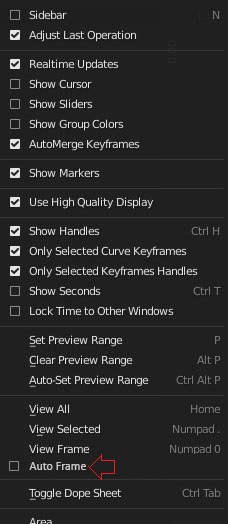
An option to autoframe whenever a channel is selected, it's so tedious to keep hitting the home button to frame on a single channel or all of them.
11 Comments
I wrote an add-on that this this in 2.7x. I suppose I should blow the dust off it and port it to 2.8x.
* @Jason van Gumster * yeah man, do you remember at somepoint they even showed of a patch that would do this and then for some reason they scraped it?
* @Luciano A. Muñoz Sessarego * I do remember that. Was that in a report/task on developer.blender.org? I can't recall.
* @Jason van Gumster * yeah but then they suddenly killed it i dont know why, we should try to search it and bring it back
* @Jason van Gumster * after a quick search: developer.blender.org/D1128
* @Luciano A. Muñoz Sessarego * Reading through it, it looks like there was some dissatisfaction with the way the interface worked.
* @Jason van Gumster * yeah i think it should only auto frame in the Y axis, not the x one, to me when i tried it worked pretty well for the most part. I think we should give it an other go :), plus if you can turn it off is good too !
Care to post a link to the add-on code (github?) where perhaps volunteers could help?
This should also include fcurve modifiers that might have a function that is restricted outside of the keyed frames for the fcurve.
A workaround is selecting all keys on curve by CTRL+ALT click and use view selected shortcut which is "Numpad ." . This is better than manual framing but an specific operator and auto framing option will be nice.
This should also include fcurve modifiers that might have a function that is restricted outside of the keyed frames for the fcurve.