
Copy and Paste in Image Editor
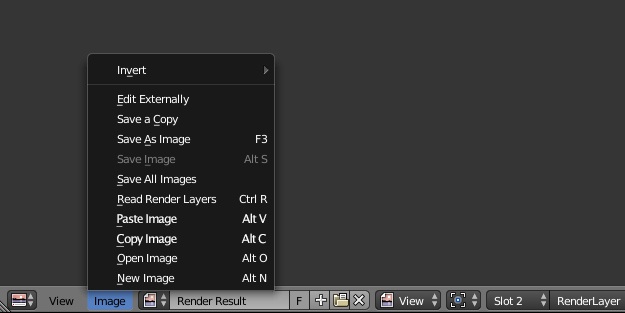
Just as plain as the title: ability to copy and paste pictures into the image editor. When copying a new image should be created on the fly with the needed resolution and bit depth.
This would make it easier and faster to work with reference images that now have to be first saved on disk, and then loaded into the editor. Often references images are needed only once to make a single operation (like color sampling for example). So, having the chance to paste a screenshot into the editor would be useful, plus it would prevent saving links to unneeded files.
5 Comments
it's not only a matter of color sampling. one time operations can be various: framing reference, size/proportion reference etc... Also you might want to copy an image from the browser, paste and save into the blend. faster than saving onto the disk color sampling outside blender window would be welcome anyway ;)
Done in v3.6 LTS for windows:
youtu.be/0-LiGWgKRgk
Reference/Release Notes/3.6/User Interface - Blender Developer Wiki
You can use Styriam Clipboard Paster to paste images into Blender (as a plane, reference, image node or image in image editor) blendermarket.com/products/clipboard-paster styriam.eu/products.html
oh man I this needs to happen. past from clipboard is my primary workflow.
If it's a one time operation (like color sampling), wouldn't it make more sense to suggest that color picking work outside of the general Blender interface rather than this solution?