
Sweep modifier prebuilt shapes
So in most of 3d modeling tools you can find a sweep tool to extrude a profile along a curve. Blender has it too with the Bevel option, but I would like to suggest prebuilt shapes (Circle, square, L, I, U shapes).
Why am I suggesting this? Most of the times we use this for simple shapes, making pipes or profiles to decorate the scene and most of the times those elements are on the background. Having a pre-built shape will save a lot of modelling time and will make things easier.
How could it be done? How do they do that in other softwares? Right now the bevel option creates half a circle unless you select another shape, and while that usefull it is not as good as it could be.
For example 3ds Max has pre-built shapes to make profiles withour the need to make a new shape (you also have this option) it also includes parameter to define the relative position of that shape to the curve.
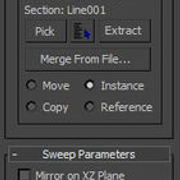
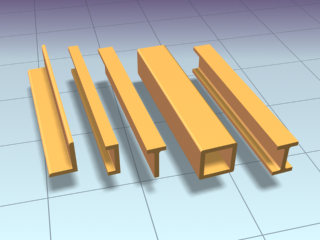
8 Comments
I very often need a simple Extrude modifier. That woul bring me to another level for parametric modelling (for 3d print).
Just an extrusion Amount, Vertex Groups maybe. Extrude along Curve as goodie.
Hi Torrecilla, I made some thing like what you want in add-on I am working on. youtu.be/yHeE0OvcGWE BsMax is a free add-on that simulating 3Ds max in Blender much as possible. but it`s not complete yet, still on progress.
Something like a Profile dropdown in the Bevel section of the nurbs path properties. Like the Object option but with presets... The problem is that this does the same that the Object dropdown. Maybe adding a toggle Object/Profile template above and using the same dropdown. dropdown closed: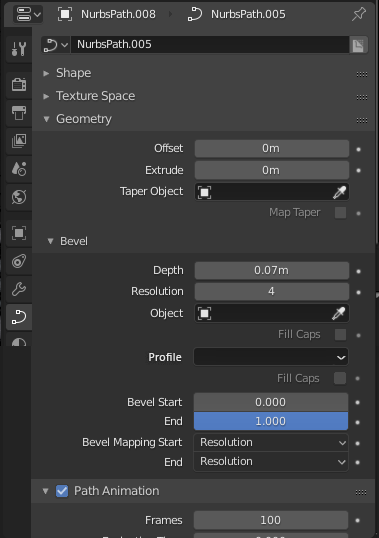 dropdown open:
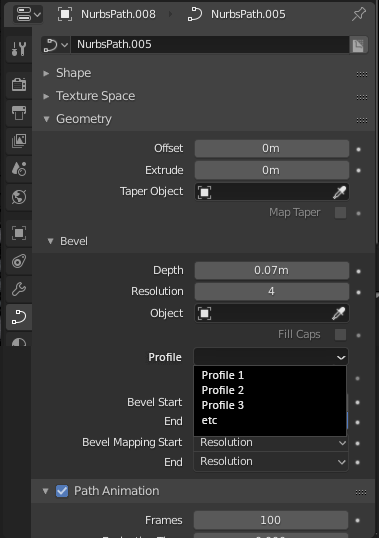
@g3ntile: That would be the idea, and to prevent having 2 dropdown menus you could have the toggle Object/Profile you mention. Now thinking about that dropdown, it would be even better to add/edit your own profiles to the list, like with the matcaps list, si if you are really using a specific one a lot you don't need to redraw it in every blender file.
I wouldn't mind having that I suppose, but I should point out you can actually do this with the screw modifier. Just add a screw value for how much it extrudes then change the angle to 0.
@daniellapalme: I don't think the screw modifier will do the same. I'm talking about a shape extruded along a spline, not a lineal extrude but following the 3d spline along it. I find that there are a lot of steps in order to make a simple pipe follow a curve while in other programs is just a couple of clicks. An example of what I mean: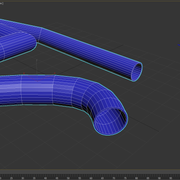
@daniellapalme:
Screw will also only do thin walls.
I was going to ask for this, so yeah, I think it would be very useful, in 3ds max I use this sweep modifier all the time. In blender you have to build the curve yourself, even if it's a simple circle... and you have an extra object on the scene to move to another layer, to hide... etc