
Improve the Simple Deform modifier
Simple Deform can't Bend objects in all directions
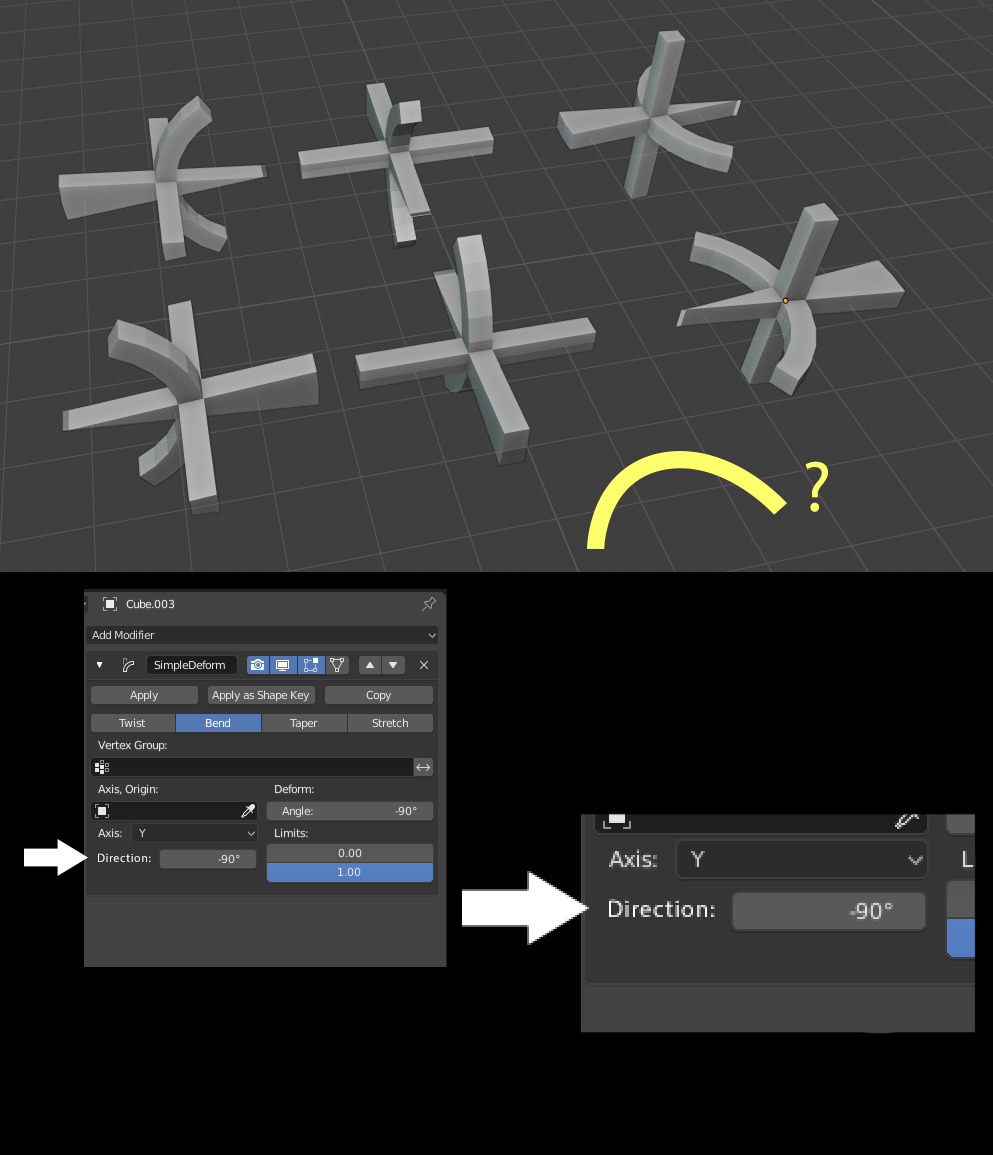
When you use the Simple Deform modifier to Bend objects, you currently define the deformation axis (X, Y or Z), and the Deformation angle (how many degrees is the object bent). These are not enough to bend the object freely in all directions!
The bending direction needs to be defined with two values: bending axis and bending direction . The amount of bending is also defined as an angle, called Deform angle in the modifier.
The bending direction would be an angle value that rotates the "origin" of bending. When the object is bending in the Z direction, the bending direction would be an angle that rotates the "origin" of the transformation in the Z axis. The same goes for X and Y.
Currently, this functionality can only be achieved by adding a new Empty or other control object, and rotating it. Having this functionality as part of the modifier itself would be quite useful, though! Making a control object, and making sure it moves with the modified object can be a bit of a hassle.
6 Comments
Yes, Widgetify that bastard!
This functionality is one of the relatively few things I've always kept missing ever since I crossed over from 3ds Max to Blender.
from my experience, only the "simple deform" addon (paid) makes this modifier behaves in an expected way. It simply shows you a rotation gizmo, and by simply rotating the gizmo on whatever axis, you get a deformation in that axis, without any funny business.
I believe that such Modifier interactivity such as the one found in "Simple Deform" and "HardOps" addons needs to be implemented in Vanilla Blender.
Oh god yes, when will this be improved? Using empties is a workaround, it's like a tacet admission that the modifier just doesn't do what it's meant to. It's not unreasonable to expect that you can create an object, apply a bend modifier and have it just bend without fuss.
it's so annoying when I need to create an empty just to have the correct deformation..
I looked into the Simple Deform modifier's source code. Here's the math the Bend modifier currently uses. This is for the X axis:
Variables cost and sint are precalculated cosine and sin function values for a given angle (theta). The math goes way over my head, but I believe this is some sort of a matrix transformation.
Code is from here: developer.blender.org/diffusion/B/browse/master/source/blender/modifiers/intern/MOD_simpledeform.c
This is basically a math problem. The implementation here follows mesh deformation tutorials where the object bends in one axis, but I couldn't find a good example of what math would be needed to make it bend in other directions. :(
EDIT: Actually, the implementation might be relatively simple after all. There's a variable transf , and when it is in use, it overrides the axis and origin options. Usually, it is only defined when an object (such as an empty) is used to define the deformation.
If the trans variable was also defined whenever the modifier is set to Bend mode, and the trans value was defined by taking the current deformation axis and rotating it by a new direction value around itself, that should work, more or less. And it'd only require a single rotation calculation.