
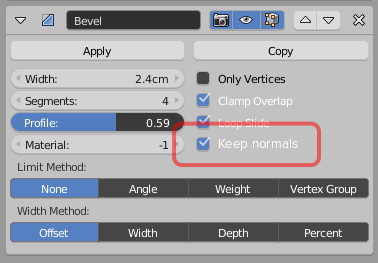
Keep normals option for bevel modifier
Add an option for bevel modifier to "keep normals" that magically turns this:

into this:

All that need is make the last line of vertexes in a level with the original face, or make custom vertex normals.
10 Comments
This is a much needed feature, and one I've wondered why it wasn't the default.
The request is to make the normals of the last beveled edge flat with the original surface. This is required to stop the flat faces from looking skewed.
postimg.cc/image/9a51lxp7f/
Here is the current behavior. Notice the first beveled vertices are not in line with the large faces. While this behaviour is 'correct' from a computer science perspective, the smooth shading of this results in the first image in the proposal. This is a useful feature and is not about limiting which edges get beveled.
@christopher: I haven't looked at the source, but my guess is that Blender probably naively batch-updates the normals of the entire mesh whenever a change is made, with no regard to what kind of operation was done. The bevel modifier/tool likely doesn't even deal with normals, and they're dreamed up later based on the resulting shape instead.
Again, just a guess, but if that's the way it is, I can understand why it didn't already have this feature.
@quargzon: I suspect that is the case, it would make sense that dealing just with the vertex data would make the problem a lot easier without having to deal with custom normals as well.
As far as I'm aware, a modifier can 'return' any sort of mesh or object data it likes, so I don't see why this proposal is impossible or even all that involved.
This video shows how it can be achieved with a duplicated mesh and two modifiers, so I'm sure it is possible to incorporate this functionality into the modifier itself. Having it togglable as proposed keeps everyone happy. It could even by off by default as it add some processing time. youtube.com/watch
I am 100% for this. I've wished for exactly this feature many times before and wondered why it isn't available.
Why bevel everything? It's commonly used in photorealistic rendering because, in the real world, there's no such thing as a perfectly sharp edge. This can be achieved with a rather generous subsurf and "sharp" edges, but for low poly modeling (which isn't just for video games, but also more efficient path tracing), this is greatly preferable.
But why would you want those interior edges beveled at all? Why not just use one of the Limit Methods in the modifier to control which edges actually get beveled? Adding an option like this feels like it encourages bad habits in topology.
@Jason van Gumster: Devil's advocate. Both masterXeon1001, and MACHINƎ, the respective creators of the popular hard surface addons HardOps and DecalMACHINE, preach about ditching "proper topology" and the results speaks for themselves, not only in quality but also in the speed of their creative process. Both of them have started incorporating custom normals into their addons. As someone who cares about "proper topology", I can't get into hard surface modelling because of how hard it is to set aside those dogmas, so maybe their philosophy is a good thing.
@Wo! 262: But it's not just about topology in this case (and I should've said that). By beveling coplanar edges, it's also adding unnecessary geometry to the mesh and generally making it more complex (and computationally expensive)... especially when you get down to texturing and rigging.
It just strikes me that there are solutions already present in the bevel modifier; such a "Keep normals" feature seems redundant. It's the same number of clicks as choosing the Angle limit method. Is there a usecase where it would make sense click Keep Normals instead of clicking Angle?
@Jason van Gumster: In that case, Keep Normals brings something different to the table. Not redundant because it solves something different. Being able to have flat shading on the surface, with smooth shading on the edges, and with the proper transition between the two, which is very common in that kind of hard surface, no subdivisions modelling, and Limit Method does not solve this since it has nothing to do with it. Naive smooth shading looks wrong on the faces you intend to be flat, regardless of if you use Limit method or not, you have to manually edit normals and face shading, or manually add geometry to the edges to control the shading and restore the flat look in the middle.
Since they added Custom Normals to blender, we are still waiting for the tools to edit those normals more easily, and for other parts to integrate with it. Adding custom normal functionality to some modifiers would go on the good path to better integration with the feature.
@Jason van Gumster: I think you might not be understanding exactly what the goal is. If you don't know about the new bevel node for Cycles materials, take a look at it.
What's being proposed here is essentially the same thing, but achieving it with physical geometry instead of procedurally. The end result uses minimal geometry, which is great since using a subsurf is overkill for a simple cosmetic "rounded edge" look.
@Jason van Gumster: Edit: When using profile 0.5 for quick and easy to reconfigure edge loops (as profile 1.0 makes smaller subsurf bevels, which might not always be desirable when there's limited space for the loops) this also happens, and there beveling these additional edges is an absolute must.