
keep shading model when use the knife and loop cut tools
for now that tools broke shading on the models
- loop cut tool
- knife tool
i can use the Weighted Normal modifier but it did not solve the problem on a whole mesh
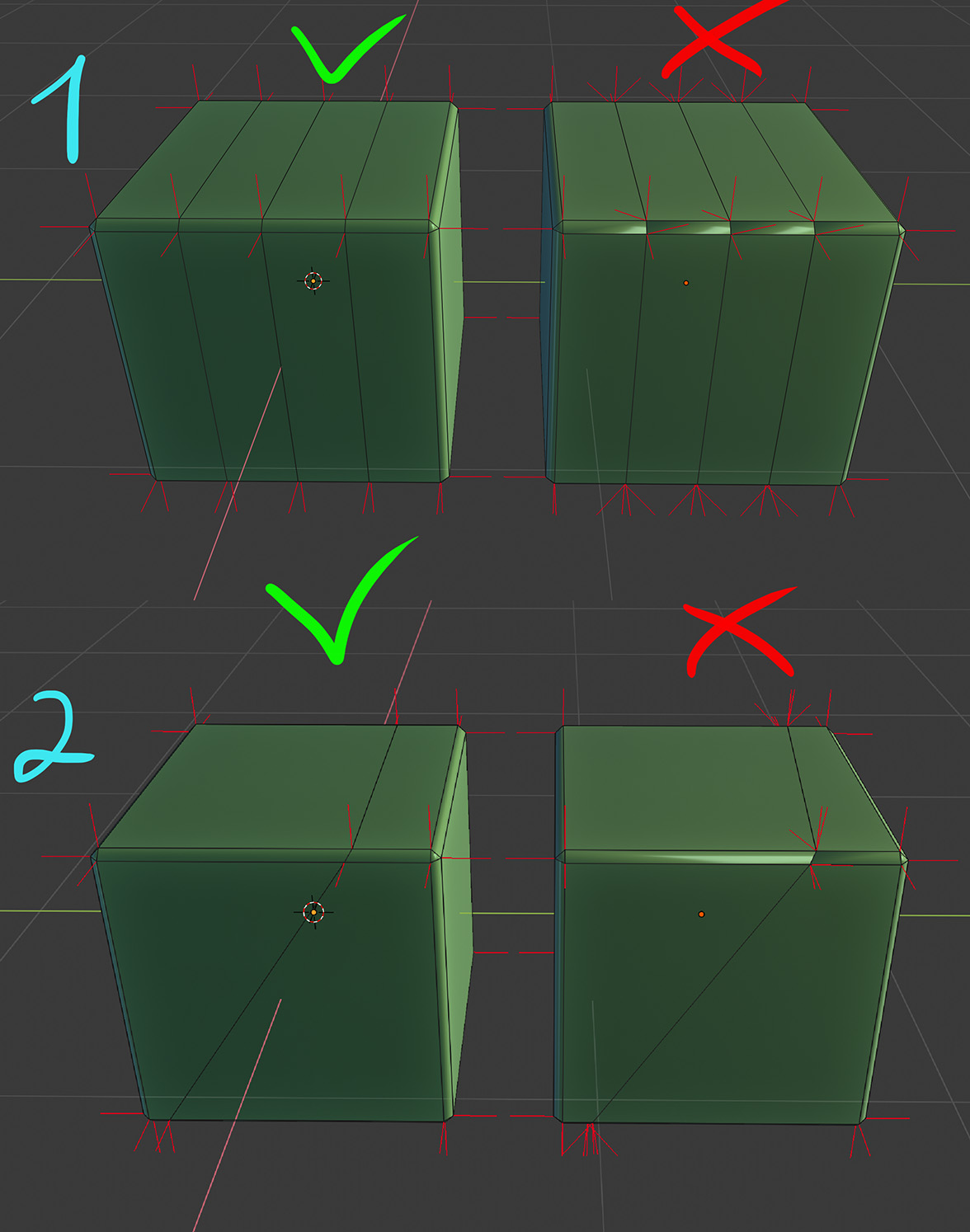
for now that tools broke shading on the models
i can use the Weighted Normal modifier but it did not solve the problem on a whole mesh
10 Comments
This should probably be reported as a bug rather than a new feature suggestion.
* @ammusionist * yes i tought , but... yes i test it again, i will report it
* @ammusionist * they say its not a bug ) )
* @Sergey Ivanov * HAHAHAHA
* @Sergey Ivanov * WOW! Ok then. ... Up-voted!
I can't reproduce it either. Something is wrong on your end I think? {attachment Clipboard01qweqewqwjpg}
* @Chingiz Jumagulov * You need to set custom normals orientation.
In my case they don't split however, maybe it depends on how normals were authored. {attachment screenshot1567427791png}
I've tested it on plane, and it got split. {attachment screenshot1567430733png}
I cannot find you on developer.blender.org . Do you have the link to your bug report?
* @rodgerdaledavis * Found no as well. So I made my own. File and video attached: developer.blender.org/T69429
That's weird. I can't reproduce this.