
Customizable transform manipulator click detection
The outer circle in the rotation, and especially the scale transform manipulators/gizmos (whatever the correct terminology is), takes priority in a tool that seemingly is there for more accurate tweaking. The outer circle has been implemented for a while and has not had any changes and I have also not found anyone posting issues with it other than a single post on another forum that had no replies.
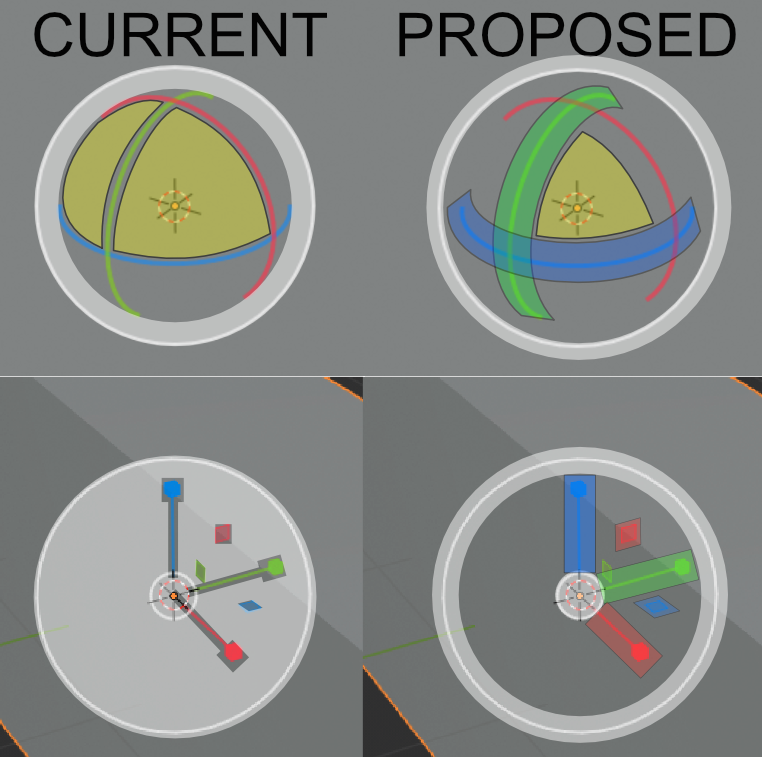
The issue is right now, as indicated in the image below (hopefully the images worked) you have to almost pinpoint accurately click on the single axis or dual axis manipulator handles to be able to use them, otherwise, it will activate the free transform mode. The biggest issue with this outer circle is that its the entire filled area of the circle that acts as that handle, not just the white circle. (Shown clearer in the last image)
 My cursor is indicated with a triangle as PrintScreen did not capture the cursor.
I propose having the ability to toggle off the outer circle in the user preferences. some, maybe most people like it, but I am sure there are others who, like myself, do not. And as blender is king of customizability it fits in the use case.

As well as that toggle ability I propose the ability to set the "thickness" of the handles. I know you can scale the entire gizmo but then it gets in the way. Having the option to have thicker/wider click detection for the manipulator handles would be great with a variable in the user preferences for the extra thickness, and being a setting those who wish it as it currently is can keep it that way, whereas those who wish is easier to click without taking up any more visual space can have it so.
 The visual of the manipulator would remain the same, only the click detection would change.
A comparison of how the click detection currently works on the left for both the rotation and scale manipulators vs how I propose it should be handled. I know the rotation inner and outer circles handles different rotation types, one free the other trackball. But I do not see how that would be negatively affected with what I propose below.
 The blank space would just be that, blank space that you could use to select the object behind it, rather than prevent a large area from being used (Should you not want to use free transform).
Also, the ability to edit the increment amount of the free scale, in user prefs, would be amazing. As dragging from the small inner circle is super large increments and is unusable in most situations even when holding shift to lower the increment amount.
If these changes were to be implemented I would suggest each be separate. So if you wanted thicker handles but also the flood fill approach of the free transform in the scale manipulator you could have it. And having the dual and single manipulator thicknesses being separate, for those who never use dual-axis could make them tiny, etc. Or turn off the free transform portion altogether. This is vastly more flexible and in combination with the existing gizmo scaling would allow users to have the gizmo manipulators set up in the most suitable way for them.
I have not found any such setting that would allow this behavior even in the latest 2.81 experimental and I have not seen any other posts related to this topic. If there are and I missed them I apologize for the duplicate post.
Thanks
6 Comments
agreed, the hotspots on the gizmos are waaaaay too finicky.
Agree with proposal
I do not lose hope that this will be fixed
I too have issues with Blender's Manipulators , I wish we could have the option to resize them they are too small to grab especially the rotation axes.
Oh, man I hate this circle. He is stopping me from working.
Thumbnail is broken, and attempting to delete and replace gives a 404 error. Was just the last image.