
Constraints should use their constrained position as the Tool pivot
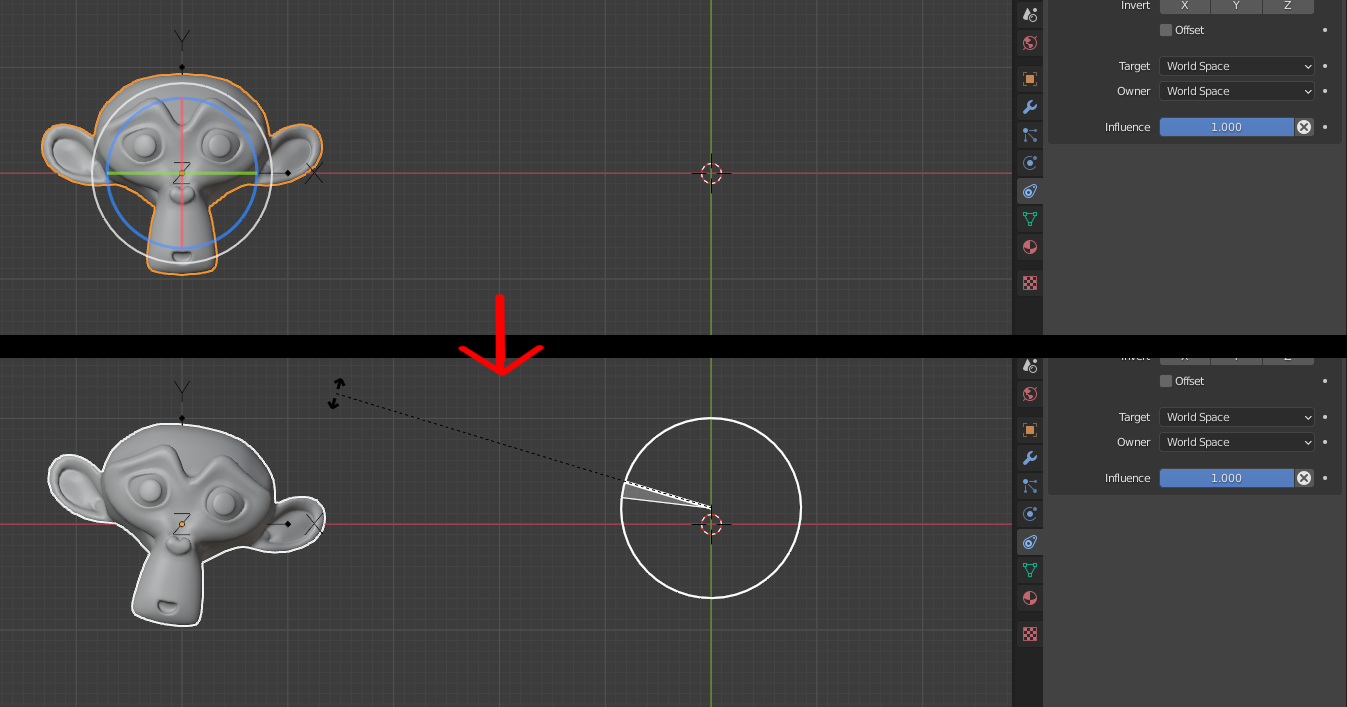
if you use a "copy location" constraint to move an object to a different location, the tool gizmo will appear in the center of the new position. As soon as you use that gizmo however, the tool uses the original object location as the pivot. This is a confusing and inconvenient behavior, since this means an object that is far away from its original root, can only be edited in a limited way.
7 Comments
Yeah, this is super annoying. It isn't just constraints, in mesh edit mode it is also shape keys.
When I set pivot to active element with a key on my mesh then try to rotate, it rotates with respect to the the active shape key and not the mix. So, if I'm working with two or more keys on, it throws the pivot point off wildly.
Same thing with snap. If I want to, say snap the 3d cursor to a vert after it has been transformed by multiple or even partial shape keys, I have to first create a new shape from mix, select that shape then do the snap. This wastes a lot of time if you have to do it a lot. Same issue with armature transforms and pretty much every other modifier
Its not quite the same with constraints. If I want to snap the cursor or some other object it works fine but if I want to rotate the constrained object around its origin, the pivot is always at the unconstrained location, meaning that if my object is constrained far away from its original origin, pressing R will result in barely any rotation at all on that axis. I know I could just use the transform sliders but a lot of the time I want to rotate relative to view, and you cant do that with sliders.
I know this bug is basically a papercut as Thane5 said, but things like this very much break up my work flow and add unnecessary time to frequently used tasks that add up!
No, that's correct behavior. The object isn't being evaluated after constraints, but before constraints.
* @Josephbburg * But then the gizmos should appear on the object's original position as well, otherwise they are near unusable
* @Thane5 * Is that not what it's doing?
* @Josephbburg * No, look at this video, its really annoying imgur.com/a/M1zexHB
* @Thane5 * Oh... that is really annoying! Have you reported this as a bug? That gif looks like a bug to me.
* @Josephbburg * i didnt bother because i see this as a papercut, and those barely get any attention