
Camera Tilt Correction
Hello Everyone,
I'd like to propose something called Camera Tilt Correction. I'm not trying to make Blender like other software, but since for me this is an useful options, we should consider it to be in Blender.
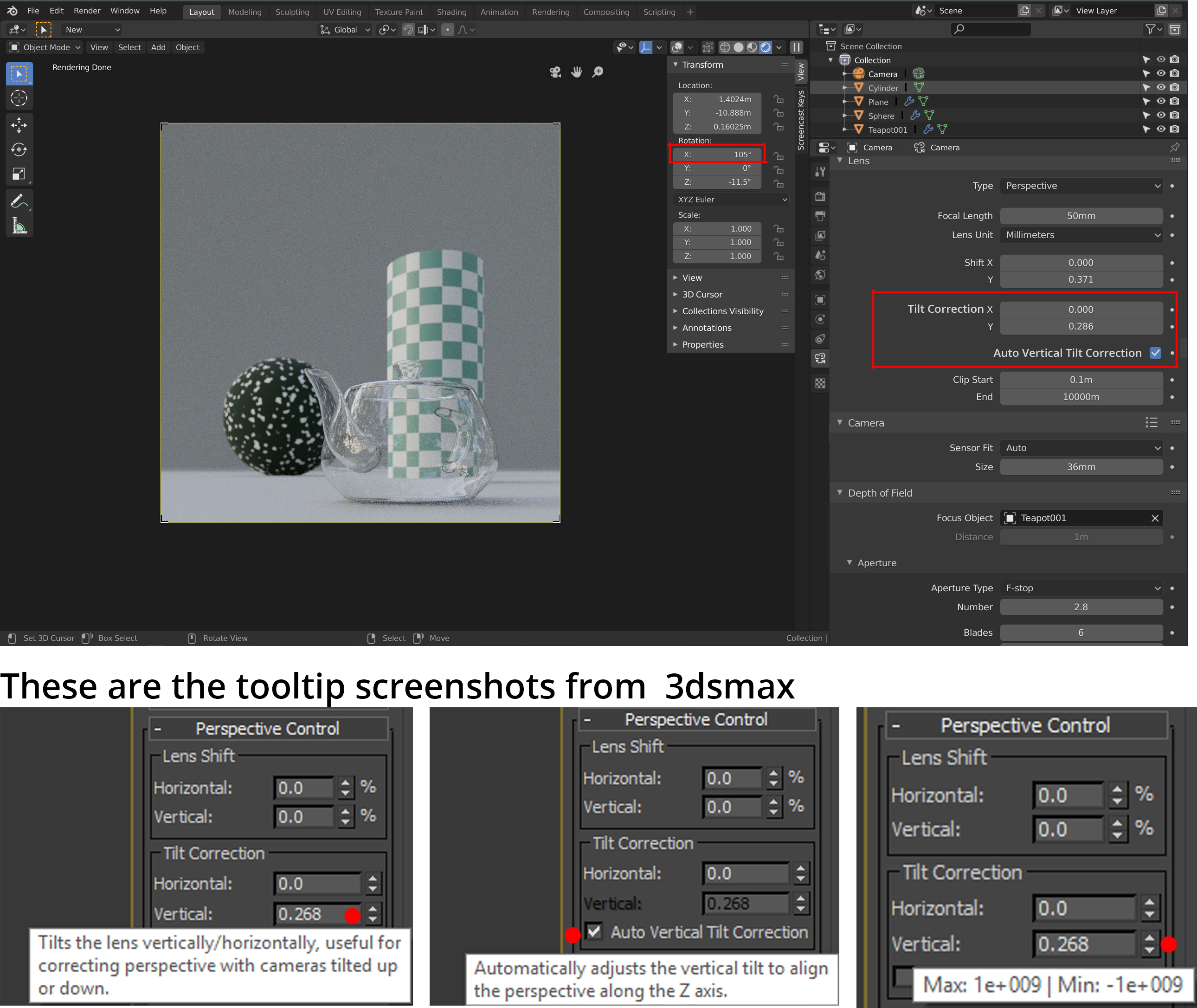
Currently the workaround to have better camera vertical alignment is we need to make sure the camera X rotation always set to 90 degree, and then using camera shift Y we can adjust vertical shifting of the camera to have better composition.
But it'll be nice if we have auto vertical tilt correction, so we don't need to always make sure our camera X rot always set to 90. I put some images so you can see how it works.
The first images show us how to deal with Blender camera tilt correction, and how to deal with 3dsmax camera tilt correction. As I said before, in Blender we need to keep camera X rotation to be 90, then playing with Shift value. In 3dsmax we just turn on Auto Vertical Tilt Correction and it's done.
And this is the proposal to have option to Auto Tilt Correction. Anyway please vote if you think this option should be in Blender.
Thanks
11 Comments
Absolutely a must for architecture and archviz!
Anyway, I wonder how to make image display on this page, I saw other post using imgur links, and the image appear on their post, but it seems my imgur link didn't show the image. What was wrong with the link ?
* @bintangsenjapratama * As a "commentator" in this forum we can't post an image (pictures worth a thousand....). So I have to write it out. Hack time, make your scene with the camera where you want it, distortion and all. Now make a copy of your camera"2" and rotate it on Z 180°. So camera 2 is looking away from your scene. Now add a Plane object in front of the camera 2 so you can frame that plane in camera 2's view. Assign a 100% mirror material to that plane. When you render camera 2 you should see your scene in the reflection on that plane. Now you can tilt the plane (mirror) to distort the perspective. Yes a hack.
extensions.blender.org/add-ons/two-point-perspective/ I have made this addon :)
We anime industry also use this quite often for making BGLO , would be awesome if see blender have it too!
can't we make this hot again , I have made an addon for it , it is a bit glitchy but it works
Great proposal. It's a huge time saver any artist that works in archviz. Also sometimes you need to look for an angle directly from the camera view without worrying about the camera X axis and the fact that you will need to shift the camera later. A very welcome feature to add.
Are you talking about how a 4x5 camera works? otake.com.mx/Foros/LensShiftTilt-01.png
* @othoap * I don't really know how exactly 4x5 camera works, I'm talking about camera tilt correction basically, when camera in some kind of rotation angle / tilt up / tilt down, we need to correct the tilt without needing to shift the camera
* @bintangsenjapratama * On a 4x5 the lens and the film plane are on independent pivots. This way you can tilt the lens (board) off parallel to the film (CCD) thus distorting the projection of the image to the CCD. The result is the perspective looks correct. photographyri.com/media/fleet_building_persp.jpg
* @othoap * I see... yes basically we don't need to make sure the X rotation of camera should always 90