
Animation :Audio Volume Control in the timeline.
Sorry I deleted the first proposal by mistake.
This Feature is best coupled with this one.
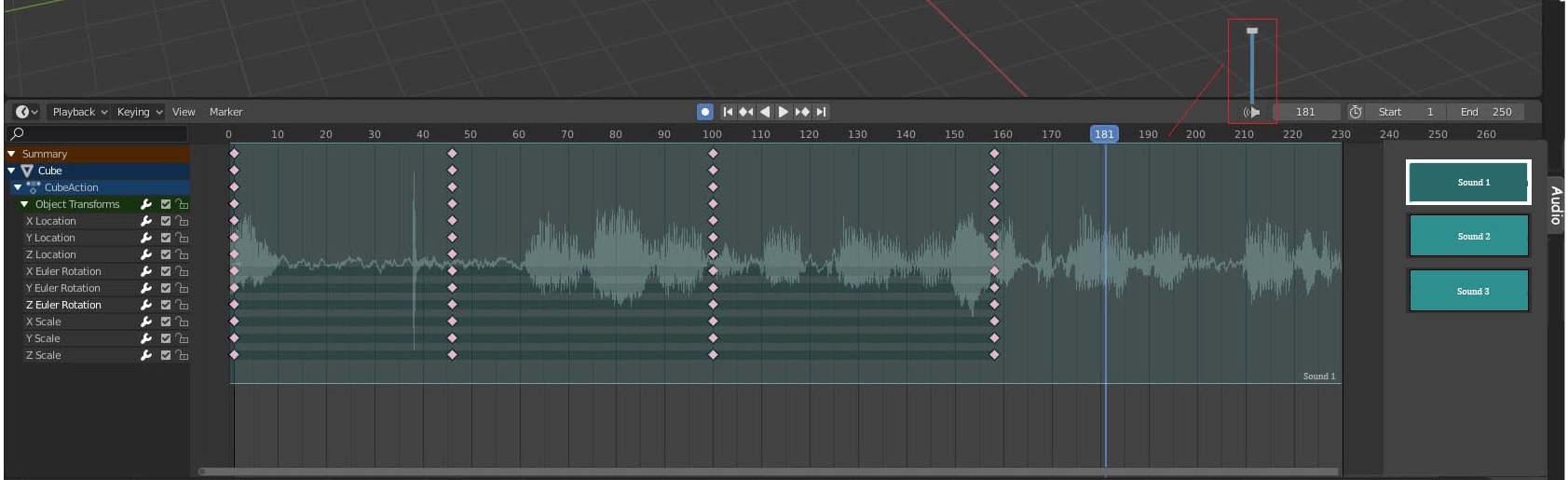
The Time Line need audio with waveform
I added few improvements to this one like having multiple Audio files in the timeline's sidebar so we can easily switch between which Audio file tjat should be displayed & played. Having everything in one Editor makes it much easier to match keyframes to the sound unlike the Video Sequencer which doesn't show Keyframes..etc
6 Comments
I posted the same as this. lol, I want it Dope sheet and curve editor. and add a color setting to waves
I don't know if the general timeline needs a feature like this. It is really handy if you need to edit animation to audio, but in that case I would recommend simply opening up the VSE and adding the clip there. You can easily place it under the timeline and view it in parallel.
* @Zach Hixson * Displaying waveforms in the timeline and controlling the Volume is standard in any Animation Software now days, the switching between Audio files is just an extra addition nice to have but not a necessity..the problem that i have mentioned is that VSE doesnt't show keyframes the only workflow to match Audio is to use markers which adds an extra step for it also you'll end up opening more Editors like one for the camera view another maybe for the graph editor..etc so the Screen Real Estate gets smaller & smaller when you can only have one Editor that does the work
* @Cobra *
This would be nice... except that I also like the fact that the VSE allows you to put multiple sound files together as the soundtrack to an animation, and edit the relative volumes of them, and I don't see how this would be possible in your version.
* @Cobra * Maybe a hybrid approach, where you add the clips you want to the VSE, and there is simply a toggle in the dope sheet along the lines of "Show Selected audio waveforms in background" option. This way any selected audio clips in the VSE are added to the background, and you don't have to have the duplicated funcitonality
* @mikefutcher1 *