
"New Empty Object" Option for Object Lists
Very often when you have to pick an Object from a List in Blender, the object you want to reference is an Empty Object that doesn't exist yet. So you first have to create an Empty Object, give it a reasonable name, select your previous object again and then choose the empty object.

How tideous!
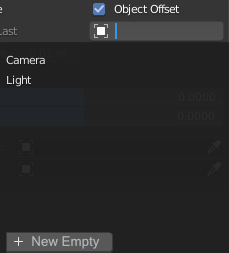
A simple little button at the end of some Object Lists in the Interface could make this process much faster. This button would add a new Empty Object, give it a reasonable name (like in this example:
Suzanne_array_controller
) and choose it from the Object List.

Some UI areas that could make use of this are:
- Constraints
- Modifiers
- Texture Coordinate Node
- ...
I would not implement it as a general feature of Object Lists, since there are areas (like the Particle Instance selector) where it doesn't make sense.
5 Comments
Animation nodes addon has exactly that for target objects. You can either pick an object with the drop pick, choose what's already selected or create a new target object in just one click. I'm using it every day and it's a huge timesaver. {attachment Screenshot_2png}
* @WiresoulStudio * Oh yes I was amazed by that when I used it. And having it as a button just like the picker makes it even more efficient.
* @WiresoulStudio * Nice - having it in this place is actually much better.
Could be a quite good idea! But in most case you want that empty in a particular place to work with correctly, how would you set the potential transformations when creating the empty from there?
* @Shimoon * That part wouldn't change from the current behaviour. This suggestion still ads more handyness to the UI and reduce back'n'forth movements and clicks.