
Keying set summaries in the dopesheet!
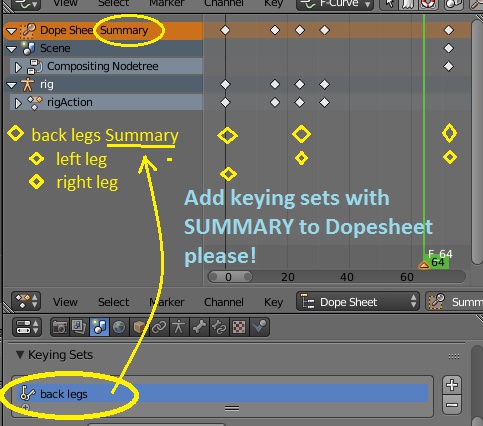
When you work on animation timing, more often than not you have to tweak the timing of things, offset it and generally repeatedly adjust it for a number of controllers.
Blender's way of dealing with this seems to be by having to manually reselect these controllers. Blender has keying sets that can be used to apply keyframes repeatedly to user defined character controllers. These keying sets could easily be made infinitely more useful than that by being added to the dopesheet as new entries. That way a keying set can be a summary of channels, whose keyframes one can move to change timing. That way a boring and time consuming step is taken away from the workflow. Having to repeatedly select a set of controllers to change their overall timing is both frustrating and distracting. There is an addon, but it doesn't really do what I am suggesting.
wiki.blender.org/index.php/Extensions:2.6/Py/Scripts/Animation/SelectionSets I wrote about this proposal more with an example use at the wiki: wiki.blender.org/index.php/Dev:Ref/Proposals/UI/Better_gui_for_animators
2 Comments
yes, totally, it would make stuff better ordered and easier to reach, also the order of the channels either alphabetical or by the order of selection, right now it seems pretty random
That sounds like a great idea. I have a hard time offsetting parts of my rig's timing while using the dopesheet, as I make mistakes from not selecting all of the correct ones.