
Individual character spacing gizmos
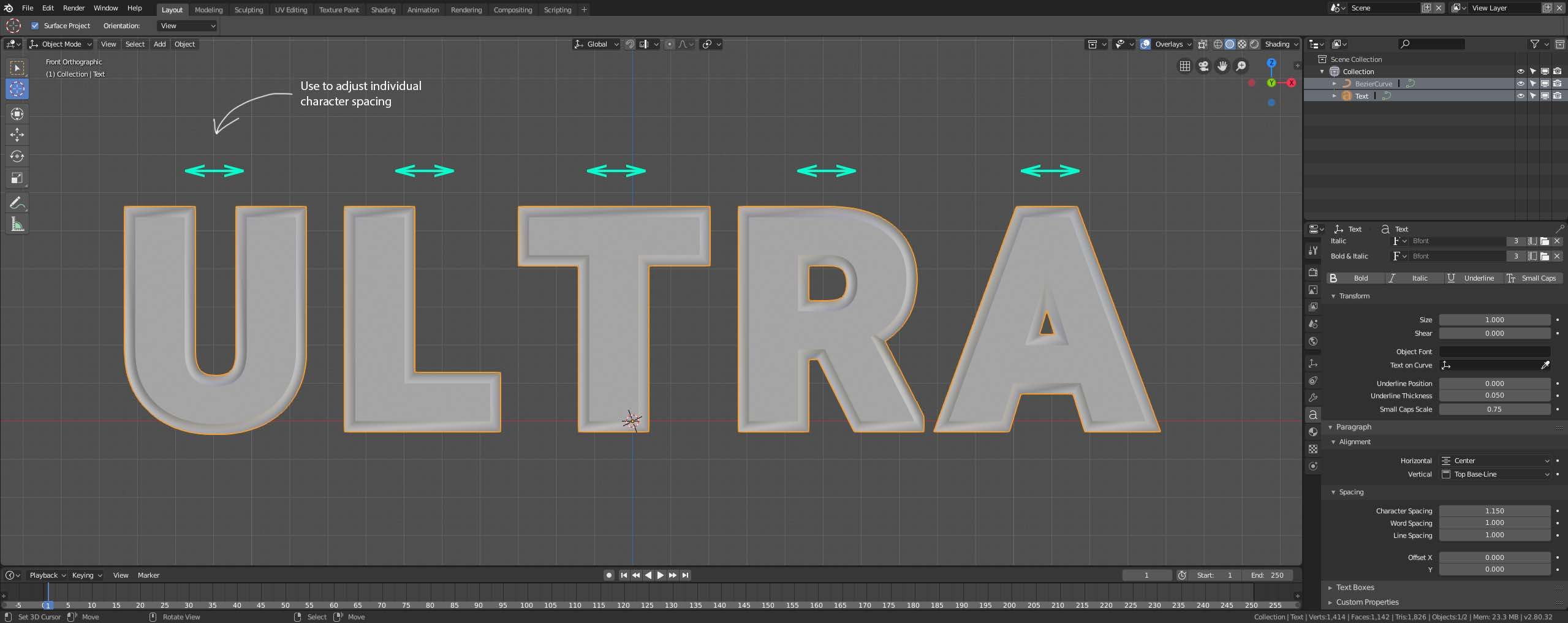
Here's an idea for a feature that Blender currently does not have, but other 3d packages do (e.g.: Cinema 4d). Today, we can only adjust the spacing between letters in a word in a "global" fashion, but this feature would allow us to fine-tune text spacing without the need to convert it to a mesh, making it uneditable.
Here's how it is today:

Here's an example using individual gizmos for each character, thus allowing to move only 1 character at a time (if wanted):

Cinema 4D current approach:

6 Comments
Are you aware of the short cuts? Edit mode on text, place the cursor and alt-left or alt right?
@Emil Assarsson: this is a really arcane way of doing it- i think the gizmo proposal is a good one.
@Emil Assarsson: Arcane or not... the widgets could be a good addition to the short cuts and also make users aware that its possible. If they where implemented they should be down-geared so the adjustments are precise. Also... they should be placed so that they don't overlap any character (ÅÄÖ) for instance. They could also be overlapping the line above/below. But right implemented they should be fine but I think the suggested layout needs work.
@Emil Assarsson: Hi! Actually, I wasn't aware of the shortcuts at all! I'm glad the functionality already exists! Thanks!
@Emil Assarsson: Please, don't take my illustration for a final visual implementation or even a draft. I was only trying to illustrate how gizmos could help quickly refine kerning by clicking and dragging or something of the sort. A visual aid, that's all. I'll post a screenshot from Cinema 4D to show how it does that!
Widgets for text control, spacing, bevel, extrude, all of this would be so much more fun than in the properties panel sliders.