
Node editor lazy/quick connect: Grab the closest wire, connect to closest pin
I've had this idea for a long time, mainly because I've been using UE4's node based scripting. The most time consuming part about node based editing is that you have to hover your mouse over a small pin every single time you want to grab a wire or connect it.
In blender, I discovered that there's node wrangler addon that has a special feature for this. By ctrl-right clicking anywhere, it'll grab the first output of the node that is closest to your mouse and when you release, it'll connect it to the first input of the closest node.
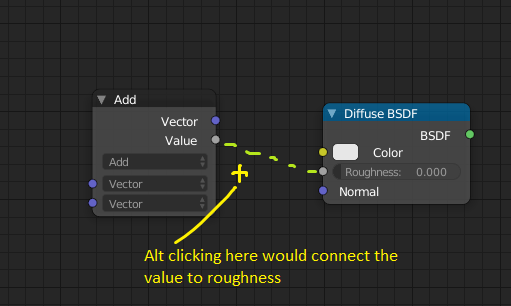
My idea works very similar, but you can pick any pin. Alt click anywhere and it grabs the closest wire (input or output, doesn't matter) to your cursor. If you keep holding alt and release it, it'll connect the wire to the closest combatible pin, so the same type (vector, float, etc) and the opposite direction (input/output).
I hope you can imagine how useful this would be. Often times, you wouldn't even have to move your mouse, you could just alt click between 2 nodes and it'd connect them automatically. The keybinding doesn't have to be alt left click by the way, that's just what I had in mind. It may conflict with some node editor keymaps, I don't know.
0 Comments