
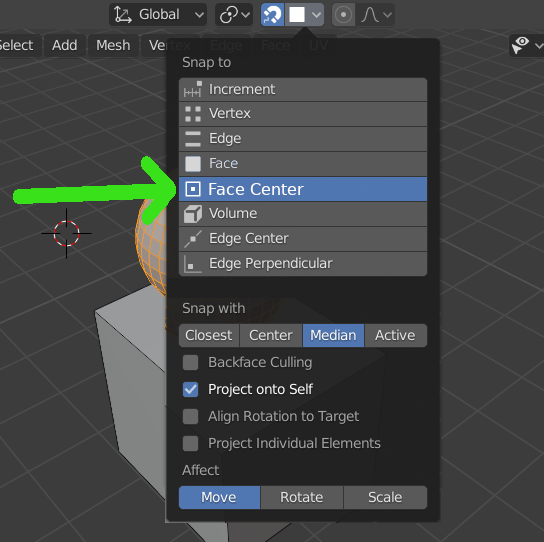
Snap to Face Center
The snap function is very useful in a blender, but if you need to move an object to the center of the surface of another object, you have to do >Edit Mode > Select Face> snap Cursor to selected > Object Mode > Select Needed Object> Selection To Cursor
20 Comments
I agree it will be nice to have this as an explicit option.
I use Vertex snap + Center or Median and if I press "A" when snapping, without dropping the dragged element, then move to another vertex and press "A", the snap will occur at the middle point between "A" marked vertices. You can repeat for all 4 vertices in case of an irregular quad. You can even snap in the empty space between separate objects.
Example:
docs.blender.org/manual/en/dev/editors/3dview/controls/snapping.html
* @Ge Ro * yeah! this "A" trick is like one of most underground blender shortcuts, I never saw anyone using it
* @Vas * Yes, it should be easier to discover. Right now it's only a small hint in the contextual shortcuts bar.
* @Ge Ro * Thank you so much! it says it right on the status bar "A adds a snap point" however I never realized what a "snap point" is before reading your post o_0
Hi! This option won't work if you have faces that are angled differently and you need an object to be rotated exactly to match the faces rotation angle, it's okay on the surfaces that are flat like you are showing, but try it on a quad sphere or a cylinder.
To do this right now you have to: 1 - Snap to face and click on align rotations to target 2 - Once you aligned the rotation you have open the Snapping menu and choose Snap to vertex AND untick Align rotation option 3 - Only then you have to start selecting vertices and hold A button.
It's SOOOO time consuming and bizzare, just adding Face Center option at least as an optional menu that appears after Snap to Face option would have saved so many clicks. It can also be done automatically in the viewport when your mouse cursor is getting close to the Face center, just make a dot indication that it's snapping to the center.
We have edge Center and Perpendicular for some reason and not face center!
I have trouble doing this and I think it's a waste of clicks as I have tendinitis
Totally agree but it has other uses beyond face centers.
* @impacman * Green — possible and obvious Orange — possible and tricky
Is tangent == surface or what? Tangent assumes rotation, not just snapping. What is endpoint? End of what? {attachment 2020-04-12-22-44-34-Clipboardpng}
* @ Vyacheslav * man, dont be so serious it's just a sarcasm.. if u interested in 3ds max's snapping system- knowledge.autodesk.com/support/3ds-max/learn-explore/caas/CloudHelp/cloudhelp/2020/ENU/3DSMax-Basics/files/GUID-C18F1E36-4FFC-43CF-A811-0ED6D5545C40-htm.html also it has separated nurbs snapping options...(but everybody knows that nurbs in max outdated long ago...) personally i use only vertex snapping with axis constraints... and dream about creating primitives in center of selection with up axis oriented as average normal...by the way..) have a good day
that's a beautiful option, but a more beautiful one would be simply pressing Ctrl while "Snap to Face" and it would find the center!
this would be cool, it doesn't seem like they want to go down the contextual route for snapping though.
hahahahaha 🤣🤣🤣🤣
The oldest of the old snapping request...
Probably will never happen... LOL
This can be changed to done now. It's coming in blender 5.1 :) projects.blender.org/blender/blender/pulls/148297
Please add this option, it's ridiculous how many clicks needed to achieve this, old 3d dccs have this option
Fuck yes, please add snap to center of the face as an option or sub option of the Snap to face. It will save so many clicks, especially when you need to create different primitives aligned to particular faces' of the object you are working on, you have to snap to face and click on align rotations to target, then you have to choose Snap to vertex untick Align rotation option and then start selecting vertices and hold A button. It's so time consuming, please, just add Face Center option for Christ's sake. We have edge Center and Perpendicular for some reason and not face center!
My workaround is using keKIT addon "Cursor Fit & Align" and then create or align object by 3d cursor location and rotation
This should be default option.
This is the best case scenario of possible but if it is too much buttons for some, an alternative would be to have it as an optional snapping feature under the face snapping; just by clicking ctrl or a ui display indicator when the object snaps to the face center.