
Easy Material Clean Up in the Outliner
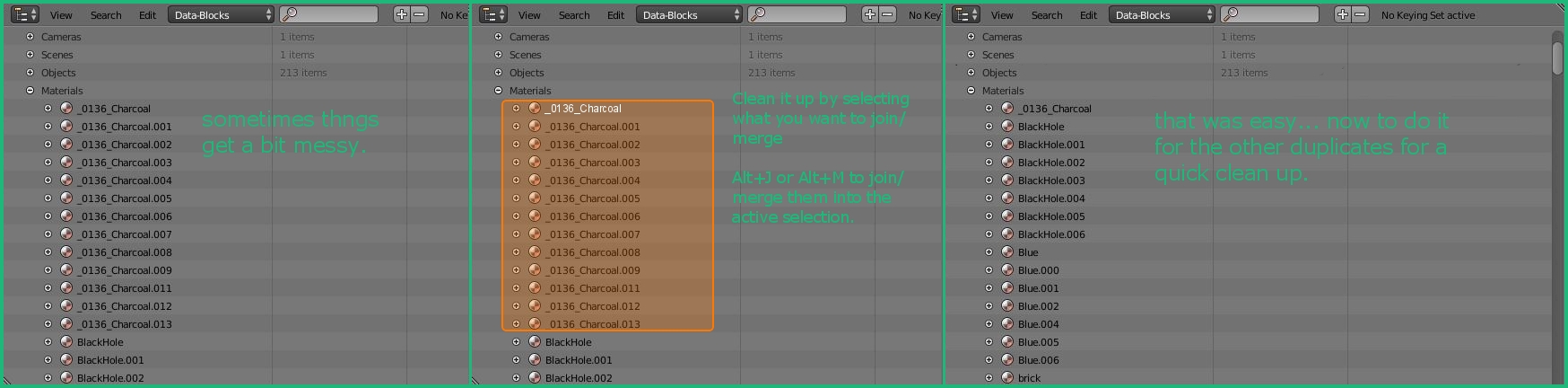
i do a lot of arch viz stuff. for that i end up copying a lot of things from another blend file containing a lot of my furniture/equipment. the downside to this is how i end up with a lot of duplicate materials.
if there's a faster way to remove the duplicates than going object by object and changing them to the original i'm unaware of what it is. this tends to leave me with either a messy set of materials or a decent bit of work if i need to tweak a common material or just clean things up.
as such i'm suggesting the ability to merge/join a selection of materials into a single material so that anything that was previously using one of the duplicates automatically gets updated into the single material that the selection is merged/joined into.
this would greatly ease the cleaning of the material set and by extension help keep material selection from materials you already have easier.
11 Comments
I also work with a lot of cad files and found this to be a headache as well, then I stumbled on a feature of one of the add-ons bundled with Blender. It's called "Addon Factory: AF: Materials Specials."
After the add-on is installed, click the down arrow by your object material slots and go to Clean Slots>Merge Base Names.
This will merge all of materials with the .001, .002, etc. to the base name. So Material.001 and Material.002 will be removed and the instances of those materials will be replaced with Material.
@dpdpforlife: oh dang i'm gonna have to check that out. thanks for the info.
You can apply the same material from the active object to all selected objects by using the <kbd>Ctrl</kbd>+<kbd>L</kbd> hotkey combination. That should give all of those other duplicate materials zero users. So if you save (<kbd>Ctrl</kbd>+<kbd>S</kbd>) and reload (<kbd>Ctrl</kbd>+<kbd>Shift</kbd>+<kbd>O</kbd>), all of those duplicate materials should be gone. I do this a lot when pulling in SVG files.
@Jason van Gumster: that's useful for some of my duplicates (various shaped versions of the same thing) but not exactly what i'm looking for.
a lot of the duplicate materials i have aren't on similar objects rather than just from objects that share one or two materials but not all materials. copying materials like this ends up replacing the whole stack as far as the active object's material list will take it.
Same thing is needed for nodegroups!
while the suggestions by dpdpforlife and Jason van Gumster are going to be useful i think i'd still like to have my original suggestion because i've noticed while in the final stages of my current arch viz project i tend to tweak textures and colors in texture duplicates in order to find the best looking combinations. thanks to that my chosen material isn't always the original material rather than a material.00#.
so being able to pick the one that gets to remain (by which is active) would still be a benefit to me.
@Josh Strawbridge: I'm working on a better solution now. At this point with the AF addon, you can rename the material you like to the root name. So you may need to rename "material" to "material.999" for instance and then rename the material you like to be "material" and then run the add-on.
@Josh Strawbridge: Here's a solution in the form of an add-on I made. Pick the material slot you want to be the master and all materials with a similar name will use the selected material. So, in the example here, all mats with the base name “Material” (ie “Material.001”, “Material.002”, etc.) will be assigned “Material.029”. Any other materials will remain. Click the down arrow menu next to the material slots and pick "Clean Cad Mats"l
Get the add-on here
edit: There should definitely be some interactivity like this in the outliner when filtering by "data-block". Right now the items in this view can't even be selected.
@dpdpforlife: oh dude that is exactly what i needed. thanks a ton. you are awesome.
@Josh Strawbridge: No problem. I needed it too. Make sure it works for you. It may have issues if the base name has strange characters in it.
@dpdpforlife: works well. =D thanks again!