
Knife tool new features (Transformable tangent shape cuts)
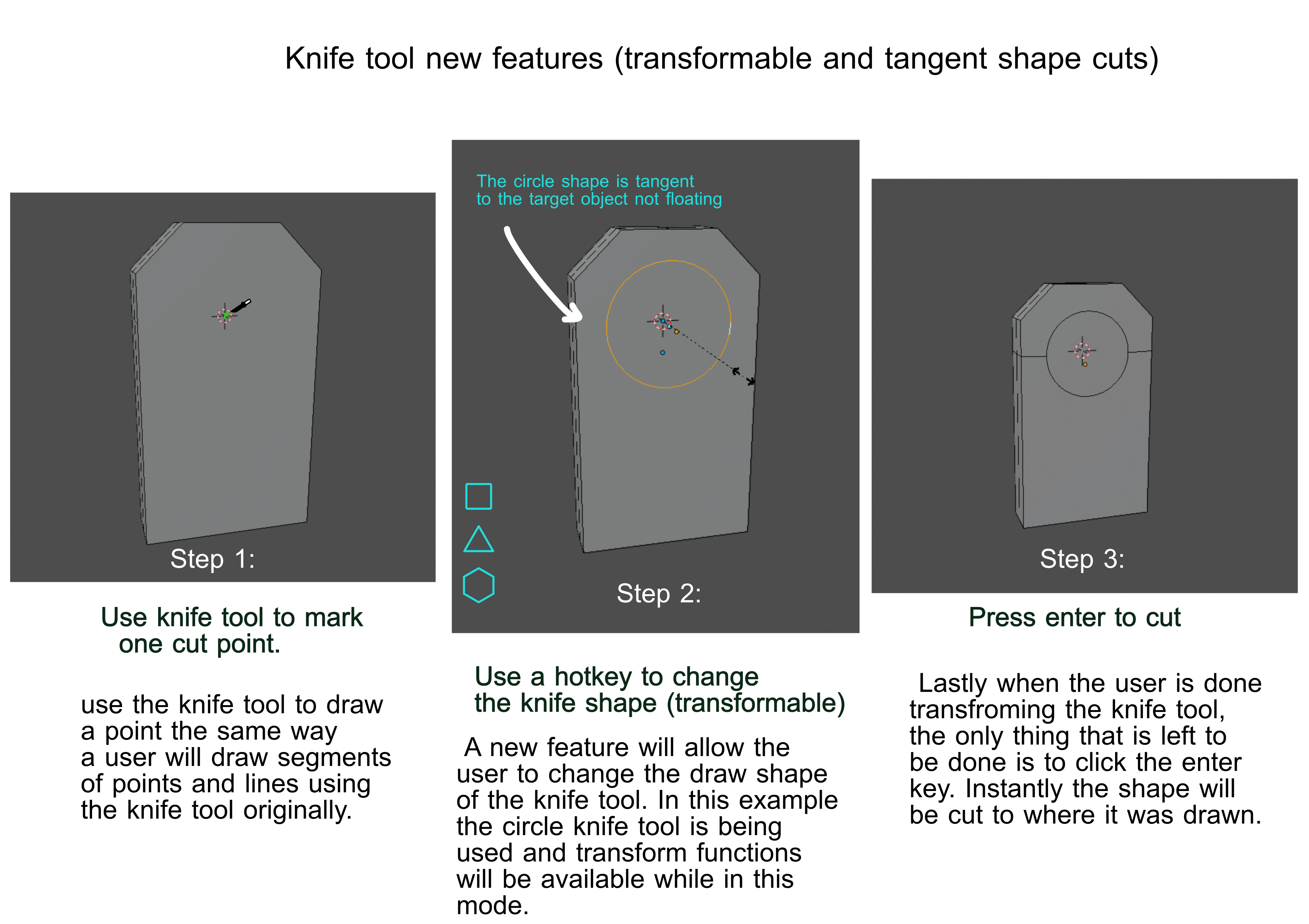
Hello guys. I am not sure if this a duplicate. This feature focuses more on the function of tangent shape cuts. As far as I understand, tangent means objects that are connected to each other.
Additionally this is somewhat the same with how loop cuts behave. The tangent shapes will not be floating, instead they will be attached to the plane where the first knife cut point is marked.
Tge knife tool has a lot of potential. I hope we can add some similar features like these.
Thanks.
12 Comments
did you see the approach of Pablo Dobarro? the concept of a transparent plane is a CAD tool. he was explaining that he worked on tangent too and using the knife for the moment. a plane is great because imagine pressing 5 you could work on 2D...my dream. even for artistic modeling not only CAD...
* @1conscience * I am aware of that. I have only used free cad and fusion 360 and so far autodesk did a really good job with its software.
How does the horizontal cut produced on step 3?
* @Alexey Mak * Similar to knife project the program tries to find an edge to cling to as a foundation.
* @johnpdelacruz26 * But it looks like vertical edges were cut. This is undesired behavior when you cutting a single face.
* @Alexey Mak * Most of the time that is not the case. This is just a fast mock up I made to show how the knife tool new feature would work.
I did not focus too much in the topology while doing this. Hense if this happened you can always fix the topology manaually.
you mean it? youtu.be/YQJn6hy2Cj4
* @xmaiter01 * Thank you. Technically that is what I am trying to convey though what that video you have shared has more features packed into it like the arc cut which can be useful in some cases.
I hope blender will add features similar to this. I haven't noticed that sketchup has a plugin like this. I have only tried the software for a short period of time. Thanks again for the linked video.
* @johnpdelacruz26 * rhinoceros partially has this function
* @johnpdelacruz26 * I think it’s unlikely that the developers will add this, since they have other priorities and few people will support such functions.
* @xmaiter01 * I truly understand what you are referring to but this one in my opinion is very helpful when we are talking about edit mode. Right now the fastest way I could think of to achieve these kind of tasks is the knife project or the to sphere function.
The current tools has its specific usage that it can work at its best but these new features I believe may make this kind of task more easier and faster. This can possibly make things more dynamic when working inside the edit mode.
* @xmaiter01 * this is a site to submit ideas and sometimes this ideas become priorities. and they are many more devs now. so any idea can become a priority if someone decides to work on. I did my first addon certainly watching some ideas there.