
Automatic configuration for sculpture mode
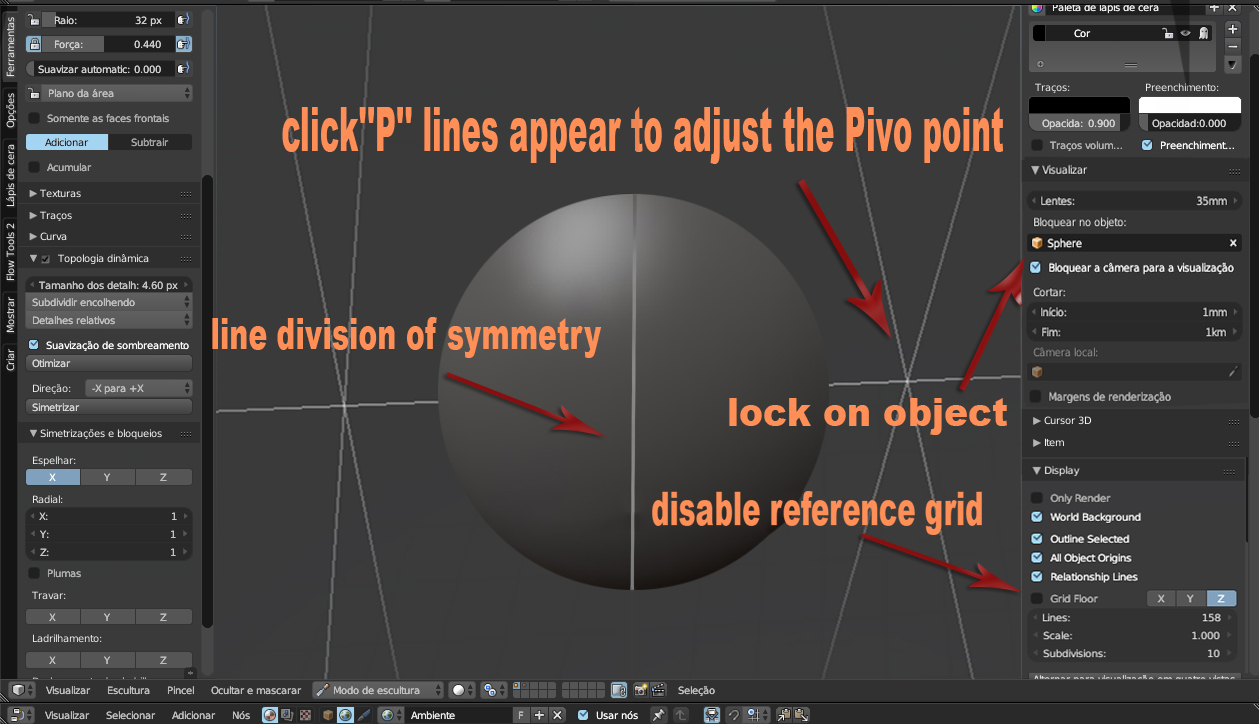
When switching to Sculpture Mode Blender could automatically set the scene to fit the sculpture mode, for example I do not need the reference grid view in sculpture mode, and if there could be a line that would mark the division between the X axis and Y would be easier to locate the division of symmetry --- The object could already be set to be in the center of the scene manually you do this with the command ALT + G in obejto mode and for visualization the camera should already be configured to block in the object so the camera would rotate around the object similar to the Zbrush preview --- and could add a type option clicking the '' P '' button it creates a line for better viewing of the Pivo point and where you drop the center point of the line is marked the pivot point that will be where the rotation of the camera will rotate around, for example if you are modeling the head and then modeling the hands the camera needs to change the pont the visualization pivot for the camera to rotate around a specific point ---- Blender has neither pivo point for sculpture mode --- And the Mirror axis symmetry''X''has to be activated by default ---- Some of these configurations can be done manually plus this would help a lot beginners, already beginner a function with the best optimized settings as is done in the zbrush or Sculptris
1 Comment
In a lot of ways, most of this is already possible with Screen Layouts. You just need to customize one for sculpting. That said, once the Workspaces implementation in 2.8 is done, you should be able to dial it in even further.