
Lock proportions & swap orientation of render size
* EDIT: I added a couple of other mockups after some feedback in the discussion, adding also the possibility to swap the orientation. *
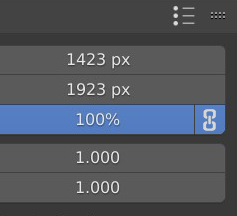
It would be nice having the option to lock proportions for scaling the render's dimensions.
1- Lock proportion
1A

1B

2- Lock proportion + Swap orientation
2A

2B

19 Comments
I have been working in a patch.{attachment GifLockResolutiongif}
I would also like a button to swap the values around to make it easy to switch from landscape to portrait.
And Pablo V. has an addon that shows the exact pixel dimensions next to the percentage box. That info should be available without an addon.
* @thinsoldier * I agree with all!
I think this is a good idea! I would suggest making it into a button next to the fields X and Y resolution:
* @arjo.nagelhout * Nice design!
* @David Vernaglione * Thank you! I'm looking into all ways I can help to make the Blender interface more intuitive and usable. Exciting stuff!
* @arjo.nagelhout * If i can make a suggestion, maybe I'd make disappear the handles when it's off:
* @David Vernaglione * One thing I'm also noticing is that this might make the % field redundant, which could reduce the amount of visual elements.
Initially I wanted to react that I didn't think removing the line for an unselected button would be a good idea and I wanted to back it up with how others programs do it, but then I came to the conclusion that your change could actually be more in line with how other programs do it!
* @arjo.nagelhout * I think percentage is also useful when adjusting the size for small preview fast render. Just a different way to choose a smaller size.
* @florinf * I agree, I use the percentage feature myself often when using the compositor. It was just a thought :)
Can I suggest adding a 2 button toggle above or below the dimension fields with the option “Portrait” and “Laying down”? I don’t have my computer with me, but this is also used in for example Illustrator. I think the term swap might be a bit unclear, and an icon of a portrait picture might immediately convey that the height is more than the width
* @arjo.nagelhout * the issue with such buttons is that they have to change their state depending the resolution you set. A simple swap button is simpler, both to implement and use.
* @-L0Lock- * I agrre with you that it can be managed with just one swap button, but it's fair to say that my design it's not very intuitive, a dedicated icon could solve it.
1 b is better design. But I hope you know already that if you click top number, drag mouse down and to the left/right - you already will change resolution without changing proportions.
* @rpserge * Yes I do, still I think for the specific case of render size would be a neat feature to have.
Emmmm...... How did you add the buttom into the panel by python ? I can't find any api for it.
Excuse me, What is the current progress of this project?
1B > all
Yes. That could be great! Just an idea, perhaps and extra row to type in the aspect ratio which is either locked or unlocked could also be a solution solving the problem.